Inspiring
July 23, 2018
Answered

Cannot uninstall Lightroom cc.

  • July 23, 2018
  • 3 replies
  • 23501 views

I think I have corrupted my Lightroom cc app.

Windows 7pro

I use a program titled Ashampoo snap10 and snapping a web page I was getting Lightroom cc opening instead of the normal ashampoo action required.

Lightroom will not now open nor can I uninstall Lightroom cc, nothing happens. Also when I attempt to reinstall using my adobe email and password I do get the

option to install but it seems to freeze and a statement states Installing now.

Also my photoshop cc does open from (in W7 ) but only from the programs page, it will not open using shortcuts at screen anymore now.

Being trying to contact Adobe via telephone but no luck, is there a genuine adobe number available?

Or can you guys please help and 80 year old out of his mess?

John

PS uk user
    This topic has been closed for replies.
    Correct answer Rob_Cullen

    I have still not solved my problem.  Adobe lightroom classic cc using and following the above instructions.

    Lightroom will not open, it will not uninstall and attempting to download the correct program it freezes or it did not install.

    Please help further.


    To Un-install:

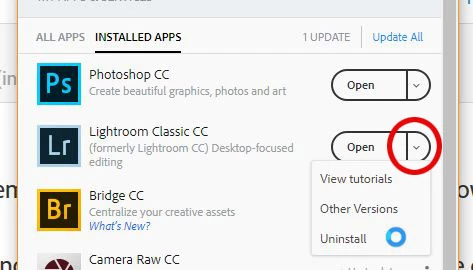
    In the CC Desktop App: Click the down arrow beside the [Open] button and you have the uninstall choice.

    If this does not work: Download and run the Adobe Creative Cloud Cleaner App

    Use the Creative Cloud Cleaner Tool to solve installation problems

    3 replies

    Participant
    June 8, 2022

    my computer is W11


    Rob_Cullen
    Community Expert
    Community Expert
    June 9, 2022

    Only current version of Lightroom-Classic (v11) is stated as compatible with Windows-11.

    $9.99 PHOTOGRAPHY PLAN (USA)


    Regards. My System: Windows-11, Lightroom-Classic 15.1.1, Photoshop 27.3.1, ACR 18.1.1, Lightroom 9.0, Lr-iOS 10.4.0, Bridge 16.0.2 .
    Abambo
    Community Expert
    Community Expert
    July 23, 2018

    moving from Adobe Creative Cloud​ to Lightroom Classic CC — The desktop-focused app

    It looks for me as you have Lightroom Classic CC (compared to Lightroom CC -  and yes it is confusing also the younger ones). If you have, however, Lightroom CC please notify me and I will move the request to the Lr CC forum.

    Windows programs use the extension of a file to find the associated programs. If 2 programs compete for the same extension, the last one installed wins.

    ABAMBO | Hard- and Software Engineer | Photographer
    Inspiring
    July 23, 2018

    Thanks yes its silly me! I am trying to uninstall   Lightroom Classic cc

    Abambo
    Community Expert
    Community Expert
    July 23, 2018

    duchymandevon  wrote

    Thanks yes its silly me! I am trying to uninstall   Lightroom Classic cc

    It's not at all silly. It's confusing and it's Adobe creating this confusion. :-)

    ABAMBO | Hard- and Software Engineer | Photographer
    Ani*Adobe
    Community Manager
    Community Manager
    July 23, 2018

    Hi there,

    Apologies for the poor experience.

    Please start at www.adobe.com/getsupport

    and enter your Adobe ID (email address) and password to view the available support options.

    ^Ani

    Inspiring
    July 25, 2018

    To Staff.

    Thank you for that reply, as you can see I am unable to complete and follow instructions from yourself and others. Please contact me with a solution.

    Just Shoot Me
    Legend
    July 25, 2018

    duchymandevon  wrote

    To Staff.

    Thank you for that reply, as you can see I am unable to complete and follow instructions from yourself and others. Please contact me with a solution.

    The solution is to use the CC Cleaner Tool to Completely remove all Adobe software then reinstall the ones you want.

    A link to the cleaner tool with instructions has been provided in another reply.