
Participant
June 2, 2022
Question

Canon 6D Mark II over exposed in LrC

  • June 2, 2022
  • 1 reply
  • 670 views

I purchased a Canon 6D Mark II to use for real estate photography, and also own a Canon 90D. 

The raw CR2 images from the 6DII consistantly show over exposed by a full stop in LrC. I cannot figure out why, I assume the profile for a camera this old should be accurate by now. I do not see the same issue with the 90D CR3 files.

This is a comparison of the same unprocessed CR2 file in Canon DPP4 vs. LrC:
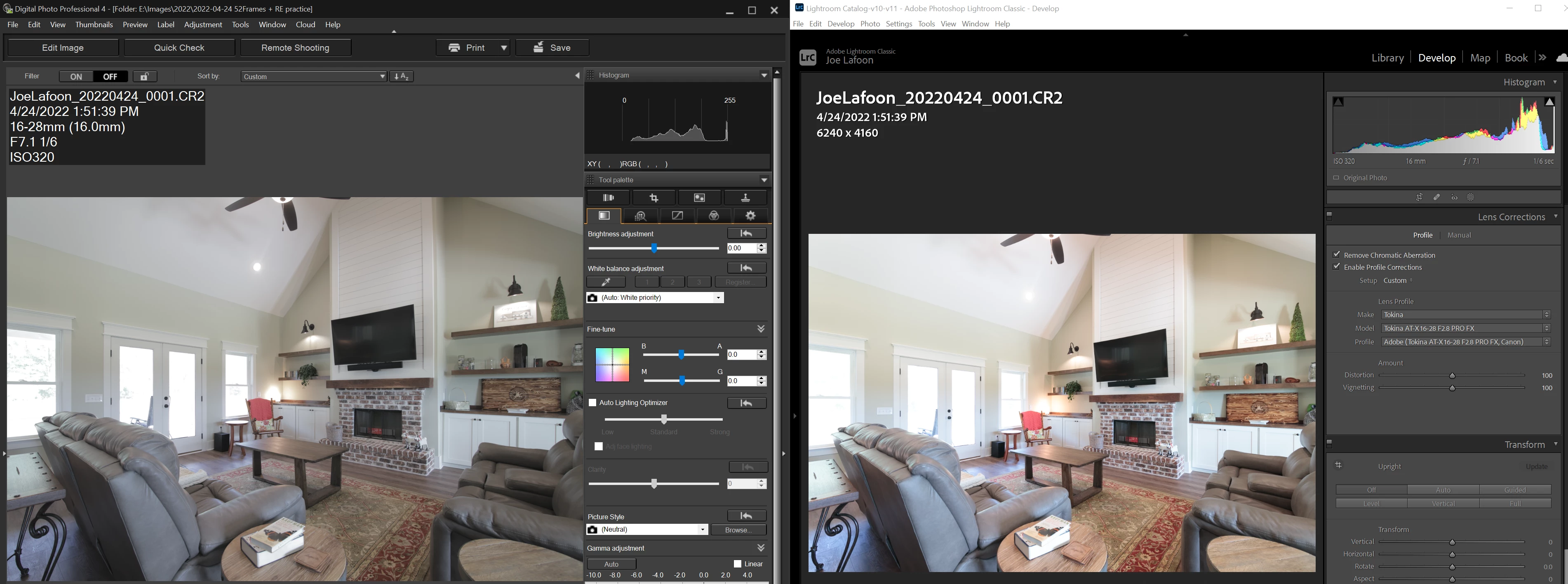
Thanks for any insight.

This topic has been closed for replies.

1 reply

TheDigitalDog
Inspiring
June 2, 2022

There is nothing in either product that tells you about a raws exposure (over or otherwise); one IS brighter than the other. The only way to view exposure of raw is with a product that has a raw Histogram (like RawDigger*). Now if you can upload an raw to something like Dropbox or similar, I'd be happy to show you the raw Histogram. 

The two images you see are being handled differently due to two different proprietary raw processors so you can't expect them to match. It is possible you could make one match the other and vise versa. The brighter image you see in LR is simply due to the current rendering settings applied to that raw data. Nothing to do per se with actual exposure (that is only an attribute of aperture and shutter applied to the sensor). 

Camera profiles have nothing to do with accuracy. 

None of the images you've shown us are unprocessed. That isn't the case with RawDigger.* 

https://www.rawdigger.com

Author “Color Management for Photographers" & "Photoshop CC Color Management/pluralsight"
Participant
June 5, 2022

This is the same exact file, in two different raw file processors: DPP4 (Canon's software) and LrC (Adobe's industry standard software), unprocessed as in no adjustments made in either software to exposure.

The histogram is one full exposure different in LrC. This doesn't happen with any of my other cameras, only the Canon 6Dm2. 

Here is a THIRD editor, RawTherapee. It also matches DPP4, which will always be the most accurate since it is Canon's software, but NO editor should be one full stop over exposed out of camera with no adjustments made in the editor yet.

This is a problem in LrC that needs to be addressed by Adobe.

TheDigitalDog
Inspiring
June 5, 2022

@BigJoeVA68 wrote:

This is the same exact file, in two different raw file processors: DPP4 (Canon's software) and LrC (Adobe's industry standard software), unprocessed as in no adjustments made in either software to exposure.

The histogram is one full exposure different in LrC. This doesn't happen with any of my other cameras, only the Canon 6Dm2. 

Here is a THIRD editor, RawTherapee. It also matches DPP4, which will always be the most accurate since it is Canon's software, but NO editor should be one full stop over exposed out of camera with no adjustments made in the editor yet.

This is a problem in LrC that needs to be addressed by Adobe.


Let me repeat again: there is nothing in either product that provides information about exposure and each differs due to the proprietary means of which their current settings are applied. There is no 'No adjustments' in either product. There are defaults or settings of zero. But there ARE adjustments. 

Again, until you provide us a raw, you cannot be provided any data about actual exposure. Unless you have something like RawDigger; do you? 

You seem again to be confused between brightness (from rendering) and exposure which only takes place at image Capture. 

Hence, articles on exposing for specifically and only raw:
http://www.onezone.photos
http://schewephoto.com/ETTR/
https://luminous-landscape.com/the-optimum-digital-exposure/
http://digitaldog.net/files/ExposeForRaw.pdf
https://www.fastrawviewer.com/blog/mystic-exposure-triangle
https://www.fastrawviewer.com/blog/red_flowers_photography_to-see-the-real-picture
https://www.rawdigger.com/howtouse/exposure-for-raw-or-for-jpegs
https://www.rawdigger.com/howtouse/beware-histogram
https://www.rawdigger.com/howtouse/calibrate-exposure-meter-to-improve-dynamic-range


BTW, this is what a raw would look like with NO adjustments:

Author “Color Management for Photographers" & "Photoshop CC Color Management/pluralsight"