


Participant
July 10, 2025
Answered

Canon R5 LR Import Issue

  • July 10, 2025
  • 1 reply
  • 213 views

When importing files into LR Classic, the RAW files have several of the sliders set on non-zero values. I have no presets being used upon import. Clicking on the slider triangles will not reset them to zero. I have to hightlight each of the values in the boxes next to the sliders and reset them by entering a zero. 


This happens whether I import (copy) from an SD card or I add from files already copied to disk. I have two R5 cameras and the effect is the same. If I open a file on disk with Camera Raw, it also has non-zero settings, just like Lightroom.


Therefore, is this a compatibility issue with Adobe and Canon, or is the camera somehow altering the RAW files? I have not seen this effect with all the other Canon digital cameras that I have owned.


LR 14.4 but this has occurred through several updates
Correct answer AxelMatt

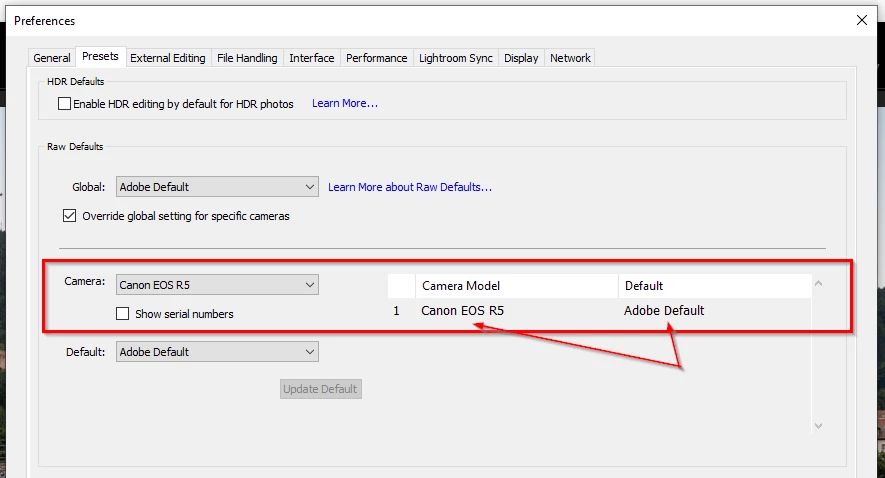
If you sure that there's no assigned preset in the import dialog take a look into the preference dialog on tab "Presets"

It's possible that there's assigned a preset to your camera type.


If his doesn't help, try to reset the preferences of Lightroom Classic:  How to reset Lightroom Classic preferences (adobe.com)

It's recommended to backup your preferences before you reset the preferences to the default settings: 

https://helpx.adobe.com/lightroom-classic/kb/preference-file-and-other-file-locations.html


1 reply

AxelMatt
Community Expert
AxelMattCommunity ExpertCorrect answer
Community Expert
July 10, 2025

If you sure that there's no assigned preset in the import dialog take a look into the preference dialog on tab "Presets"

It's possible that there's assigned a preset to your camera type.


If his doesn't help, try to reset the preferences of Lightroom Classic:  How to reset Lightroom Classic preferences (adobe.com)

It's recommended to backup your preferences before you reset the preferences to the default settings: 

https://helpx.adobe.com/lightroom-classic/kb/preference-file-and-other-file-locations.html


My System: Intel i7-8700K - 64GB RAM - NVidia Geforce RTX 3060 - Windows 11 Pro 25H2 -- LR-Classic 15 - Photoshop 27 - Nik Collection 8 - PureRAW 6 - Topaz Photo AI
rgk1111Author
Participant
July 15, 2025

Thank you. That fixed it. I have no idea how my setting got off of Adobe Default, but that's the setting now that is giving me all zeros in the Basics Panel.