Participant
January 28, 2023
Answered

Canon R6 II

  • January 28, 2023
  • 2 replies
  • 4264 views
 
Canon R6 II

Hallo, ich habe die Canon R6 II gekauft. Mit meinem Lightroom (ich habe ein Abo) werden die Raw Cr3 nicht erkannt. Wie kann ich das ändern, oder muss ich extern in dng konvertieren.


Danke

This topic has been closed for replies.
Correct answer Per Berntsen

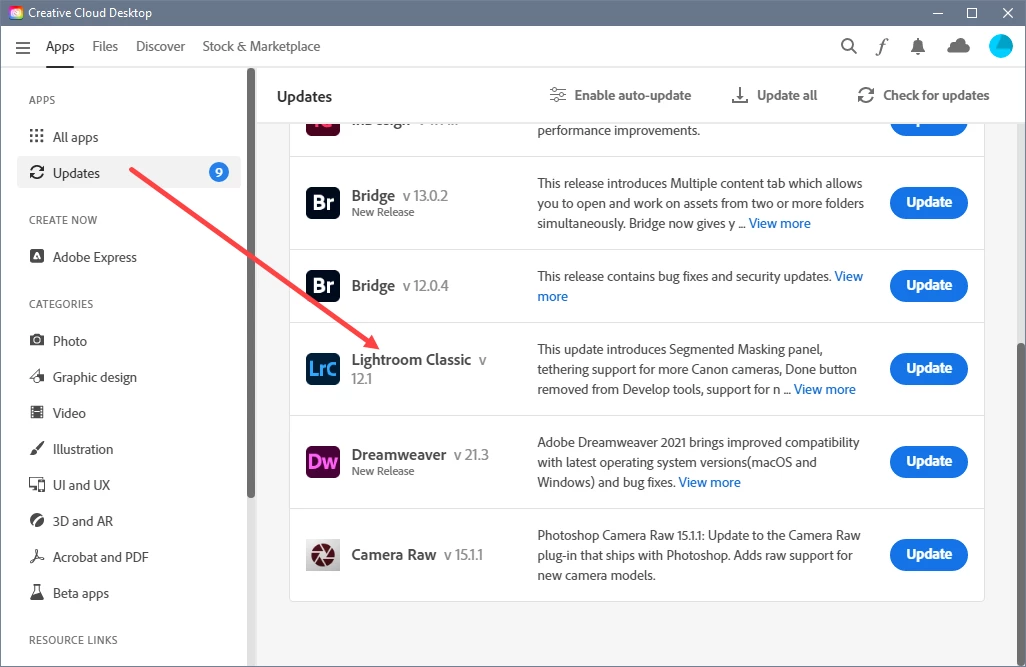
Open the Create Cloud desktop app, and click on Updates.

Are you seeing this? If so, click on Update for Lightroom Classic.
 

2 replies

Per Berntsen
Community Expert
Community Expert
January 28, 2023
quote

Hi, I bought the Canon R6 II. With my Lightroom (I have a subscription) the Raw Cr3 are not recognized. How can I change this, or do I need to convert to dng externally.


The Canon EOS R6 II requires Lightroom Classic version 12.0 or later.

What version are you running? Go to Help > About Lightroom Classic to verify.


Participant
January 28, 2023

I'm using version 11.1. How does the installation work? I have already made an update several times.

TheDigitalDog
Inspiring
January 28, 2023

Updates take place through the Adobe Creative Cloud application. 
https://helpx.adobe.com/creative-cloud/help/creative-cloud-updates.html

Author “Color Management for Photographers" & "Photoshop CC Color Management/pluralsight"
TheDigitalDog
Inspiring
January 28, 2023

See: https://helpx.adobe.com/camera-raw/kb/camera-raw-plug-supported-cameras.html

This will show you the cameras and versions of ACR/LR supported. If you can't update (or don't want to), to a newer version, the only alternative is to convert your proprietary raws to DNG using the free DNG converter. 

https://helpx.adobe.com/camera-raw/digital-negative.html

EOS R6 Mark II shows up as needing version 15.0 of Adobe Camera Raw 12.0 of Lightroom Classic.

Author “Color Management for Photographers" & "Photoshop CC Color Management/pluralsight"