Thank you for your explanation. After reading your response this morning, I selected a couple of images in Library mode to active the sync buttons. I then looked at both features (Sync Metadata and Sync Settings). On the Sync Settings, I saw a number of items checked, and a button which symply said Synchronize. I did not see a button for "AutoSync" while in Library mode under either Sync Settings or under Sync Metadata.I notice at the bottom of the window, Keywords is not checked. Yesterday, how was LR updating all selected images with my test edit if it is not selected? What then, does it mean when that is check or not checked?
In Develope mode, I see that the "Sync..." button shows the same screen as the Synchronize Settings button in Library mode, and I see the On/Off button next to it. It is set to Off. If these items are for Develop edits, why would these settings also display under Library?
One problem I had with LR 6, was forgetting in Develop mode, that I had several images selescted and would occasionally make corrections to the active image which made the same adjustments to all the other images. I suspect I will normally want to keep this Off.
Is there a link to a more comprehensive explanation of these features?
[This post contains formatting and embedded images that don't appear in email. View the post in your Web browser.]
An important point that hasn't been mentioned: In Library Loupe view (one photo showing), changes to Keywords and Metadata panel fields will only be applied to the current photo, regardless of whether Target Photo or Selected Photos is highlighted. In Library Grid view, changes to keywords will always be applied to all the selected photos, while changes to Metadata panel fields will be made to the current photo or all selected photos depending on the setting of Target Photo | Selected Photos.
It sounds like sometimes you were in Grid view and sometimes in Loupe view, which accounts for why you're seeing differing behavior.
"I did not see a button for "AutoSync" while in Library mode"
To turn on Library Auto Sync, do the menu command Metadata > Enable Auto Sync or click the toggle next to the Sync button (you can only do this when you have more than one photo selected):
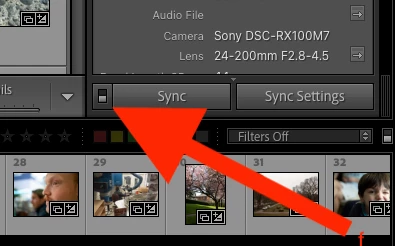
When Library Auto Sync is enabled, then changes to keywords or Metadata panel fields are always copied to the other selected photos, regardless of which of Target Photo
| Selected Photos is highlighted and regardless of whether you're in Loupe or Grid view.
This whole part of the LR user interface is a confusing mess. The documentation does capture the subtleties but not very clearly:
https://helpx.adobe.com/lightroom-classic/help/metadata-basics-actions.html
Auto Sync is described here:
https://helpx.adobe.com/lightroom-classic/help/advanced-metadata-actions.html




 AdChoices