Participant
May 26, 2025
Answered

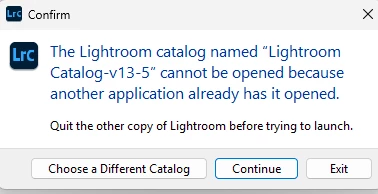
Cant open lightroom classic

  • May 26, 2025
  • 1 reply
  • 298 views

Correct answer nikunj.m

Hi, thanks for reaching out!

Please go to the location where the catalog is saved (the Pictures folder of your computer by default), and check if you have a file with the same name as the catalog ending in ".lock". If you do, delete the file and then try launching Lightroom Classic again. 

For more info, please check: https://helpx.adobe.com/lightroom-classic/kb/lightroom-error-catalog-cannot-be-opened-lrcat-lock.html


Let us know if this helps!
Thanks,
Nikunj

1 reply

nikunj.m
nikunj.mCorrect answer
Legend
May 26, 2025

Hi, thanks for reaching out!

Please go to the location where the catalog is saved (the Pictures folder of your computer by default), and check if you have a file with the same name as the catalog ending in ".lock". If you do, delete the file and then try launching Lightroom Classic again. 

For more info, please check: https://helpx.adobe.com/lightroom-classic/kb/lightroom-error-catalog-cannot-be-opened-lrcat-lock.html


Let us know if this helps!
Thanks,
Nikunj

Participant
May 27, 2025
Thank you