
Participant
August 26, 2017
Answered

cant see all my photos in import mode

  • August 26, 2017
  • 2 replies
  • 293 views

In import mode when I go to my chosen folder on my iMac HD I can only se some of my photos.

They are however ALL present when I go to the same folder in Bridge!

I use Adobe Cretive Cloud

Lightroom version: CC 2015.4 [ 1060496 ]

License: Creative Cloud

Operating system: Mac OS 10

Version: 10.12 [6]
This topic has been closed for replies.
Correct answer Abambo

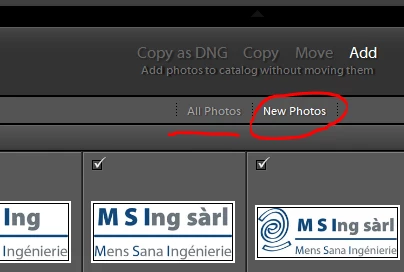
You may have those pictures in your database, so LR does not offer to import them twice:

If you want seeing all photos, click All Photos.

If you want reimporting, click off!

2 replies

dj_paige
Legend
August 26, 2017

Explain further. Why can't you see them? What do you see? Is there something different about the photos you can't see (such as they are JPGs while the ones you can see are RAW)?

SHOW US A SCREEN CAPTURE of your Lightroom Import dialog box. SHOW US A SCREEN CAPTURE of the same folder as seen by your operating system (I don't really want to see Bridge, it's not relevant).

Abambo
Community Expert
AbamboCommunity ExpertCorrect answer
Community Expert
August 26, 2017

You may have those pictures in your database, so LR does not offer to import them twice:

If you want seeing all photos, click All Photos.

If you want reimporting, click off!

ABAMBO | Hard- and Software Engineer | Photographer
