

Scott Masterton
Inspiring
November 14, 2023
Question

Captions Drop Down

  • November 14, 2023
  • 5 replies
  • 2914 views

I use a lot of repeat captions in my images but I cannot for the life of me figure out how to use a previous caption from the drop down menu that LR shows me. I have tried many times over the years and I've finally given in and am asking for your help.


In the LR Library module, in the metadata panel, when I enter a caption LR starts to prepopulate a  dropdown list of previous captions that I've used that match what I am typing in the box, but I cannot find anyway to choose one from this dropdown list. Here is a picture of what I mean.
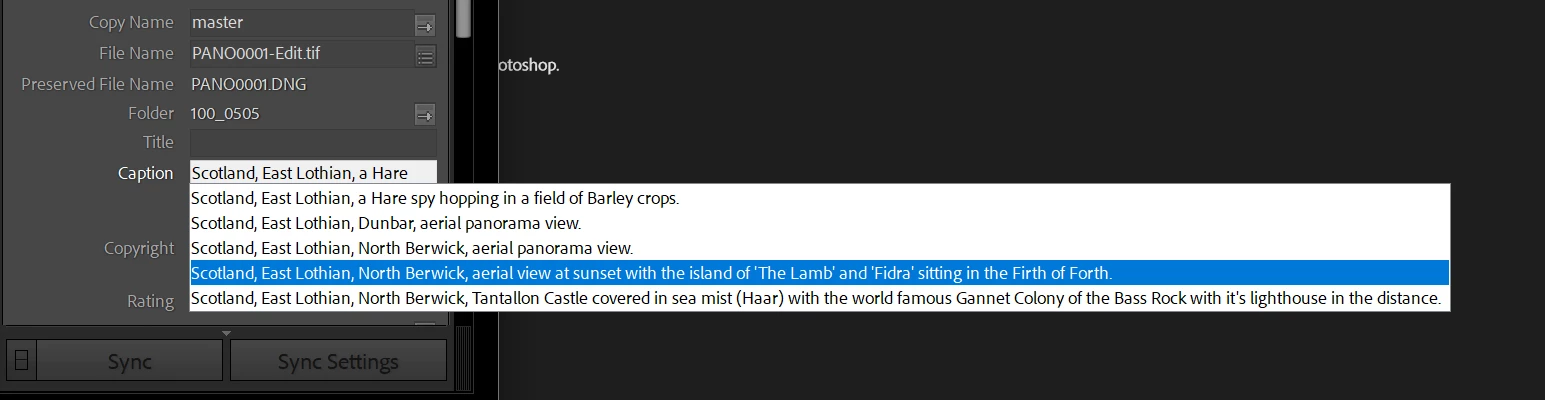


It doesn't matter what I do on that highlighted caption, whether I press tab, or enter, or any other key that I can think of, not even clicking on it with the mouse.... no matter what, it will only ever give me the first option in the list and none of the others even when I scroll down and try to choose them.


Please help me from going insane and tell me how to do this.


This problem has existed for me through multiple versions LR and Windows.


thanks


This topic has been closed for replies.

5 replies

Scott Masterton
Inspiring
November 15, 2023

So I've just created a brand new empty temporary test catalog on the same machine, populated it with a few images and tested it and the drop down works correctly, so that at least has narrowed it down to this one catalog that I'm currently using... not quite sure where to go now though.  


johnrellis
Legend
November 15, 2023

It does seem catalog-specific. You could try:


1. File > Optimize Catalog, which mainly compacts unused space, but supposedly has cleared up some inconsistencies in the past.


2. File > Export As Catalog with these options:

Export As Catalog sometimes creates a copy of the catalog that fixes various wierdnesses.


Scott Masterton
Inspiring
November 15, 2023

Thanks, I optimize the catalog every day so that's not the issue I'm afraid. 

 
Re option 2, I think I'm in the process of doing something similar just now.
 
So just to make sure, once again I have run through all the suggestions previously given, deleting the prefs and helpers etc, rebooting between each change and still the problem exists.

So as I have a brand new blank catalog that doesn't seem to have the problem, I am currently doing a catalog merge into this new catalog, and see if this sorts the issue or if the issue carries over. My catalog is 1.6GB and my folders amount to roughly 4TB (117,000 images) split across 2 drives (the images will be staying in place for the merge), so not sure how long that will take, going to leave it running overnight. 
 
Will let you know how it goes.
 
Scott Masterton
Inspiring
November 14, 2023

Thanks for the help so far. I've just tested my laptop which I thought displayed the same issue but it doesn't, it behaves as expected, so I clearly have some kind of issue on my desktop which I will now continue to investigate. I've had this issue for a long time, I believe through several iterations of LR and also in Win10. I'm now in Win11 but I can't recall if it was a clean install or an upgrade, I think it was a clean install. 


If anyone does have any bright suggestions I'm all ears.

ouiouiphoto
Known Participant
November 14, 2023

Can be a LrC plug in like keyboard tamer. Can be a program linked to your keyboard. Can be a defective keybord. I would probably start with another keyboard to test

.Sheepdog trying to help Lightroom and Photoshop beginners
johnrellis
Legend
November 15, 2023

LR may have corrupted its data file that caches metadata. Try deleting the Helper.lrdata folder:


a) Do Catalog Settings > General > Show to open Finder / File Explorer on the current catalog folder.
b) Exit LR.
c) In that folder, delete the folder "<catalog> Helper.lrdata".
d) Restart LR, and it will rebuild the folder.


The Helper.lrdata folder caches information about metadata, keywords, folders, collections, and other things to speed the performance of LR and it can sometimes get corrupted. In recent versions, LR has used it more heavily to improve the speed of displaying metadata, and there have been a fair number of bugs with it.

GoldingD
Legend
November 14, 2023

Using the up or down arrow on the keyboard does not work?


Scott Masterton
Inspiring
November 14, 2023

No not for me, not until I press the page down key first and then it will let me use the up/down arrows to scroll but then it won't let me select any of the choices, either using the mouse or keys such as the enter key, whenever I try to click on another option or scroll to another option and hit enter, it always returns the first entry in the drop down list. 


If you are saying that that is how it works for you, then you are the third person to say this, so there is clearly something wrong at my end. The thing is I'm sure this also happens on my laptop. Going to test that now.

dj_paige
Legend
November 15, 2023

I have the same problem. I have had this problem for years, just like @Scott Masterton, through many versions of Lightroom Classic, and on both Windows 10 and Windows 11

JohanElzenga
Community Expert
Community Expert
November 14, 2023

Have you tried resetting the preferences? https://www.lightroomqueen.com/how-do-i-reset-lightrooms-preferences/

These kinds of strange errors that nobody can reproduce are often caused by corrupted preferences.


-- Johan W. Elzenga
Scott Masterton
Inspiring
November 14, 2023

Hi Johan, thanks for the suggestion, I have just tried that but it made no difference, the problem still exists.

ouiouiphoto
Known Participant
November 14, 2023

Hello. Unfortunatly i cannot reproduce. If i type test it propose all the options and a can select the one i want  (W11/LR13.0.1) 


.Sheepdog trying to help Lightroom and Photoshop beginners
Scott Masterton
Inspiring
November 14, 2023

Ho do you select it, using the mouse?

Sean McCormack
Community Expert
Community Expert
November 14, 2023

For me I can click with the mouse. I can't scroll, though I'll add more similar captions and try again. 

Sean McCormack. Author of 'Essential Development 3'. Magazine Writer. Former Official Fuji X-Photographer.