


Participant
June 13, 2025
Answered

catalog:createSmartCollection and filename with spaces

  • June 13, 2025
  • 1 reply
  • 140 views

I'm creating smart collection with a list of files:


local function stringifyPhotoList( photoList )
	return table.concat(photoList, ", ")
end

[...]

local searchDesc = {
	criteria = "filename",
	operation = "any",
	value = stringifyPhotoList(photos),
}
catalog:createSmartCollection(subColName, searchDesc, newParentColSet)

 
filenames are separated with commas.


Everything works fine - I have smart collection with selected photos.


Expect one case - when filenames contain spaces - then it starts matching a lot more photos than it should.


I don't know how can I handle such case. I tried enclosing filenames in parentheses or apostrophies - it does not help.

Correct answer johnrellis

Unfortunately, there's no good solution. Adobe inexplicably omitted "exact match" from smart collections and text filters.  You used to be able to do 

All of
    filename starts with xxx yyy zzz
    filename ends with xxx yyy zzz

but that broke in LR 13.3. 


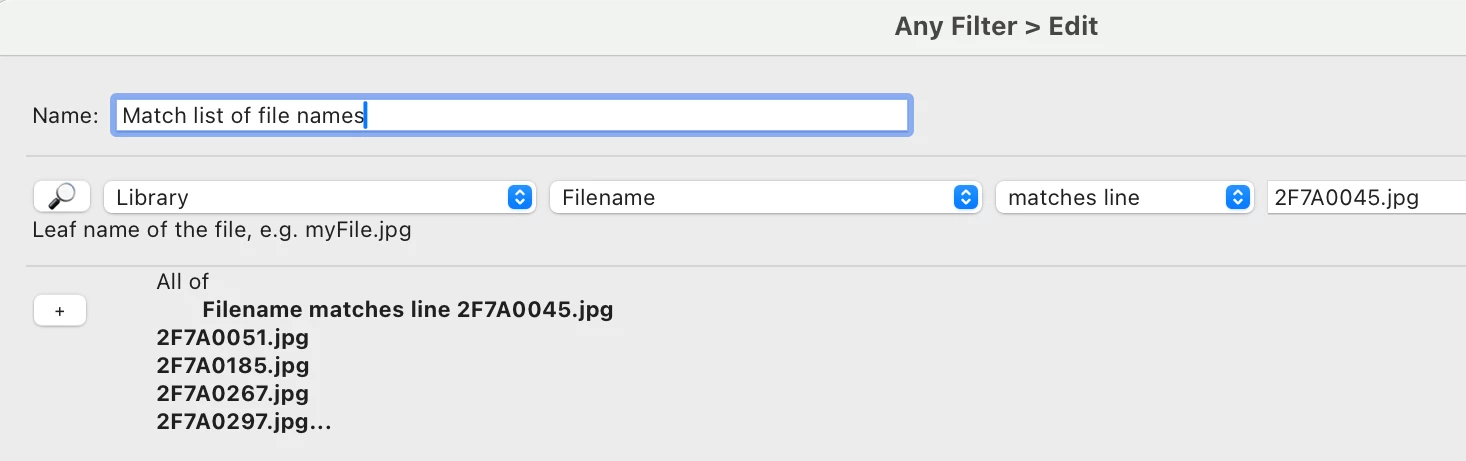
If your end goal is to find files given a list of file names, you could use the Any Filter plugin's "matches lines" operator:


If your goal is to write a plugin that provides that functionality, the plugin could call catalog:getAllPhotos() and then catalog:batchGetRawMetadata () to get the photos' file names. It could create a temporary collection in which to store the matching photos.


1 reply

johnrellis
johnrellisCorrect answer
Legend
June 13, 2025

Unfortunately, there's no good solution. Adobe inexplicably omitted "exact match" from smart collections and text filters.  You used to be able to do 

All of
    filename starts with xxx yyy zzz
    filename ends with xxx yyy zzz

but that broke in LR 13.3. 


If your end goal is to find files given a list of file names, you could use the Any Filter plugin's "matches lines" operator:


If your goal is to write a plugin that provides that functionality, the plugin could call catalog:getAllPhotos() and then catalog:batchGetRawMetadata () to get the photos' file names. It could create a temporary collection in which to store the matching photos.