
Participating Frequently
September 28, 2020
Answered

Catalog locked after lightroom crash, rebuilding sync data.

  • September 28, 2020
  • 2 replies
  • 536 views

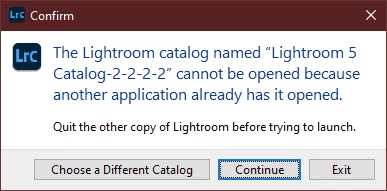
Last night my sync wasnt working so i attempted to rebuild the sync data within the setting. as soon as i launched the command LR crashed and it wont relaunch. the dialog box that pops up says its in use by another program, its not. I look at the catalog files and it shows theyre locked. So with that said, what now? i have backups. i do routine backups every 8hours so i could restore. not a big issue, but is there a way to recover without restoring? 


This topic has been closed for replies.
Correct answer DdeGannes

When Lightroom is open there is a temporary file with an extension .lock (LOCK) that prevents the Catalog from use by any other user. When Lightroom is should down normally the temporary file will be removed, however if the app shuts down in the manner you experienced the lock file may remain in place. Delete the .lock file then you can double click on the Catalog File with the .lrcat (LRCAT) extension and that should boot Lightroom and open the Catalog.

2 replies

DdeGannes
Community Expert
Community Expert
September 28, 2020

There are lots of issues reported with syncing between LrC, Lr (cloud-based) and Lr Mobile apps, it would be interesting to know which apps we're involved with your issue.

Crashes like what you report can be caused by malfunctioning drivers, problems with hardware components, hdd, ram, etc. Not necessarily software related.

The issue with the .lock file is that when the crash occurred there was no opportunity for the temp file to be removed and as the message says the app recognizes its presence. If you had lost power on the computer the same thing would have happened.

Regards, Denis: iMac 27” mid-2015, macOS 11.7.10 Big Sur; 2TB SSD, 24 GB Ram, GPU 2 GB; LrC 12.5,; Lr 6.5, PS 24.7,; ACR 15.5,; (also Laptop Win 11, ver 24H2, LrC 15.0.1, PS 27.0; ) Camera Oly OM-D E-M1.
JSkeffAuthor
Participating Frequently
September 28, 2020

The only 2 apps i use is LrC and Lr Mobile for my iphone7+

DdeGannes
Community Expert
Community Expert
September 28, 2020

The only additional thing that might cause a  sync problem would be unsupported files e.g video, and tiff / PSD files not saved with max compatibility.

Regards, Denis: iMac 27” mid-2015, macOS 11.7.10 Big Sur; 2TB SSD, 24 GB Ram, GPU 2 GB; LrC 12.5,; Lr 6.5, PS 24.7,; ACR 15.5,; (also Laptop Win 11, ver 24H2, LrC 15.0.1, PS 27.0; ) Camera Oly OM-D E-M1.
DdeGannes
Community Expert
DdeGannesCommunity ExpertCorrect answer
Community Expert
September 28, 2020

When Lightroom is open there is a temporary file with an extension .lock (LOCK) that prevents the Catalog from use by any other user. When Lightroom is should down normally the temporary file will be removed, however if the app shuts down in the manner you experienced the lock file may remain in place. Delete the .lock file then you can double click on the Catalog File with the .lrcat (LRCAT) extension and that should boot Lightroom and open the Catalog.

Regards, Denis: iMac 27” mid-2015, macOS 11.7.10 Big Sur; 2TB SSD, 24 GB Ram, GPU 2 GB; LrC 12.5,; Lr 6.5, PS 24.7,; ACR 15.5,; (also Laptop Win 11, ver 24H2, LrC 15.0.1, PS 27.0; ) Camera Oly OM-D E-M1.
JSkeffAuthor
Participating Frequently
September 28, 2020

Thanks Denis. I'll give it a shot and report back. If that works i guess the bigger question is why the crash when attempting to rebuild the sync data.


Jarett
