Participating Frequently
December 13, 2016
Answered

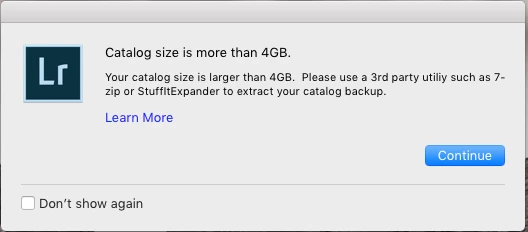
Catalog size is more than 4GB error?

  • December 13, 2016
  • 4 replies
  • 8244 views

Hi Guys

Apologies if this has already been covered, but I have searched the forum and not been able to find an answer.

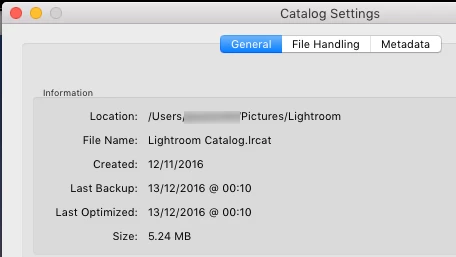
I've been using Photoshop for years, but I am new to Lightroom. In fact, I have only imported a grand total of 68 images so far, so I'm struggling to understand why Lightroom is telling me my catalog is more than 4GB. The RAW images themselves (on an external drive) are less than 1.3GB, and looking into Catalog Settings (catalog is on my MacBook Pro's SSD), the Catalog is showing as 5.24MB! The whole Lightroom folder with all the backups & previews is only 216MB.

So can anyone shed any light on this (no pun intended)? Am I being stupid and/or missing something here?

Any help would be much appreciated.

Thanks
    This topic has been closed for replies.
    Correct answer JP Hess

    It's a programming error. Just check the box to "Don't show again" and the message will go away. Maybe it will get fixed next time.

    4 replies

    Mohit Goyal
    Community Manager
    Community Manager
    March 8, 2017

    Hi paulsacf,

    Please update Lightroom to 6.9/2015.9 version which includes the fix for Lightroom: Erroneous warning message on Catalog Backup | Photoshop Family Customer Community

    refer: Lightroom CC 2015.9 now available

    Regards,

    Mohit

    Participating Frequently
    December 29, 2016

    Hey, I'm just wondering how long it takes for you machine to write the back-up file...mine takes about 15 to 20 minutes. BTW i get the same error.

    Participating Frequently
    December 30, 2016

    Only a few seconds on my 2015 rMBP, but as a new Lightroom user, I still only have a very small catalogue (just over 13 MB).

    Participating Frequently
    December 30, 2016

    Thanks! I've been using for years but not still not a power user. If anyone can help with this issue of 20min backups please reply.

    When I go to Catalog>Settings> and check the location of my catalog It takes me to users>me>pictures>Catalog Name>Backups. So confusing. I think somehow my directory structure got messed up. The size of the catalog folder is 21 Gig. and within the catalog folder are some files and a folder named backups. Its within the backup folder is where Lightroom takes me to find my catalog.

    Participant
    December 22, 2016

    I got this message this morning too but my catalog actually is over 4gb (it's 4.16). Do I need to worry about it?

    99jon
    Legend
    December 22, 2016

    No. It's just letting you know that backups are compressed and that if you ever need to restore from a backup you will have to unzip the file using a third party tool.

    Mohit Goyal
    Community Manager
    Community Manager
    December 28, 2016

    Hi paulsacf,

    Please refer the below troubleshooting article, related to this issue.

    Unable to back up the catalog in Lightroom CC

    Regards,

    Mohit

    JP Hess
    JP HessCorrect answer
    Inspiring
    December 13, 2016

    It's a programming error. Just check the box to "Don't show again" and the message will go away. Maybe it will get fixed next time.

    Participating Frequently
    December 13, 2016

    Thanks Jim.

    Is this just a bug in the latest release of Lightroom CC? Did I miss previous posts on the subject - I can’t be the only one who’s had this issue?

    Participant
    December 13, 2016

    Same to me.

    I updated yesterday the desktop version (6.8) – my catalog is 1,02 GB. If I close LR, it states that the catalog is more than 4GB. Thanks, Jim – I clicked "Don't show again." and don't care about it any more...

    By the way: Optimizing and compressing takes as much time as it did before the update.

    Tom