

Catchlight missing from Red Eye tool & PV4 images change Red Eye to Pet Eye
1) Catchlight checkbox missing from Red Eye tool and can not find any release notes indicating that this was an "as designed" change. In screen shot with PV3, it clearly shows that Red Eye was used on the image and the Catchlight checkbox is present.
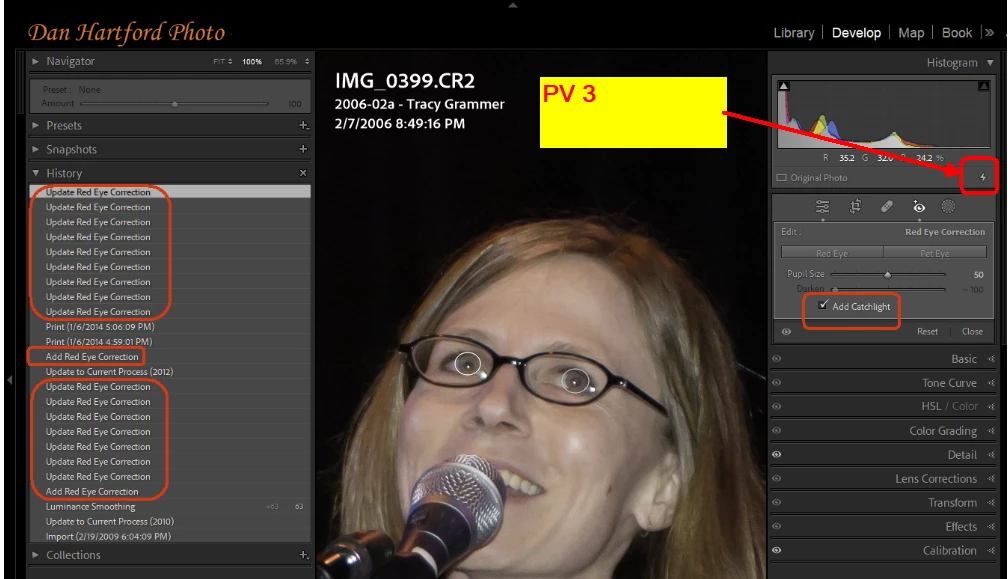
If I change the PV to current, the check box remains. But if I re-import the image (without XMP) and at import it gets the current PV, the catchlight check box cannot be made to appear.
2) On the original image, If I import it with it's PV3 XMP side car file which brings it in as PV3 image but with no history, It has the catchlight checkbox but then if I convert it to the current PV, select one of the red eye circles and delete it, the history panel shows "Delete Pet Eye Correction". In other words, LrC somehow changed the correction form Red Eye to Pet Eye.
So, two related bugs. 1) Catchlight missing from Red Eye, and 2) LrC secretly converting Red Eye Corrections to Pet Eye for images with prior PV's in which Red Eye was used.
 AdChoices