
Participant
October 26, 2023
Question

Changing the angle in the Crop tool does not keep "locked" aspect ratio

  • October 26, 2023
  • 2 replies
  • 276 views

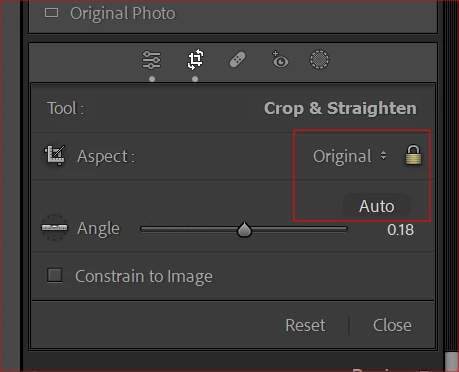
When I am in the Crop Overlay dialog and select either "Auto" to straighten a horizon line angle or when I adjust the angle manually on a photo the subsequently cropped size does not preserve the original aspect ratio of the image. 


I have the aspect ratio locked already. 


When I manually drag the handle to resize the image it preserves the locked aspect ratio but when I try to adjust the angle either through "auto" or by changing it manually the aspect ratio is not preserved. 


As an example I had a photo that was 6240x4160 and when I adjusted the angle it cropped it to 6211x4141.


Is this standard or is there a setting I am missing?


Thank you!
 

This topic has been closed for replies.

2 replies

Community Expert
October 26, 2023

Just to be fully clear, Aspect Ratio lock refers only to preserving the crop's shape proportion, not its dimensions or its pictorial composition.


The moment any corner of the crop boundary hits the edge of the overall image while rotating, or moving or resizing the crop for that matter, crop dimensions are automatically reduced to prevent that corner from straying beyond the available image data's extent.


That is how the Crop tool is designed: by contrast with the manual and the automated Upright options in the Transform panel, where you can choose whether "Constrain Crop" (to the image extent) should be enabled or not.


So in Transform, when Constrain Crop is un-checked, as the image is rotated or otherwise manipulated, any straying beyond the original image extent will show up in the result as white margin area. But when it is checked, LrC reduces the  image boundary such that no such white margin areas will show - the same as the behaviour of the main Crop tool.

Participant
October 26, 2023

Thank you everyone for the helpful info, I understand the tool better now and hopefully this may help others as well! 

johnrellis
Genius
October 26, 2023

"As an example I had a photo that was 6240x4160 and when I adjusted the angle it cropped it to 6211x4141."


The original aspect ratio was 6240 / 4160 = 1.5.


The cropped aspect ratio is 6211 / 4141 = 1.499879256218305.  With whole pixels, that's as close as you can get to 1.5 with a width of 6211. That is, 6211 / 1.5 = 4,140.666666666666667, which is 4141 after rounding to the nearest whole pixel.


Perhaps you're thinking of something else?