
Dave Rye
Known Participant
September 28, 2024
Question

Check for app issues. Such as what?

  • September 28, 2024
  • 5 replies
  • 1167 views

Is it just me or is anyone else getting the same dialog any time they try to boot their copy of ALRC?
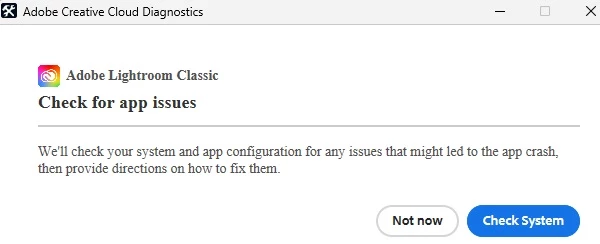
 If I tell it "Not now" it just stops, and if I select "Check System" after about a minute it tells me there are no compatibility issues with my system.  OK so why won't it run?


[moved from bugs to discussions according to the community rules - Mod.]

This topic has been closed for replies.

5 replies

GoldingD
Legend
September 29, 2024
GoldingD
Legend
September 29, 2024

Will PS start?

If so, can you collect the system info from PS and post that in a reply


Dave Rye
Dave RyeAuthor
Known Participant
September 29, 2024

PS and Bridge both boot up fine.  I'll take a break in a bit and try to gather up the system info from PS and get it posted.  I've just been real busy trying to help my neighbors clean up some after Hurricane Helene came through our area.  I spent 20 years with my local fire department so that is something I have had a fair share of experience with.

johnrellis
Legend
September 29, 2024

Doing a clean uninstall/reinstall as described in the Adobe help article is the next step.

Dave Rye
Dave RyeAuthor
Known Participant
September 29, 2024

This is what I am getting today while I'm still trying to get pictures of hurricane damage ready to send in to the local daily newspaper.
First it tells me to check for app issues.  Then it says no issues found.  But it still won't run.  And this is with me paying $120 / year for it.

GoldingD
Legend
September 29, 2024
  1. Bring up your copy of the Adobe Creative Cloud Desktop App.
  2. Sign out
  3. Sign in
  4. Pay attention for any error messages
  5. Look at any notifications
  6. If nothing bad occurs, then try LrC again.


johnrellis
Legend
September 28, 2024

Before we start guessing solutions, please do the LR menu command Help > System Info and copy/paste the entire contents here so we can see exactly which versions of hardware and software LR thinks you're running and important LR options that are set.

Dave Rye
Dave RyeAuthor
Known Participant
September 29, 2024
OK.  The only problem is that the program never gets to the point of
offering the main menu before going into the
"Adobe Creative Cloud Diagnostics" diag

Adobe Lightroom Classic Check for app issues and offering to allow me to
have the software check my system and provide suggestions for fixing it...
"We'll check your system and app configuration for any issues that might
led to the app crash, then provide directions on how to fix them."

The only comment it makes if I tell it to check the system instead of
"Not now" is about one minute after I tap the check it button it says my
system is compatible and it couldn't detect any issues. Then the
software shuts down before I can make any menu selections.
johnrellis
Legend
September 29, 2024

Try doing a complete uninstall of all Creative Cloud apps using the Cleaner Tool:

https://helpx.adobe.com/creative-cloud/kb/cc-cleaner-tool-installation-problems.html


Then reinstall, starting with the Creative Cloud desktop app:

https://helpx.adobe.com/download-install/kb/creative-cloud-desktop-app-download.html