Inspiring
June 4, 2025
Answered

Clean install of Lightroom Classic

  • June 4, 2025
  • 4 replies
  • 1599 views

MY Lightroom Classic has been running poorer and poorer as time goes by.

To make a very long story, short. This has been plaging me for a very long time.

All I wish to do is uninstall LrC, then do a clean install.

My question is: how do I do this and preserve all of my personal presets, brushes, etc.

Correct answer Per Berntsen

Your GPU driver is 12 months old.

I agree with @dj_paige that your GPU might be too old to perform well with LrC, but updating the driver might help a bit.

Download the latest studio driver from here: https://www.nvidia.com/en-us/drivers/details/245675/


You also have an integrated GPU – UHD Graphics 630.

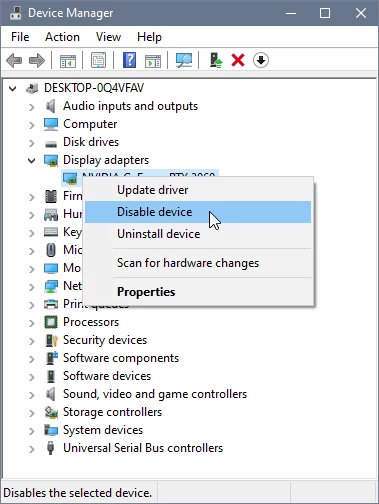
Make sure that it is disabled, LrC does not work well with dual GPUs.

Go to Control panel > Device manager > Display adapters. If the UHD Graphics 630 is enabled, right click it and choose Disable.


4 replies

Known Participant
June 12, 2025

I didn't read all replies but have you made sure your hard drive with LR catalog etc. isn't almost full. 

Inspiring
June 12, 2025

Yes. Absolutely.

Thanks

dj_paige
Legend
June 4, 2025

All I wish to do is uninstall LrC, then do a clean install.


This is unlikely to help slowness, as stated by @Per Berntsen . Please provide the system information that was requested.


Also please be specific, what actions in LrC are slow?

Inspiring
June 11, 2025

Would you believe ALL ?

From startup times as long as 3-4 minutes, or longer. I sometimes can literally go make coffee while waiting for LR to become usable. Or how about this one: Grab a brush, pick a color, whatever, drag the brush across the image, then sit back and wait for it to slowly draw, or, one more create a mask, make it a brush whatever, doesn't matter, then when creating another mask, go use the bathroom while the image flickers, changes colors, goes through all kinds of gyrations befor it finally puts the new mask up. Not your usual day to day expectations. I have a short video showing one anomalie, but seems there is no way to post it here. If I'm missing something, and it can, let me know. I think I still have it.
Thanks

Per Berntsen
Community Expert
Community Expert
June 11, 2025

If you want help, please post your system info as I requested above.

It contains lots of information about your computer and your LrC configuration, and is an invaluable tool for troubleshooting.

We get quite a few posts from people having issues similar to yours, and I'd say that more than half of them are solved by means of the system info. Reinstalling rarely fixes anything.


If you're replying by email, you cannot post images and videos, you have to use a web browser to do that.

Please do not attach images, use the Insert Photos button in the toolbar to embed them in your post.

The button to insert videos is right next to it.


Per Berntsen
Community Expert
Community Expert
June 4, 2025

Reinstalling will probably not fix the issues you're having.

Your system info could contain clues about what's wrong, so please go to Help > System info in LrC, click the Copy button and paste in a new reply here.

Inspiring
June 11, 2025

Thank you for your reply. I have been swamped lately and will get back when I can.
I'll say this for now. The reason I believe a reinstall may work is, I and a friend have tried everything else. Every suggestion I have received during the past several months has been tried without avail. ANd the kicker is, no other image editing software shows the same symptoms at all, EXCEPT LR.

AxelMatt
Community Expert
Community Expert
June 4, 2025

First backup all your personal data, like presets and so on.

Infos about that you'll find here: https://www.lightroomqueen.com/backup-lightroom-files/


Then do the clean installation by following the steps below:


If you're unable to install the cc desktop app at this stage, use an administrator account (solution 4 here,   https://helpx.adobe.com/creative-cloud/kb/creative-cloud-missing-damaged.html)


My System: Intel i7-8700K - 64GB RAM - NVidia Geforce RTX 3060 - Windows 11 Pro 25H2 -- LR-Classic 15 - Photoshop 27 - Nik Collection 8 - PureRAW 6 - Topaz Photo AI
Inspiring
June 11, 2025

Thank you for your reply. I have been swamped lately and will get back when I can.