

F. McLion
Community Expert
Community Expert
October 27, 2024
Question

Clone/Heal not fully covering

  • October 27, 2024
  • 2 replies
  • 390 views

Hi

Even with opacity set to 100% clone or heal does not fully cover the area. Is someone else seeing this as well?
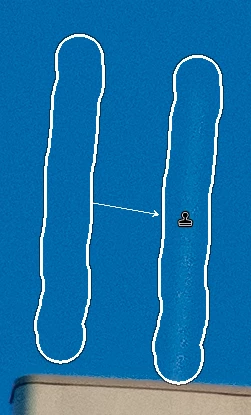
 

I did all the usual stuff like resetting the preferences, having the latest GPU driver installed.

Turning GPU support on/off does not make any difference.

LrC 14.0.1 on Win 10.


This topic has been closed for replies.

2 replies

GoldingD
Legend
October 27, 2024

Did either (or both) the Removal or the Masking buttons have a red circle/dot below them calling for a update?

F. McLion
Community Expert
F. McLionCommunity ExpertAuthor
Community Expert
October 27, 2024

Nope.

I believe Johan's post nails it and is also what I am seeing.

Strange, that I'm giving advice to do differently and tapping into the same 🤣


--- Got your issue resolved? Please label the response as 'Correct Answer' to help your fellow community members find a solution to similar problems. ---
JohanElzenga
Community Expert
Community Expert
October 27, 2024

If you used an AI Sky mask, then @GoldingD is correct that the mask icon should show a red dot, indicating that the mask needs updating. However, you can also create a sky mask manually, for example by using the brush tool with 'auto masking'. In that case the explanation and the solution is the same, but you'll need to update the mask manually and there won't be a red dot. The Remove icon will not show a red dot, because remove is not what needs to be updated.


-- Johan W. Elzenga
F. McLion
Community Expert
F. McLionCommunity ExpertAuthor
Community Expert
October 27, 2024

Just found that I already made correction to the sky before. Removing all that, then the clone/heal works as expected.

Anyhow, I feel like that was not the case in earlier versions.


--- Got your issue resolved? Please label the response as 'Correct Answer' to help your fellow community members find a solution to similar problems. ---
JohanElzenga
Community Expert
Community Expert
October 27, 2024
quote

Just found that I already made correction to the sky before. Removing all that, then the clone/heal works as expected.

Anyhow, I feel like that was not the case in earlier versions.


By @F. McLion


It definitely was in earlier versions too. To explain what's happening: Let's suppose you made a sky mask to darken the sky a bit. There was a kite in the sky, so the mask does not include that kite: it will have a gap in the shape of the kite. Then you decide to remove the kite. The kite is now gone, but the gap in the mask is still there. That means that the spot where the kite used to be will not be darkened by the mask, and so you see a 'ghost kite'. Removing the kite first and masking later solves this, but simply updating the mask after you removed the kite will solve it too.

-- Johan W. Elzenga