
Participating Frequently
June 3, 2022
Answered

Color banding Nikon Raw in LRC 11.3.1

  • June 3, 2022
  • 2 replies
  • 251 views

LRC = 11.3.1

Windows 10 Pro  21H1   Build 19043.1706   

Windows and Apps on SSD drive

User and data on hard drives

Windows Feature Experience Pack 120.2212.4170.0

Intel(R) Core(TM) i7-3770K CPU @ 3.50GHz  RAM 32GB


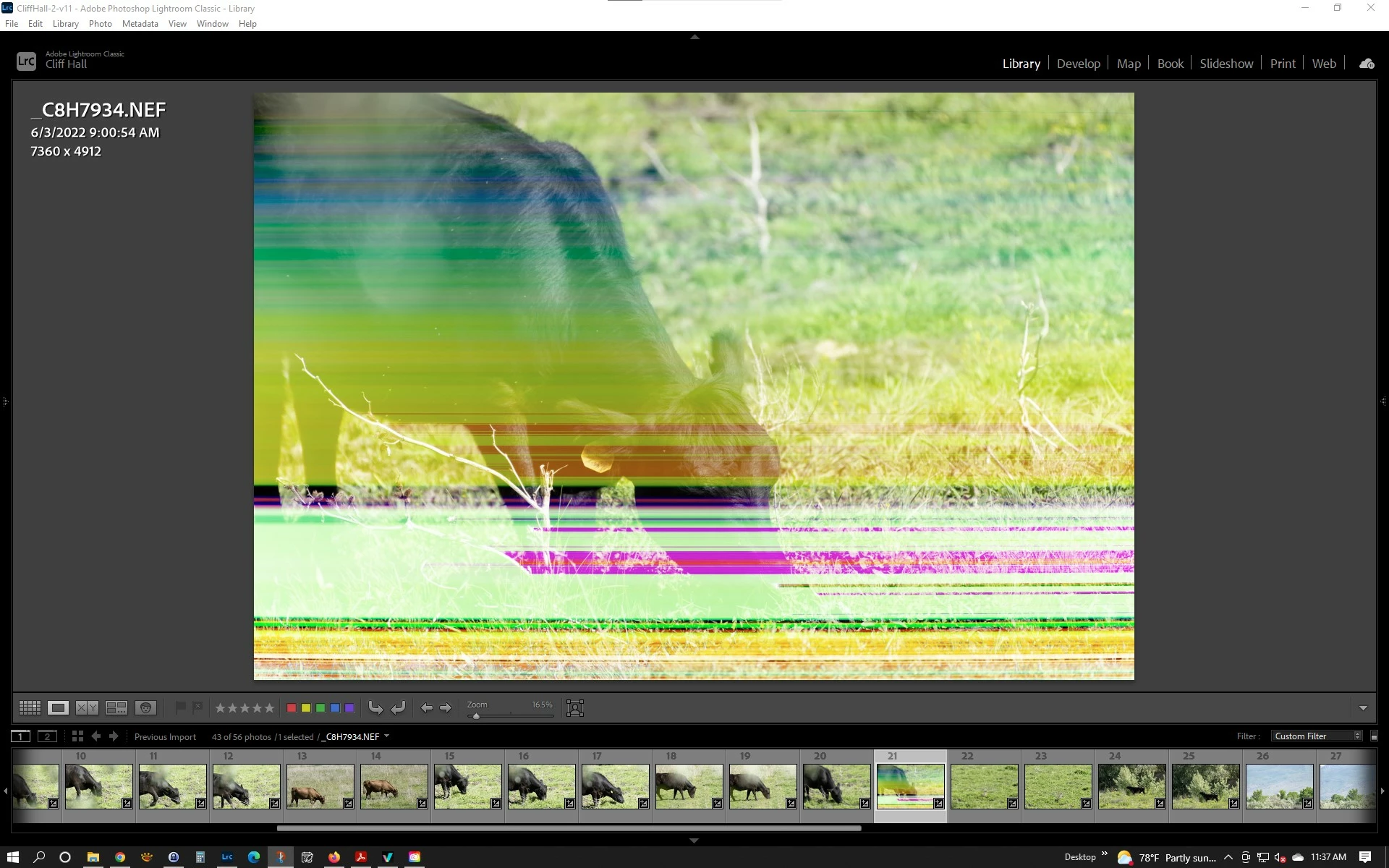
On a very few Nikon NEF photos from my D800 Lightroom Classic will render the image with color bands as shown in screenshot below.  The banding is there at all zoom levels.

If I use Nikon's ViewNX-i the file is rendered with no color bands and looks fine even zoomed way it.

I have been seeing this for some years now, and just wrote it off as file corruption on my CF card since it happens rarely, but was checking photos today with ViewNX-i and its Lightroom that is rendering it wrong.  I have also attached the NEF file so you can reproduce the issue.  Note attachment was not accepted so here it is on my One Drive.

https://1drv.ms/u/s!An-2gAxktTe6vxKNBVmip9YMHLvI?e=YZn4SX 
 

This topic has been closed for replies.
Correct answer dj_paige

First try discarding the preview and then re-creating the preview.


Library->Previews->Discard 1:1 preview

Library->Previews->Build 1:1 preview


If that doesn't work:

This is a corrupted file and cannot be used. Restore a copy from your backups or from your camera card.

2 replies

Skidoo100Author
Participating Frequently
June 3, 2022

It was a corrupted file.  I guess ViewNX-I is able to recover some corrupted files.

D Fosse
Community Expert
Community Expert
June 3, 2022

It's showing you the embedded jpeg, not the full raw data. The embedded jpeg is just a small part of the file and can be ok in an otherwise corrupted file.

Skidoo100Author
Participating Frequently
June 3, 2022

ViewNX-I is showing raw data.  It has a button for switching between embedded preview and raw data.  The image that has the problem in LRC shows good for both preview and raw in ViewNX-I.  That image is corrupted as reloading it off the CF card fixed it so LRC rendered it correctly.  So ViewNX-I has some built in recovery capability, but it is a Nikon product so it knows those files better.

dj_paige
dj_paigeCorrect answer
Legend
June 3, 2022

First try discarding the preview and then re-creating the preview.


Library->Previews->Discard 1:1 preview

Library->Previews->Build 1:1 preview


If that doesn't work:

This is a corrupted file and cannot be used. Restore a copy from your backups or from your camera card.