Participant
February 3, 2021
Answered

Color changing when viewing at greater than 33%

  • February 3, 2021
  • 5 replies
  • 436 views

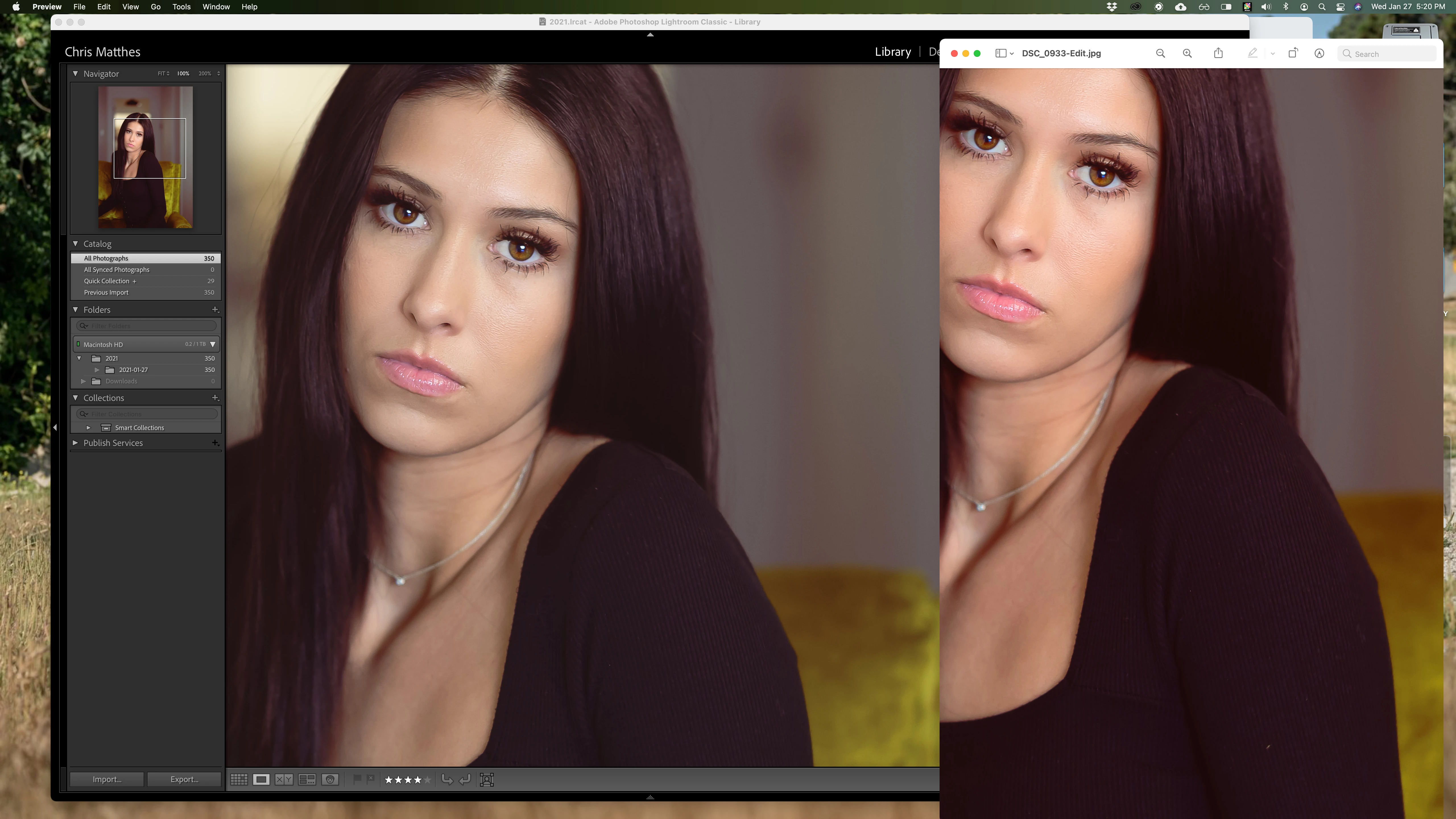
Like the title says, I am noticing desaturation when viewing images in LR 10.1.1 at greater than 33%.  I have replicated the issue with different files and it occurs in the Library and Develop modules.  I am on a iMac 5k running Big Sur.  Seen here, the file on the left is viewed at 100%.  On the right is the same file exported to the desktop and opended in preview.  Anyone have ideas what could be causing this?
This topic has been closed for replies.
Correct answer johnrellis

Adobe has acknowledged this bug:

https://feedback.photoshop.com/conversations/lightroom-classic/lightroom-classic-library-zoomed-view-shows-wrong-color/5fcfefbe990dc97e9ddf3083 


Please add your constructive opinion to the bug report, and be sure to click Like and Follow at the bottom of the first post. That will make it a little more likely that Adobe will prioritize a fix, and you'll be notified when the bug's status changes.


[Use the blue reply button under the first post to ensure replies sort properly.]

5 replies

DdeGannes
Community Expert
Community Expert
February 5, 2021

Since I am not pressed at this moment due to the Covid restrictions and do not have many new images I will live with the limitations in the Library display and await a fix from Adobe, hopefully in the near future. 

Regards, Denis: iMac 27” mid-2015, macOS 11.7.10 Big Sur; 2TB SSD, 24 GB Ram, GPU 2 GB; LrC 12.5,; Lr 6.5, PS 24.7,; ACR 15.5,; (also Laptop Win 11, ver 24H2, LrC 15.3; PS 27.0; ) Camera Oly OM-D E-M1.
DdeGannes
Community Expert
Community Expert
February 4, 2021

Quote from your initial post "Seen here, the file on the left is viewed at 100%.  On the right is the same file exported to the desktop and opended in preview"

Is the 100% capture from the Library or Develop module?

The exported file is it jpg, sRGB, AdobeRGB or ProPhotoRGB?

Things you need to be aware of, the working color space the Library module uses is AdobeRGB and it displays the preview files built at import. The Develop module uses a variant of Pro-PhotoRGB. This is how Lightroom is set up and users cannot change it.

Finder, I am not aware what color space that uses.


Regards, Denis: iMac 27” mid-2015, macOS 11.7.10 Big Sur; 2TB SSD, 24 GB Ram, GPU 2 GB; LrC 12.5,; Lr 6.5, PS 24.7,; ACR 15.5,; (also Laptop Win 11, ver 24H2, LrC 15.3; PS 27.0; ) Camera Oly OM-D E-M1.
johnrellis
johnrellisCorrect answer
Legend
February 4, 2021

Adobe has acknowledged this bug:

https://feedback.photoshop.com/conversations/lightroom-classic/lightroom-classic-library-zoomed-view-shows-wrong-color/5fcfefbe990dc97e9ddf3083 


Please add your constructive opinion to the bug report, and be sure to click Like and Follow at the bottom of the first post. That will make it a little more likely that Adobe will prioritize a fix, and you'll be notified when the bug's status changes.


[Use the blue reply button under the first post to ensure replies sort properly.]

DdeGannes
Community Expert
Community Expert
February 4, 2021

Yes Chris, I agree with you in the Library Module I also see the image at 100% less vibrant than the fit.

In the Develop Module is see I see no difference in the display fit or 100%.

In the thread, I added a screen capture yesterday in the evening.

Adobe is aware of the issue and is working on a fix.

I am att attaching the image I am referring to above. Left is fit display in Library, the middle is fit display in Develop, the right is 100% display in Develop.


Regards, Denis: iMac 27” mid-2015, macOS 11.7.10 Big Sur; 2TB SSD, 24 GB Ram, GPU 2 GB; LrC 12.5,; Lr 6.5, PS 24.7,; ACR 15.5,; (also Laptop Win 11, ver 24H2, LrC 15.3; PS 27.0; ) Camera Oly OM-D E-M1.
DdeGannes
Community Expert
Community Expert
February 3, 2021

What version of macOS Big Sur are you using. I updated to v11.2 yesterday and it hat worked for me. I was experiencing a similar problem. See the thread below.

https://community.adobe.com/t5/lightroom-classic/lrc-10-1-1-on-imac-bigsur-11-2-update/td-p/11802057


Regards, Denis: iMac 27” mid-2015, macOS 11.7.10 Big Sur; 2TB SSD, 24 GB Ram, GPU 2 GB; LrC 12.5,; Lr 6.5, PS 24.7,; ACR 15.5,; (also Laptop Win 11, ver 24H2, LrC 15.3; PS 27.0; ) Camera Oly OM-D E-M1.
Participant
February 4, 2021

I've just updated to 11.2 and the condition still exists. 


TheDigitalDog
Inspiring
February 4, 2021

It's a known issue and a fix is coming. 

Author “Color Management for Photographers" & "Photoshop CC Color Management/pluralsight"