Participant
December 18, 2016
해결됨

Color management in "Print"

  • December 18, 2016
  • 2 답변들
  • 1205 조회

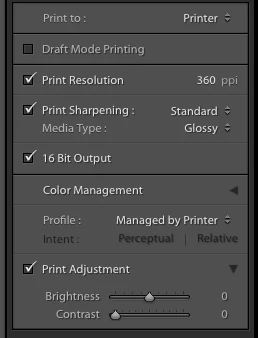
Lightroom on i-mac to epson 3880 printer I have always printed using icc profiles for each paper type which pop up under color management; profile All of a sudden profile says "managed by printer" and I have not found a way to get back to my list of papers.

How do I get back to the paper profiles in color management?

Thanks

    이 주제는 답변이 닫혔습니다.
    최고의 답변: JoeKostoss

    Are you referring to "Color Management" in the Printer Panel on the right side of the screen?  Click on the 2 up/down arrows to the right of "Managed by Printer" to select the ICC Profile for the paper/printer combination.

    2 답변

    WLSPHOTO작성자
    Participant
    December 19, 2016

    That is what I have always done in the past but now when I click on the  arrows I do not get printer paper options I get a list of " profiles" like pal/secam,rgb ,iflux etc. I have never seen any of these before. and they do not directly relate to paper choice.

    Thanks for your help

    arjunhaarith
    Adobe Employee
    Adobe Employee
    December 19, 2016

    Hi ,

    Please check if by any chance the printer driver might have been uninstalled / needs updated.

    Under the Color management -> Profile , Click 'Other' and see if you are seeing the intended profile.

    Please let me know your observations.

    Thanks,

    Arjun

    WLSPHOTO작성자
    Participant
    December 19, 2016

    That was what used to happen. Now when I click other I get 15 options ( name and then long string ) that seem to be related to color space but none relate to printer paper combinations.  I can't remember how the paper options were originally loaded. I will try to reload the printer drivers?

    Thanks

    JoeKostoss
    Community Expert
    Community Expert
    December 18, 2016

    Are you referring to "Color Management" in the Printer Panel on the right side of the screen?  Click on the 2 up/down arrows to the right of "Managed by Printer" to select the ICC Profile for the paper/printer combination.