
Known Participant
January 28, 2022
Answered

Color shift after export- reimport issue?

  • January 28, 2022
  • 2 replies
  • 722 views

I don't know what has happened, but there last two times after I have received my DNG/TIFF files back from my retoucher and I put them into LR classic, and then export jpeg files- the colors shift soooo far RED. 


I've tried everything, but the TIFF files are being sent in sRGB and when I export I ensure that the color space is sRGB.


Not sure if this is happening because I am putting the file back into lightroom and making slight adjustments.... 


Any help would be GREATLY appreciated!!

Thank you
This topic has been closed for replies.
Correct answer Per Berntsen

If you are on Windows 11, make sure that it's up to date. There was a color management bug that was fixed recently, with the KB5008353 Cumulative Update.

If it is up to date, or you are on Windows 10, note that the Photos app is now color managed, and should display the same as Lightroom. When two color managed applications don't match, it's usually caused by a defective monitor profile.


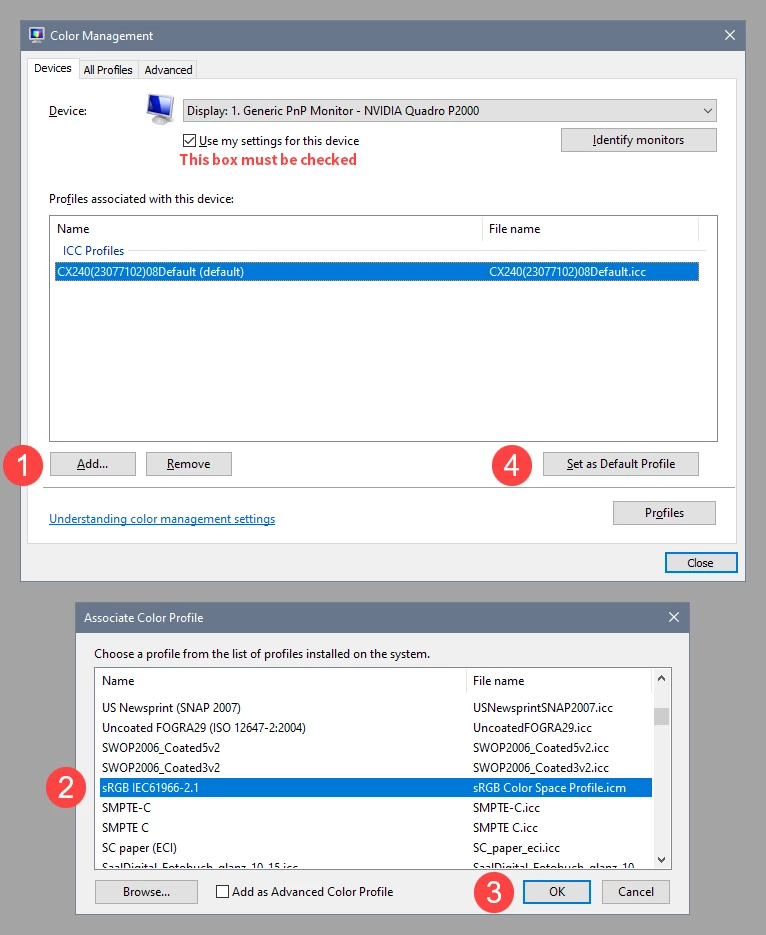
As troubleshooting, and as a possible temporary fix, try setting the monitor profile to sRGB (use Adobe RGB if you have a wide gamut monitor).

If this fixes the issue, you should ideally calibrate the monitor with a hardware calibrator. This will also create and install a custom monitor profile that describes your monitor accurately.


Close all color managed applications, including web browsers.

Press the Windows key + R, type colorcpl in the box and press Enter.

Add the sRGB profle, then set it as default.


2 replies

Per Berntsen
Community Expert
Community Expert
January 28, 2022

In what application are you viewing the exported jpg? If it is not color managed, colors will be wrong, especially if you have a wide gamut monitor.


Not sure if this is happening because I am putting the file back into lightroom and making slight adjustments.... 


So, do you see any difference in Lightroom before you make the adjustments?

Known Participant
January 28, 2022

Hi -


I am viewing the image in the pre-installed windows photo application - which I understand that is an unmanaged photo space so I don't really have expectation that the colors will look correct there.


But the issue is that when I put the photo into Dropbox and look at it on my phone, and then put it into Instagram, it typically would look fine and colors would shift back to how I saw them on my LR.

However now - they are completely out of range and the color does not shift. How I see it in the dropbox/window photo app is how it is on the web.


Attaching example - this may not show how fully red she is on my side, but even here the subject is much more orange toned and saturated then I had edited the image to.


Per Berntsen
Community Expert
Per BerntsenCommunity ExpertCorrect answer
Community Expert
January 28, 2022

If you are on Windows 11, make sure that it's up to date. There was a color management bug that was fixed recently, with the KB5008353 Cumulative Update.

If it is up to date, or you are on Windows 10, note that the Photos app is now color managed, and should display the same as Lightroom. When two color managed applications don't match, it's usually caused by a defective monitor profile.


As troubleshooting, and as a possible temporary fix, try setting the monitor profile to sRGB (use Adobe RGB if you have a wide gamut monitor).

If this fixes the issue, you should ideally calibrate the monitor with a hardware calibrator. This will also create and install a custom monitor profile that describes your monitor accurately.


Close all color managed applications, including web browsers.

Press the Windows key + R, type colorcpl in the box and press Enter.

Add the sRGB profle, then set it as default.


Known Participant
January 28, 2022

I also should add, this only started happening that the colors did not adjust when uploading to social/web within the last month. Before I would expect a color shift on my monitor or Windows photo application, but when I would put them into a file delivery systemm dropbox/wetransfer or the like, then export to say instagram the colors would shift back to how they were correctly seen in my LR/PS. 


But now they just stay shifted to the RED profile.

And I can't adjust this as I'm seeing how the image should be within lightroom's color managed profile...