Jlevineah
Known Participant
January 16, 2018
Answered

Color Shift Lightroom -> Photoshop -> Lightroom

  • January 16, 2018
  • 2 replies
  • 17972 views

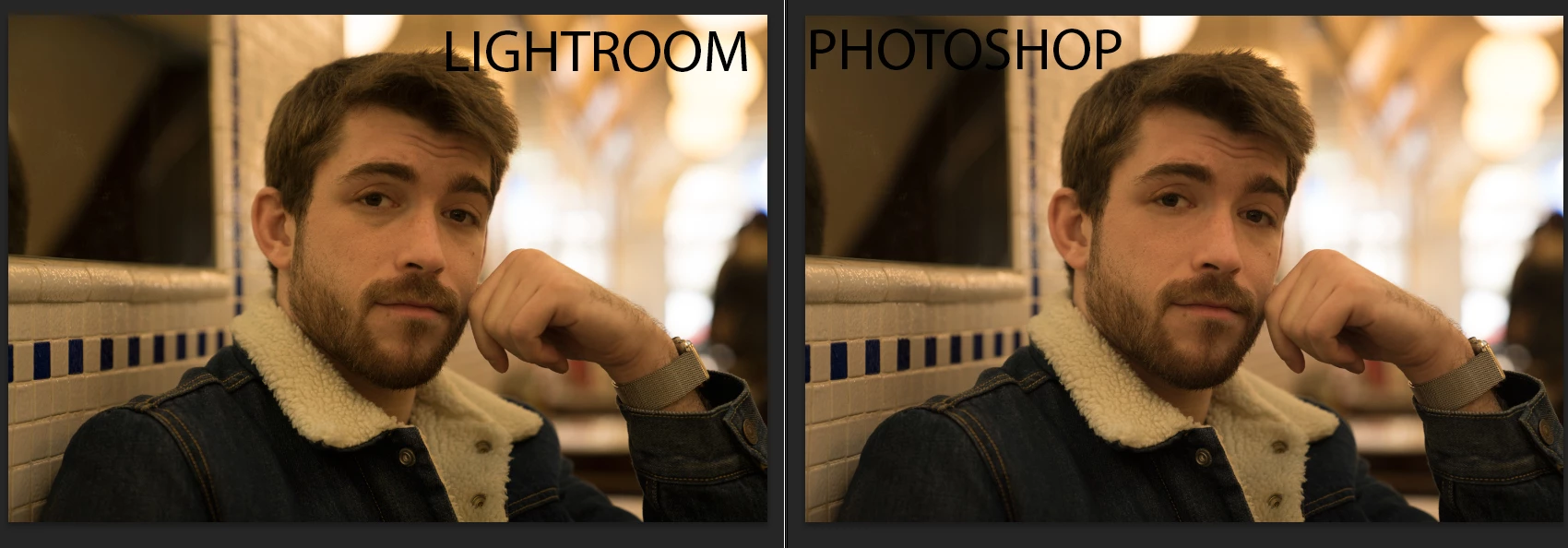
When I use edit in photoshop then import back to lightroom there is a huge colorshift in the imported image. I have done several tests and the histogram shifts slightly when back in lightroom.

Here is the original from lightroom and import from Photoshop.

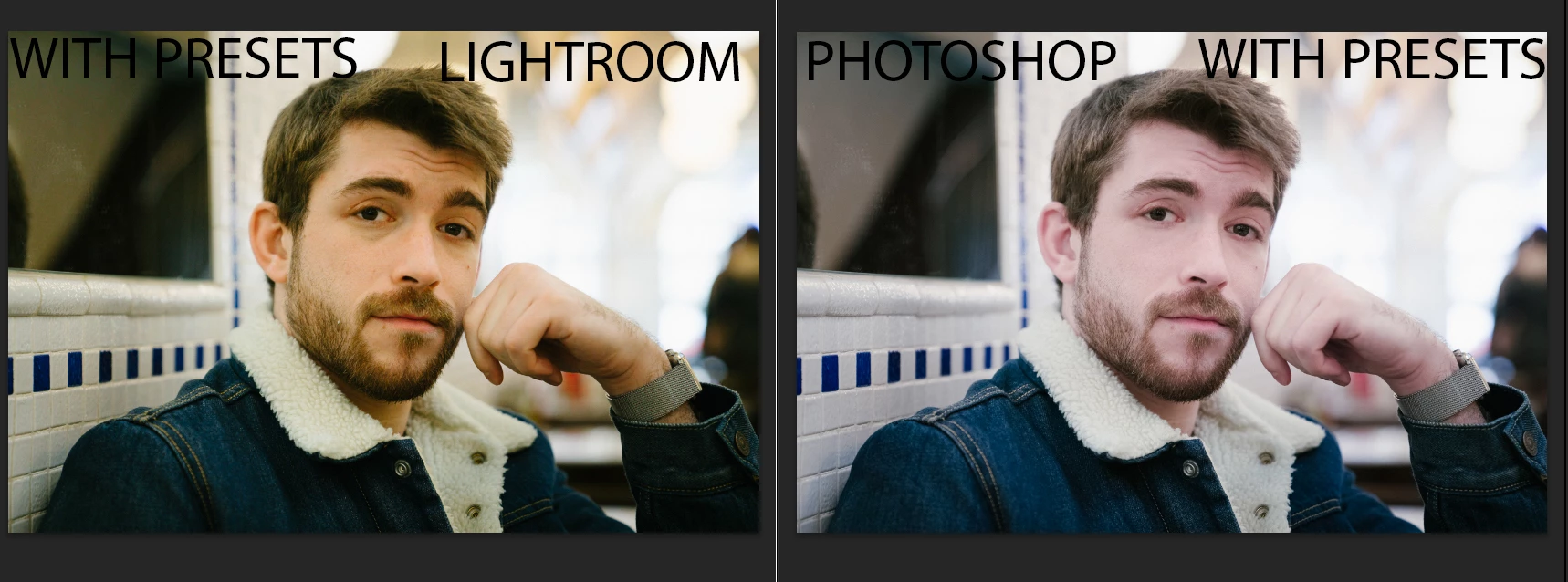
Here are both with presets applied

Here are my color profiles.

Monitor: sRGB

Photoshop: ProPhoto

Lighroom (to photoshop): Prophoto

This is driving me crazy! Any thoughts?

This topic has been closed for replies.
Correct answer D Fosse

you will get a color shift if you go from Lightroom (Melissa RGB) To photoshop if your photoshop is set to Srgb..  that is not new and is a fakt..


No, you will not, unless you have messed up Photoshop's color management by changing settings without knowing what you're doing.

Photoshop color management policies should always be set to preserve embedded profiles. Then the profile out of Lightroom will be preserved and override the working RGB in Photoshop.

Even if the profile is converted in Photoshop, you will not see a difference. A profile conversion will never result in a general color shift - if it does, color management isn't working as it should. The most common reason for that is users changing settings without knowing what they do.

The only difference you will ever see in a profile conversion is clipping, if the target color space is smaller than the source. But unless you have a wide gamut monitor you will never see that. The monitor clips everything to sRGB anyway. With a wide gamut monitor you may see clipping from Adobe RGB to sRGB - but not from ProPhoto to Adobe RGB. That's outside monitor gamut.

Lightroom uses a custom color space internally, with ProPhoto primaries but a linear tone response curve. That's not Melissa RGB. Melissa RGB is only used for the histogram and sliders. It again has ProPhoto primaries, but sRGB tone response curve.

Lightroom's linear ProPhoto color space is not related to the 1.8 ProPhoto used in Photoshop. And they don't need to be. Photoshop's working RGB can be whatever you choose it to be.

2 replies

Known Participant
June 1, 2018
D Fosse
Community Expert
Community Expert
June 1, 2018

savage08  wrote

have you setup like this?? https://www.slrlounge.com/does-your-image-look-different-in-lightroom-photoshop/

This repeats a myth that seems impossible to defeat. It pops up again and again.

No, color settings do not need to match in Lightroom and Photoshop!

The profile coming out of Lightroom will be preserved in Photoshop. That's the whole idea of color managed applications.

If you get a color shift from one to the other, it's for entirely different reasons, usually a bad monitor profile. Or it could be that you have turned color management "off" in Photoshop, which is something you should never do under any circumstances.

Known Participant
June 2, 2018

you will get a color shift if you go from Lightroom (Melissa RGB) To photoshop if your photoshop is set to Srgb..  that is not new and is a fakt..

TheDigitalDog
Inspiring
January 16, 2018

First off, always compare LR to other applications like Photoshop for color and tone ONLY in Develop module. With both images at 1:1 (100% zoom ratio).

Next check your Photoshop color preferences to ensure all policy is set to Preserve Embedded Profile!

Author “Color Management for Photographers" & "Photoshop CC Color Management/pluralsight"
Jlevineah
JlevineahAuthor
Known Participant
January 16, 2018

Did that and no change. My Photoshop management policies are all set to preserve embedded profile.

D Fosse
Community Expert
Community Expert
January 17, 2018

A preset (or any numerical adjustment) will not have the same effect on a raw file vs. a rendered RGB file. One works on the sensor data, a very dark/compressed grayscale image - the other on gamma and color space encoded RGB data with a lot of information discarded. So this is expected.

As long as Lightroom displays the raw file the same way as Photoshop displays the RGB file, everything's normal.