
Answered
Color Shift, LR to PS back to LR
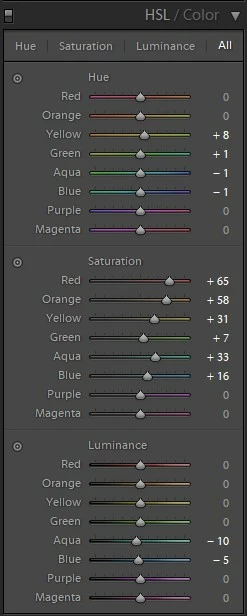
I am experiencing a weird color shift when I open my files in Photoshop. I have Photoshop setup in ProPhoto RGB and to Preserve Embedded Profiles. When I open a RAW file in Photoshop, perform no edits and simply save it as a PSD, then go back to LR, the image colors are all off. They look almost uniformly de-saturated and have less contrast. I have made sure all apps are up to date as well as Camera Raw. I am attaching a screenshot of the shifts I needed to do in order to make the PSD match the raw image in LR, these are pretty large shifts to me. What could be causing this?
 AdChoices