


Participating Frequently
August 23, 2024
Question

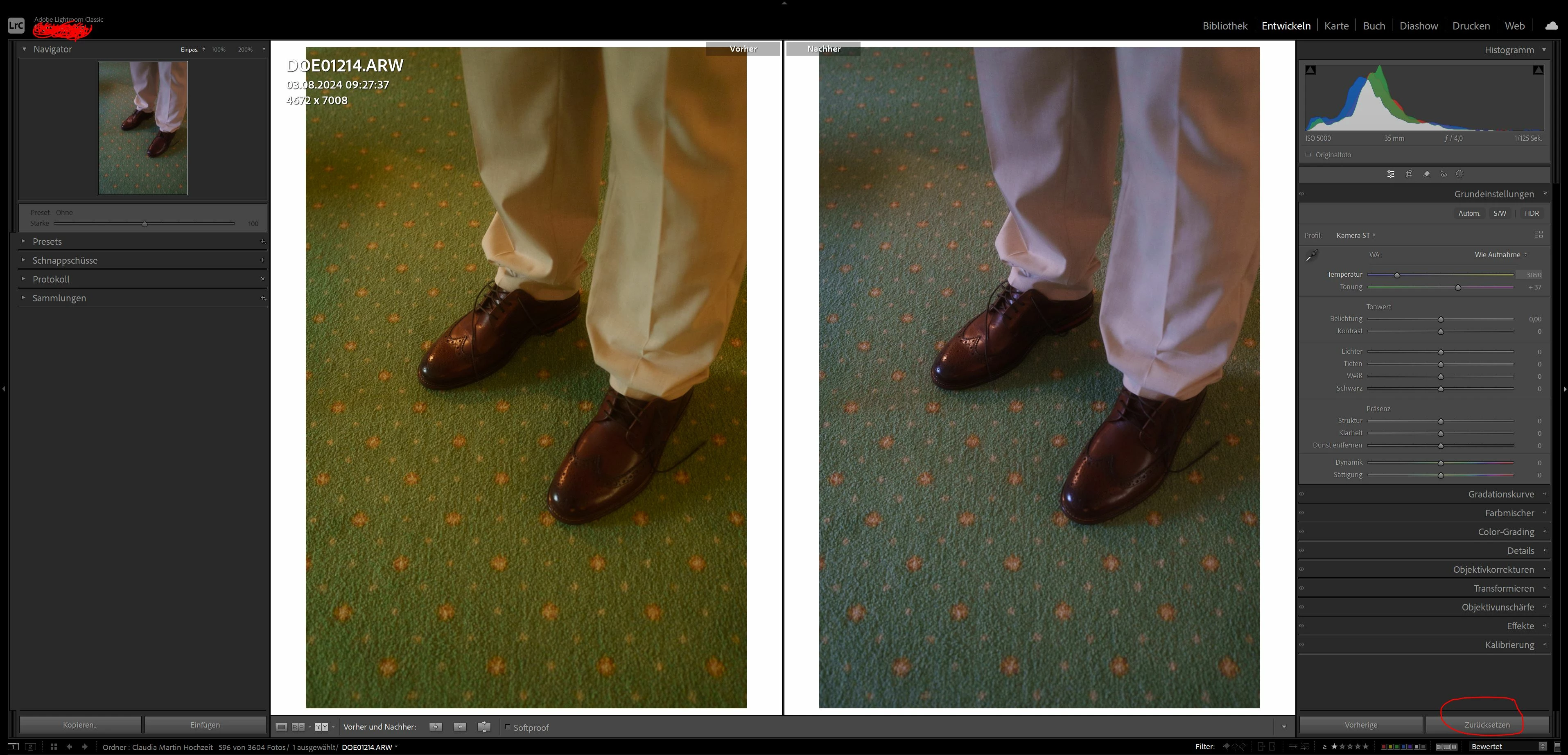
Colors between before and after edit look different even if I dont edit at all
  • August 23, 2024
  • 5 replies
  • 1929 views

Hello everyone,

big trouble: when I import pictures they look good at first, the whitebalance is fine. as soon as i go to my edit panel in Lightroom CC the colors of my (not yet edited) picture switch dramatically, its mostly the white balance that goes wild. Any ideas what is happening? I'd love to start my edit on the picture here on the left, instead of having to make corrections first. Especially with many pictures in the queue.

(You might hate the whitebalance on the left compared to the right hand side, I understand, but thats only for the visualisation. On any screen, and also in-cam, it shows me the left side colors.)

Appreciate any answers! 

Raphael

5 replies

EJAS
Participant
February 6, 2026

Did you ever resolve this?  FYI, in my old non-subscription version of lightroom, the “Select” and “Candidate” views (on a single monitor) have wildly different color casts.  If you make an X-Y swap of the selected and candidate photos, the color cast remains in the same views rather than also swapping (i.e., Picture A takes on the color cast originally found on Picture B and vice versa or, in other words if the photo in the “Selected” view is too blue, whatever photo is moved into the “Selected” view becomes too blue.  These seem very similar to your issue.

Per Berntsen
Community Expert
Community Expert
August 23, 2024

The before/after view uses Develop previews, so I don't think this has anything to do with Picture styles or other camera settings.

It can be caused by a buggy GPU driver, a defective or incompatible monitor profile, or even a combination of the two.

To begin with, please go to Help > System info, click the Copy button, and paste in a new reply here.

You can delete everything below Installed Plugins, it is not required, and takes up a lot of space on the page.

Legend
August 23, 2024

Is this Classic or Desktop? I'm not even sure which app the OP has.

Per Berntsen
Community Expert
Community Expert
August 23, 2024

This is Lightroom Classic.

GoldingD
Legend
August 23, 2024

Several requests:


1. Can you retake that screenshot, but with the History Panel expanded and visible. From the Basic Panel it appears at least two edits have occurred, the Profile, and the WB.


2. Can you share a screenshot of your LrC Import Screen.  Curious about any presets called for during import.


3. Can you share a screenshot of LrC /Preferences/Presets. Curious about RAW Defaults


Participating Frequently
August 25, 2024

1. 

2. 

3. I didnt understand what presets to look for, can you elaborate?


thanks a lot for your help, I really appreciate it!


Participating Frequently
August 25, 2024

regarding 1): no edits were made, whitebalance is "like original"

Legend
August 23, 2024

First of all, you want to calibrate your display to ensure your colors are accurate.

Second, Library and Develop use different color spaces, and Develop is showing you the rendered RAW file rather than the preview which is initially used. There may be a camera picture style or settings (those are only used with the JPEG preview), and Lightroom can use its own presets that are applied automatically to the RAW file.

https://helpx.adobe.com/lightroom-classic/kb/presets-faq.html

Participating Frequently
August 25, 2024

thanks a lot. My screens are all properly calibrated. Also calibration would explain colormismatch between two different screens, but not within the same screen (as shown in my screenshot above), right? I did not use any presets in the camera. 

Per Berntsen
Community Expert
Community Expert
August 25, 2024

Please post your system info like I requested above.

This could well be an issue with the GPU or the monitor profile.

What calibrator do you use?

AxelMatt
Community Expert
Community Expert
August 23, 2024

Check the setings of your camera if you use any picture styles. Lightroom doesn't regonize such styles.

I think the left windows shows the embedded jpeg which contains in the RAW. Thats use Lightroom for the first view. If you change to the develop module LR generate a 1:1 preview from the original raw file. 


My System: Intel i7-8700K - 64GB RAM - NVidia Geforce RTX 3060 - Windows 11 Pro 25H2 -- LR-Classic 15 - Photoshop 27 - Nik Collection 8 - PureRAW 5 - Topaz Photo
Participating Frequently
August 25, 2024

thanks for your answer! I did not use any picture styles and both sides of the screen are from the raw image