
Question
computer resetting
Hello everyone. I’m coming to you with a problem in Lightroom Classic version 14.3.1. The issue is that LRc doesn’t detect the graphics processor, and when using masks, brushes, or generative denoise, the computer starts to restart. Unfortunately, this prevents me from working. In LRc’s performance settings, I don’t have the option to choose whether to use the integrated graphics card or the external graphics card. The steps I’ve taken include downloading the drivers for my graphics card and performing a clean driver installation. This didn’t help. I also performed a factory reset. That didn’t help either. My computer components are: - MSI Z370 Ga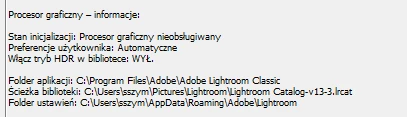
 ming Plus motherboard - 32GB RAM - i5-8600k overclocked to 4.6 GHz - GTX 1080 - Windows 10


 AdChoices