Known Participant
August 24, 2023
Answered

Confusion with color management setting in the print module versus my printer on a Windows machine.

  • August 24, 2023
  • 1 reply
  • 731 views

Hello,

In lightroom, I have changed the color management setting from Managed by Printer to a specific profile available for my Canon printer.


Is this sufficient or do I have to make any changes to the color management settings for my printer?


If I do have to make color management changes for my printer, how do I do it?


I am running with a Windows 11 machine and the Canon PIXMA Pro 200 printer.


Thanks In Advance.


Stu


Correct answer Per Berntsen

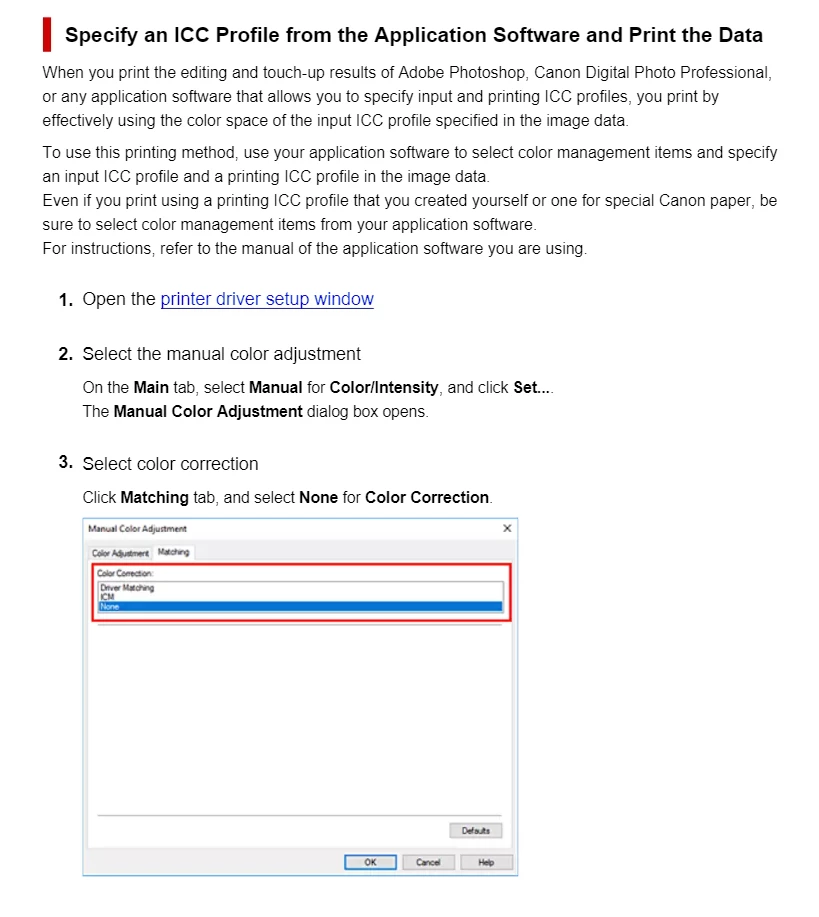
You have to disable color management in the printer driver, otherwise colors will be wrong.

I have no experience with Canon printers, but I found this, which seems to be the option you need to use.

https://www.manua.ls/canon/pixma-pro-200/manual?p=393


1 reply

Per Berntsen
Community Expert
Per BerntsenCommunity ExpertCorrect answer
Community Expert
August 24, 2023

You have to disable color management in the printer driver, otherwise colors will be wrong.

I have no experience with Canon printers, but I found this, which seems to be the option you need to use.

https://www.manua.ls/canon/pixma-pro-200/manual?p=393


stuart253Author
Known Participant
August 25, 2023

Hello,


Thanks for your reply. I have successfuly made the neccesary changes and now have Lightroom controlling my profile.


Thanks again,


Stu