Known Participant
September 30, 2025
Answered

Conversion of preset file extensions

  • September 30, 2025
  • 2 replies
  • 302 views

Hello, I currently use the old LR ver. 5.7.

I will be downloading LR Classic.

How do I go about converting my presets that are lrtemplate to xmp?


  • Thank you. 
Correct answer richardplondon

Fairly sure you would import them (it's been a long while):


In Presets panel in Develop, there is a drop-down menu from icon at top right corner 
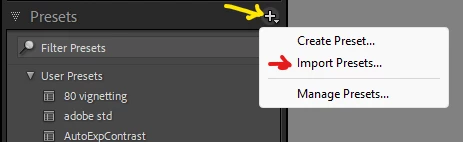
 

IIRC you then browse to the location of your .lrtemplate files, and they are copied into LrC's usual user-presets location (assuming your Catalog is not set to "store presets with catalog") and in the process they will adopt a XMP file extension.

2 replies

Rob_Cullen
Community Expert
Community Expert
September 30, 2025

Lr-Classic will do that automatically.

I don't think anything has changed in recent versions, but Lr-Classic will recognize the .lrtemplate files in the existing {Develop Presets} folder and create a copy of the presets in the .xmp format (in another folder location). The .lrtemplate files remain but are renamed with a ~~ prefix to indicate they were converted.


This old video 2018 explains a little about the change .lrtemplate to .xmp and suggests how to import .lrtemplate files that might not have been converted automatically (they still exist there out in the internet world!).-

lrtemplate to xmp preset installation tutorial - new lightroom update - LR CC Classic 2018 - YouTube


Regards. My System: Windows-11, Lightroom-Classic 15.1.1, Photoshop 27.3.1, ACR 18.1.1, Lightroom 9.0, Lr-iOS 10.4.0, Bridge 16.0.2 .
Kat549Author
Known Participant
October 1, 2025

Terrific!  Thanks so much. 

richardplondonCommunity ExpertCorrect answer
Community Expert
September 30, 2025

Fairly sure you would import them (it's been a long while):


In Presets panel in Develop, there is a drop-down menu from icon at top right corner 


IIRC you then browse to the location of your .lrtemplate files, and they are copied into LrC's usual user-presets location (assuming your Catalog is not set to "store presets with catalog") and in the process they will adopt a XMP file extension.

Kat549Author
Known Participant
October 1, 2025

Thank you, very much appreciate your assisstance.
