
Participant
November 1, 2017
Answered

convert multiple cr2 images to dng?

  • November 1, 2017
  • 2 replies
  • 689 views

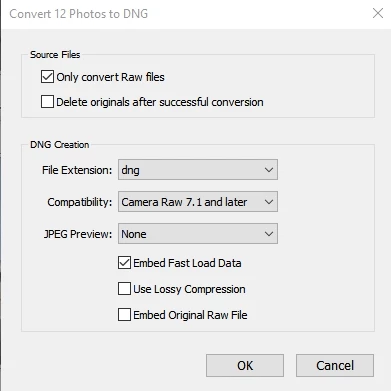
Lightroom 6 does not appear to have the ability to convert more than one image at a time to DNG. The only references I can find on line shows this option in the library menu as "Convert photos to DNG". My copy of LR 6 only uses the singular "photo" and does not appear to have an option for more than one. Converting a whole catalogue is going to take a long time!
This topic has been closed for replies.
Correct answer Rob_Cullen

I am sure that if you select multiple files in the Library Grid view then you will be able to convert them all to DNG with one click from the menu- {Library > Convert Photos to DNG }

2 replies

Rob_Cullen
Community Expert
Rob_CullenCommunity ExpertCorrect answer
Community Expert
November 1, 2017

I am sure that if you select multiple files in the Library Grid view then you will be able to convert them all to DNG with one click from the menu- {Library > Convert Photos to DNG }

Regards. My System: Windows-11, Lightroom-Classic 15.1.1, Photoshop 27.3.1, ACR 18.1.1, Lightroom 9.0, Lr-iOS 10.4.0, Bridge 16.0.2 .
softlyvicAuthor
Participant
November 1, 2017

Thanks for your prompt answer.

I had not been using the Grid view to make the selection. Details!

Yes, that works!

Ussnorway7605025
Legend
November 1, 2017

moved to Lightroom Classic forum