Participant
October 17, 2020
Answered

copies of photos appear in pictures folder after drag and drop to create an album on lightroom web

  • October 17, 2020
  • 2 replies
  • 200 views

I've noticed that when I drag and drop photographs into a new album on adobe.lightroom.com that copies of every photograph will suddenly appear in my iMac's main Pictures folder. I've spoken to Lightroom support on several occasions and they've offered no solution to the issue. These photos accumulate in my Pictures folder and then I trash them. Along with the copied photos a file called "info.lua "also appears in the folder.


I like to drag and drop my photographs becasue it is so much faster than creating a new collection in Lightroom Classic and exporting them. Help? 

This topic has been closed for replies.
Correct answer Just Shoot Me

One of your main problems is you don't fully understand how LrC (Lightroom [Lr] Classic [C]) works.


First you do not have to Export any images to place them in a LrC Collection that will be synced with the Web and Mobile systems.


You can place images, any type of image files, into an already created LrC collection that is already synced with the W/M systems (W/M = Web and Mobile). Just select them in the LrC Grid view area of the Library module and Drag them to the collection you want them in.


If you want them in a New, Different, collection and have that collection synced with the W/M system you can do that right in the Create New Collection dialog window.

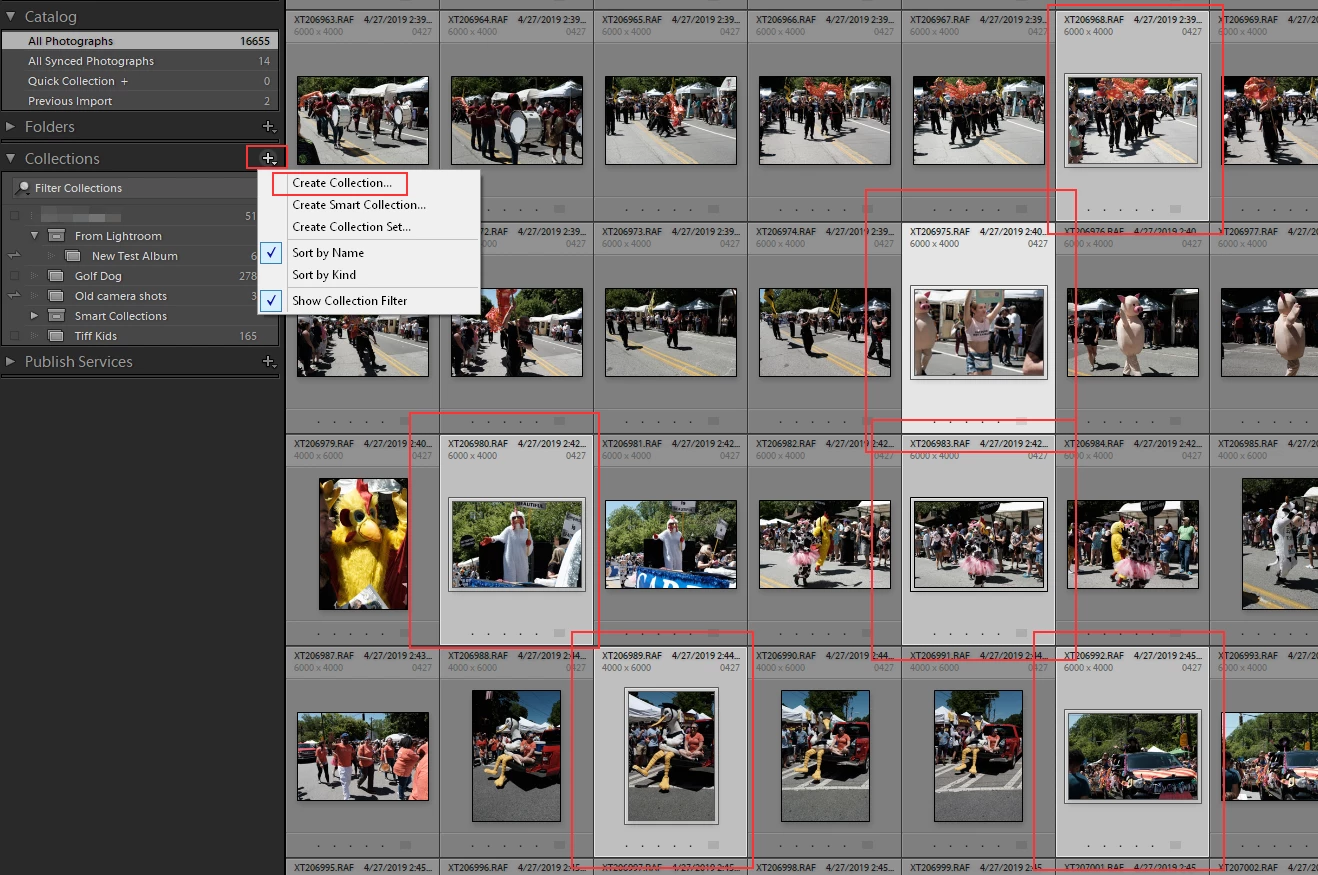
Select the images you want in that new Collection/Album first then click in the Plus Sign in the Collections header and select Create Collection.

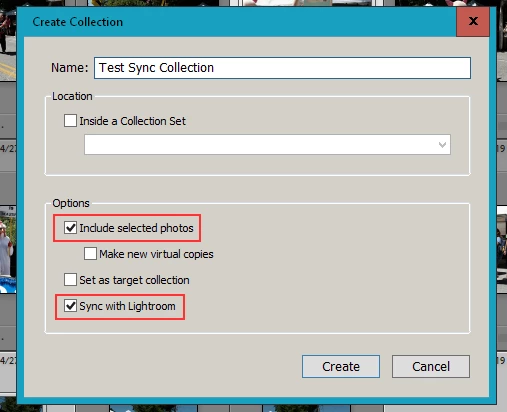
Then in the dialog box that comes up give it a name and check the 2 boxes that say include selected photo and Sync with Lightroom. Then click the Create button.


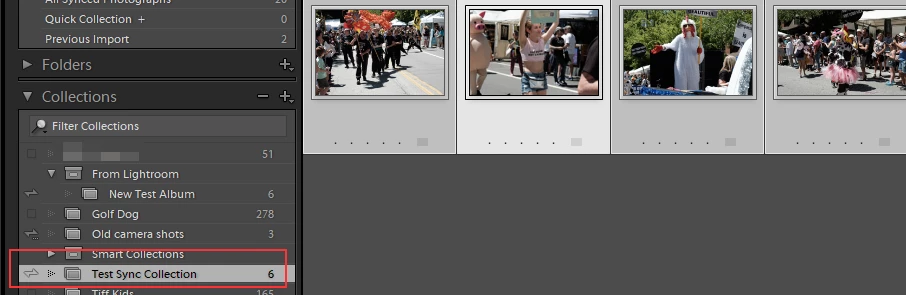
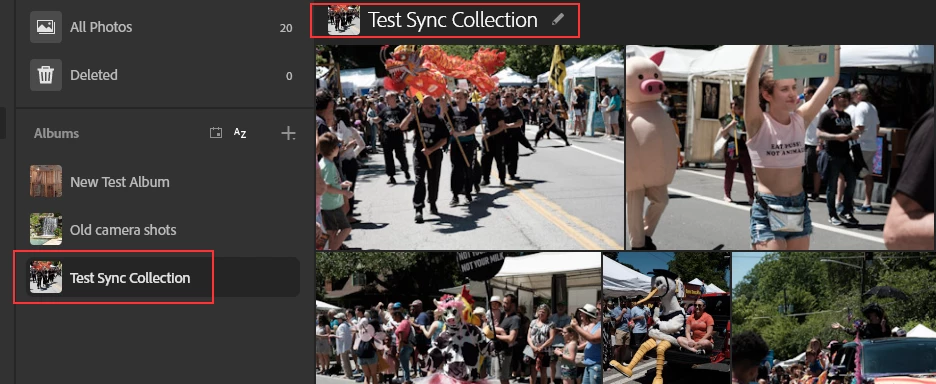
A New Album will be created on the W/M system and Smart previews of those images will be uploaded.


What you are doing now is more than likely Dragging and Dropping from the File Manager for the OS you are using, Finder for Mac and File Explorer for Windows, into the Lr Web interface which is taking the Full Resolution images and uploading them to the Lr Web system and with that Lr Web does not know they are already in your LrC catalog and then Downloading them into a separate folder on your drive and including them into the LrC Catalog.


Along with that you are eating up your allotted Adobe Cloud storage space.


2 replies

dj_paige
Legend
October 17, 2020

"I've noticed that when I drag and drop photographs into a new album on adobe.lightroom.com that copies of every photograph will suddenly appear in my iMac's main Pictures folder. I've spoken to Lightroom support on several occasions and they've offered no solution to the issue. These photos accumulate in my Pictures folder and then I trash them. Along with the copied photos a file called "info.lua "also appears in the folder.


I like to drag and drop my photographs becasue it is so much faster than creating a new collection in Lightroom Classic and exporting them. Help?"


What software are you referring to? Lightroom Classic, or Lightroom, or something else? Please provide the exact version NUMBER of your software, and the exact version NUMBER of your operating system.

Just Shoot Me
Just Shoot MeCorrect answer
Legend
October 17, 2020

One of your main problems is you don't fully understand how LrC (Lightroom [Lr] Classic [C]) works.


First you do not have to Export any images to place them in a LrC Collection that will be synced with the Web and Mobile systems.


You can place images, any type of image files, into an already created LrC collection that is already synced with the W/M systems (W/M = Web and Mobile). Just select them in the LrC Grid view area of the Library module and Drag them to the collection you want them in.


If you want them in a New, Different, collection and have that collection synced with the W/M system you can do that right in the Create New Collection dialog window.

Select the images you want in that new Collection/Album first then click in the Plus Sign in the Collections header and select Create Collection.

Then in the dialog box that comes up give it a name and check the 2 boxes that say include selected photo and Sync with Lightroom. Then click the Create button.


A New Album will be created on the W/M system and Smart previews of those images will be uploaded.


What you are doing now is more than likely Dragging and Dropping from the File Manager for the OS you are using, Finder for Mac and File Explorer for Windows, into the Lr Web interface which is taking the Full Resolution images and uploading them to the Lr Web system and with that Lr Web does not know they are already in your LrC catalog and then Downloading them into a separate folder on your drive and including them into the LrC Catalog.


Along with that you are eating up your allotted Adobe Cloud storage space.