


Participant
May 27, 2023
Answered
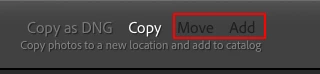
Copy as DNG, Copy and Move greyed out in Library Module
- 2 replies
- 545 views
- Translate
Hi, I'm new to Lightroom and any kind of photo editing so please excuse me if there is a simple answer to this one but when I try to import NEF files into Lightroom I only have the option to "Add" them. I want to "Copy as DNG" but this, as well as "Copy" and "Move" are greyed out and not selectable. (See screenshot). This has changed as when I first started the course I'm on I was able to "Copy as DNG".
I'm running Lightroom Classic 11.5 on a 2014 iMac Catalina 10.15.7.
Any assistance gratefully received.

 AdChoices