Participant
August 5, 2023
Question

corrupt files

  • August 5, 2023
  • 2 replies
  • 143 views

Hey, i have been experiencing a bug where my exported photos and some lightroom classic files i am not sure how to fix it i have deleted and reinstalled lightroom classic multiple times 
This topic has been closed for replies.

2 replies

Rob_Cullen
Community Expert
Community Expert
August 5, 2023

Stop using a Cloud backup service for the location of your Catalog! (Googel Drive, Dropbox, etc)

LrC does not 'like it' and only causes corruption and problems for many people.

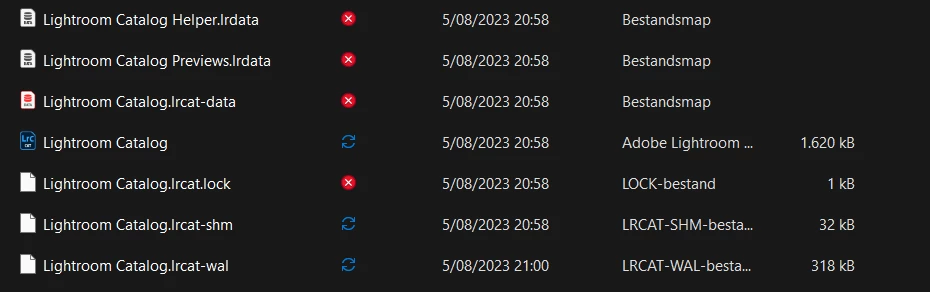
Having the Catalog open when the backup service is syncing the catalog is a problem. (ie. the blue circling arrows)


Regards. My System: Windows-11, Lightroom-Classic 15.4.1, Photoshop 27.8, ACR 18.4, Lightroom 9.4, Lr-iOS 10.4.0, Bridge 16.0.3 .
GoldingD
Legend
August 5, 2023

Is the screen capture of the files in the folder your catalog is in, taken while LrC was running, and that catalog was in use? I inquire because number 1, not sure what you are trying to show, and number two, I notice the lock file.


As for the red X, apparently you are using google drive for backups, and those files are new to google drive, not backed up??
