
bastianb81491782
Participant
December 14, 2017
Answered

corrupted photo files / Canon .cr2

  • December 14, 2017
  • 3 replies
  • 2460 views

Hallo,

I just moved my whole photo library to a new hard disk. After working on it for a couple of weeks I made a disturbing discovery yesterday.

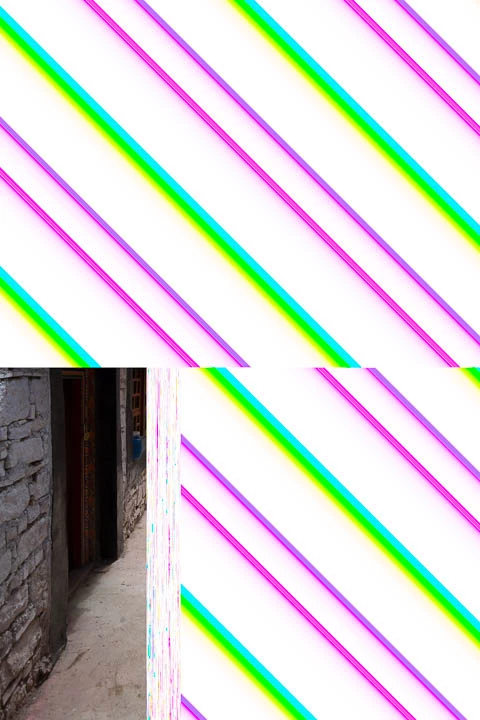
Some of my canon .cr2 raw files are corrupted / damaged. As Lightroom is using the original previews it is just visible when trying to develop these images in the develop module.

A: Has anyone an idea how files can get damaged like this by just copying the files from one HDD to another? I just my trusted software Carbon Copy Cloner to do the task.

B: Any ideas on how to check about 3,5 TB of Photos if more images are corrupted?

My only idea is to delete all previews. Rebuild all previews and look at them one by one. But that is an enormous task with so many pictures.

Thanks for all ideas.

Best Bastian
This topic has been closed for replies.
Correct answer dj_paige

This is caused by either a hardware malfunction on your new hard disk, or it was caused by an corrupted transfer from one disk to another. (I suppose it could also be your memory chips in the computer have gone bad)

You need to run diagnostic tests on your new hard disk to see if any problems are found.

You might also want to copy (not move) backups of these photos to their locations on the new hard disk.

I do not know how to check the entire set of photos, other than visually inspecting them all.

3 replies

Participant
February 19, 2018

Hello, I have the same problem like discribed above.

I tried all mentioned tipps described above, but have no positive result. My hard drive seem to be OK.

For me some questions are still open.

Why are only RAW files like canons .CR2 are affected? I have not this problem with JPG or any other file formats on this drive.

In my case this problem appears after a couple of month. I worked on this files some month ago and they seem to be OK. I opened the working files today and some of the RAW files looked like described above.

Does this happen only to other RAW version?

dj_paige
Legend
February 19, 2018

It can happen to any file.

jazzwilliam
Participating Frequently
December 29, 2017

I can suggest you to

1. Rename the existing file. Sometimes renaming the files does wonders!

2. You can let Image Editor Applications such as Photoshop, Inkscape, and Picasa to open the files and see if its opening or not

3. Try to run ‘CHKDSK’ command and fix any errors.

4. Try to convert your files to JPG format

Above are few handy fixes. If still the files is corrupt and not opening then try a Photo Repair Software instead!

Known Participant
July 14, 2020

Nope, this is isn't helping

dj_paige
dj_paigeCorrect answer
Legend
December 14, 2017

This is caused by either a hardware malfunction on your new hard disk, or it was caused by an corrupted transfer from one disk to another. (I suppose it could also be your memory chips in the computer have gone bad)

You need to run diagnostic tests on your new hard disk to see if any problems are found.

You might also want to copy (not move) backups of these photos to their locations on the new hard disk.

I do not know how to check the entire set of photos, other than visually inspecting them all.

bastianb81491782
Participant
December 14, 2017

Thanks for the reply.

After I was in contact with Lacie and CCC I run diagnostics oaf all HDD using DiskDX and it seems that all Drives are fine. How do I test the memory chips of my computer?

As far as I understand CCC the software is copying all data from one drive to another. Otherwise the original drive should have been empty after the task, right?

dj_paige
Legend
December 14, 2017

Memory chips: I don't know how to test them, but your favorite search engine will find the answer.

I also don't know anything about Carbon Copy Cloner, but I would imagine it includes a test to compare the copy to the original. Nevertheless, that is something you can find out.

An easy way to determine if the files are corrupted is to copy (not move) a backup of one of the files and overwrite the original. Then launch LR and see if the corruption is still there. This assumes the backups are on a different physical disk.