nelpix
Participant
August 25, 2018
Answered

corrupted preview last image of import

  • August 25, 2018
  • 2 replies
  • 803 views

Hi,

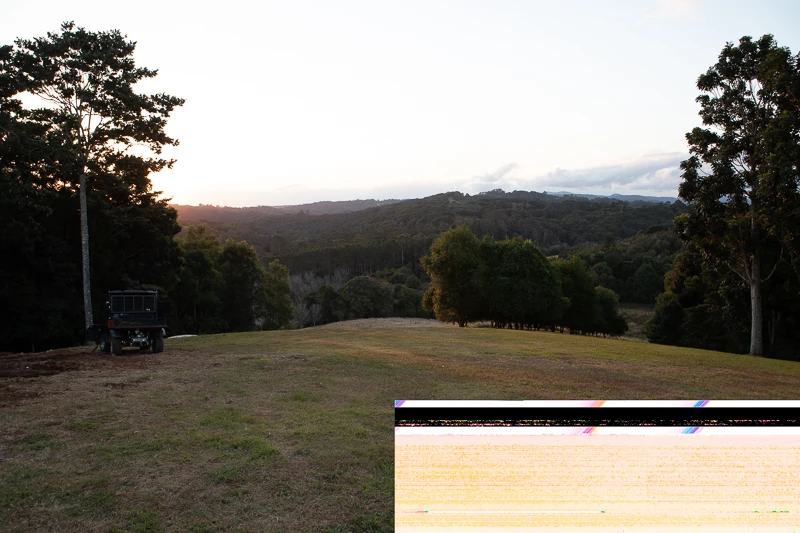
I use Lightroom Classic CC (fully updated) and have experienced an issue for the last few months. Whenever I import images from a CFast card taken on my 1Dx mk2 in RAW the last image always has a corrupted preview, irregardless of what I do! When I view the RAW image outside of lightroom it is fine, and therefore leads me to believe it is a generated preview problem and not the RAW file. This is very frustrating as I want to use these images but need to use another program to potentially achieve that

Has anyone else run into this issue? Is there a fix?? I didn't used to see it with my 7D images, and wondered if it was the new camera, but given it is now not the newest I'm getting frustrated.

**EDIT**

I went through my library and located the weird preview files in explorer and the .cr2 files are completely normal! So lightroom is doing something to my final import files... which means I can't edit them properly or export then without the lower bar..

A fix would be greatly appreciated! (image embedded to show problem)

Nelson
This topic has been closed for replies.
Correct answer nelpix

I have found this online which documents the exact same issue. It appears

it may be the card/reader combo... Looks like I'll be searching for a new

CFast reader!

http://forums.sandisk.com/t5/Mobile-memory-professional-cards/CFast-2-0-Card-and-Reader-Issue/td-p/354491

thanks for your help everyone

On Sat, Aug 25, 2018 at 9:12 PM Just Shoot Me <forums_noreply@adobe.com>

2 replies

Just Shoot Me
Legend
August 25, 2018

nelpix  wrote

Hi,

**EDIT**

I went through my library and located the weird preview files in explorer and the .cr2 files are completely normal! So lightroom is doing something to my final import files... which means I can't edit them properly or export then without the lower bar..

A fix would be greatly appreciated! (image embedded to show problem)

Nelson

LR is not doing anything to your files. When viewing RAW files in Window File manager, Win or File Explorer, you are looking at the embedded JPG file that is included in every RAW file. You are Not looking at the actual RAW file data.

If these embedded JPG files weren't included in the RAW file then if you shot RAW only on your camera you would not be able to review your shots on the cameras LCD screen.

You have corrupted RAW data files. Could be the camera, the card, the hardware used to get the images off the card/camera and onto your hard drive and it could also be a sign of a failing hard drive.

nelpix
nelpixAuthorCorrect answer
Participant
August 25, 2018

I have found this online which documents the exact same issue. It appears

it may be the card/reader combo... Looks like I'll be searching for a new

CFast reader!

http://forums.sandisk.com/t5/Mobile-memory-professional-cards/CFast-2-0-Card-and-Reader-Issue/td-p/354491

thanks for your help everyone

On Sat, Aug 25, 2018 at 9:12 PM Just Shoot Me <forums_noreply@adobe.com>

kentdesign
Community Expert
Community Expert
August 25, 2018

HI, I had a similar issue going from a Samsung CFast card reader to my Mac laptop. While using the card reader, some but not all the thumbnails looked green (corrupted) but not the .cr2 when opened in Lightroom or Photoshop. I had not used Lightroom to import from the card but rather copied from the card into a folder on my desktop. That is whenI saw the corrupted previews. When I then imported the folder from the desktop into Lightroom, everything was fine. I thought it was that card reader, so I tried my other Samsung Cfast card reader. Same thing happened...and only on some images mostly toward the middle of the set of images. I had the same issue with 2 different brands of CFast cards. SO I am convinced it is the card reader. I am waiting for HoodmanUSA to come out with their CFast card reader, as I have had fabulous results with their media cards and card readers.  My suggestion for now so you can see your previews in LR correctly is to

1. Disable the "open import dialog when when a card is detected"  setting in LR.

2. copy from the CFAST card using the card reader into a folder somewhere on your computer.

3. Then use LR to import from that folder.

Let us know if that works.

Community Expert
August 25, 2018

The first you can try is to deactivate the GPU support. Go to Lightroom > Preferences > Performance tab > Uncheck "Use Graphics Processor" and the restart Lightroom.

My System: Intel i7-8700K - 64GB RAM - NVidia Geforce RTX 3060 - Windows 11 Pro 25H2 -- LR-Classic 15 - Photoshop 27 - Nik Collection 9 - PureRAW 6 - Topaz Photo AI
nelpix
nelpixAuthor
Participant
August 25, 2018

ok unchecked. Should I purge the cache as well? It seems the preview gets saved acoss platforms with adobe camera raw in PS CC showing the banding when the original .cr2 is opened (and loaded)?