Known Participant
October 19, 2022
Answered

CPU Usage in LRc 12.00

  • October 19, 2022
  • 1 reply
  • 448 views

Hi


Since installing the new LRc today the CPU usage whenever LRc is open, including when I'm doing nothing, is 50%+/- 3%. This is on up to date W10 when no previous issues existed in the older version. .


Investigating via Task Managewr shows only the task under the overall LR banner labelled with the new catalouge version and so far I can get no further information of a more speceif nature.

 I will see if Resource Monitor tells me more and add any informatuion if there is something of value.


regards


This topic has been closed for replies.
Correct answer Conrad_C

Hi again


I allowed Excire to finish it's search/reinitialise which completed overnight. However the problem persists so I have force ended Excire to see if that was infact tyhe problem. Infact it makes no difference whatsoever and lightroom.exe still sits there consuming approx 50% CPU and 3.5GB to 4GB of memory. Occasionally CPU drops to mid 30% but increases again after some time.


At the m,oment I am simply allowing it to run in the hope that what ever it is resolves itself but it is in hope rather than expactation of success. However this is not a sustainable situation.


regards


Some more ideas…


Another possible cause of excessive background CPU use is over-zealous scanning by anti-malware software. Typically third-party software, I don’t think there’s a problem with anti-malware software built into Windows or macOS.


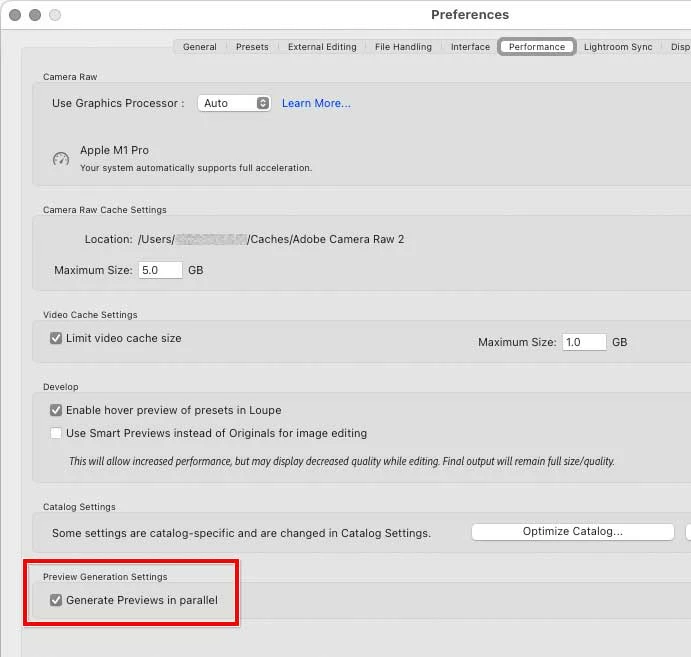
Is the Generate Previews in Parallel option enabled? If it is, during idle time Lightroom Classic will use spare CPU power to build previews in advance, for more responsive display when you browse images.


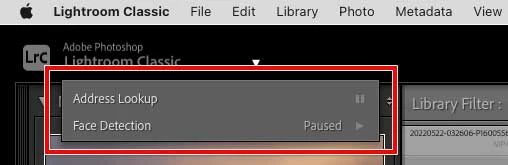
If you click the identity plate at the top, are any background operations in progress? The picture below shows an example of no processing going on there, although Address Lookup is enabled.



1 reply

Known Participant
October 19, 2022

I have been looking around and I wonder if I have found a possible explanation. I have Excire Searh installed and looking at resource monitor it coukld be that it is scanning the new catalouge verision and hence loading LRc. Not certain this is the case but it is a candidate.


For now I am just letting it run to see if whatever is happening completes sucessfully. 

Ian Lyons
Community Expert
Community Expert
October 19, 2022

Your catalog was updated when LrC 12 was installed. This update process effectively created a new catalog. So, yes, Excire Search is most likley the reason for the high CPU useage.

Known Participant
October 20, 2022

Hi again


I allowed Excire to finish it's search/reinitialise which completed overnight. However the problem persists so I have force ended Excire to see if that was infact tyhe problem. Infact it makes no difference whatsoever and lightroom.exe still sits there consuming approx 50% CPU and 3.5GB to 4GB of memory. Occasionally CPU drops to mid 30% but increases again after some time.


At the m,oment I am simply allowing it to run in the hope that what ever it is resolves itself but it is in hope rather than expactation of success. However this is not a sustainable situation.


regards