Inspiring
April 9, 2017
Answered

Creating a collage strip to create a jpg ant to print

  • April 9, 2017
  • 1 reply
  • 914 views

LR Collage making using the print module does not seem to meet my needs. I want to create a strip that is 1920x200 consisting of 4-6 imags. Is there any way to customize the page size to fit my requirement. Today, i use one of the page sizes, drop my images, save to a jpg and then corp the jpg. Is there a better approach? Thanks.

Murali
    This topic has been closed for replies.
    Correct answer Brad_Polt-Jones

    This can be done in a single step.

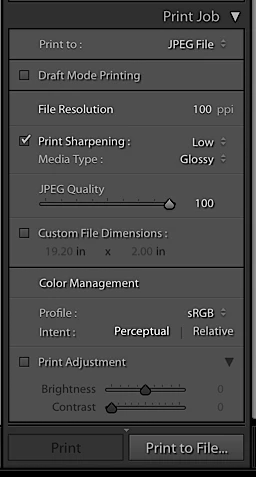
    First go to Page Setup in the print module and define a page of 19.2 x 2".

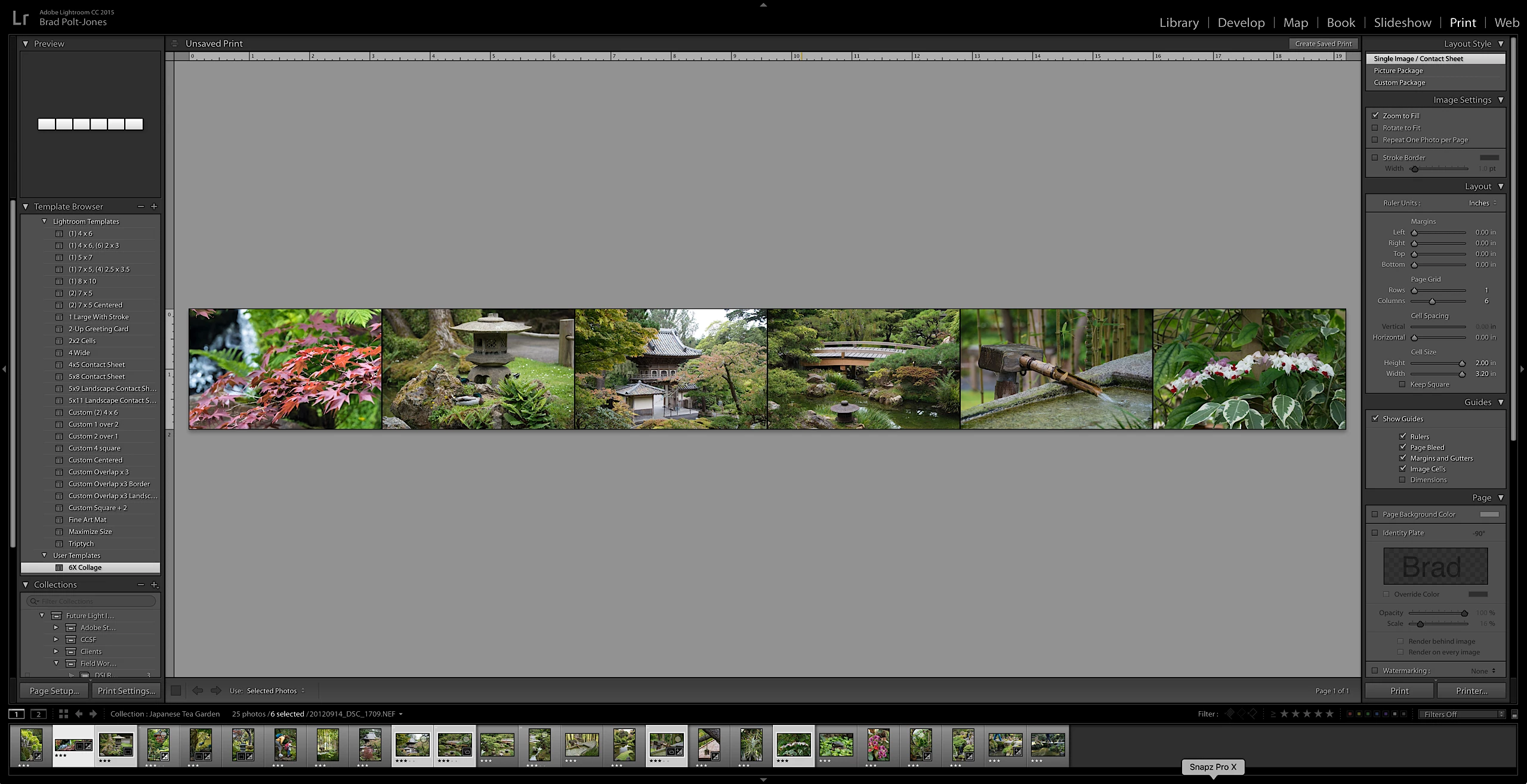
    Then either create a custom layout or preferably use a template preset to the values you need.  In the screenshot you can see I set the columns to six. Populate the template cells with the six images you want. Then use these settings to print to JPEG file.

    The final JPEG should be 1920 x 200 pixels.

    Here is a link to a Lightroom Template set to a six column layout.

    Dropbox - 6X Collage.lrtemplate

    1 reply

    Todd Shaner
    Legend
    April 9, 2017

    The 'Custom File Dimensions' limits are 4.00 to 100.00 inch at 72 ppi so there's no way to do this in a single step. Use the below Print module settings to create a 3840 x 400 JPEG file and then the Export module settings to resize it to 1920 x 200. NOTE: The Layout> Page Grid> Columns value should be set to the number of images you want to use. I used 4 in the below example.

    Print Module

    Export Module

    Brad_Polt-Jones
    Brad_Polt-JonesCorrect answer
    Participating Frequently
    April 9, 2017

    This can be done in a single step.

    First go to Page Setup in the print module and define a page of 19.2 x 2".

    Then either create a custom layout or preferably use a template preset to the values you need.  In the screenshot you can see I set the columns to six. Populate the template cells with the six images you want. Then use these settings to print to JPEG file.

    The final JPEG should be 1920 x 200 pixels.

    Here is a link to a Lightroom Template set to a six column layout.

    Dropbox - 6X Collage.lrtemplate

    muralinAuthor
    Inspiring
    April 11, 2017

    Thanks to both Brad and trshaner. My issue is that I do not have any printer connected as I do not own one :-). when i click on Page Setup in the Print module, i see only print to fax, a pdf file, and one note as options. All the 3 do not have any options to define a page with custom dimensions such as 19.2x2". All I see are A4, A6, Letter, Legal, etc. What am I missing. Do I need to download an epson printer even though i dont have it. If so, what driver do u recommend I download. Thanks.

    Murali