
Inspiring
July 24, 2026
Question

Creation date changes to Edit Date when image is edited in Photoshop

  • July 24, 2026
  • 5 replies
  • 59 views

This has just started happening !  LRc version 15.4.1  PS Version 27.8.0

When I select A RAW file (Sony ARW), and edit in Photoshop the resulting PSD file has the creation date aet to the date/time of editing and appears out of sync in the Lightroom develop module as a result. This is very annoying since it results in the original file and the edit PSD not appearing next to each other when the images are sorted by creation date. THIS IS VERY ANNOYING and has only just started to happen - it didn’t used to be like this - the creation date of the image in the ARW and PSD files used to be the same with the PSD adopting the the creation date of the RAW file.

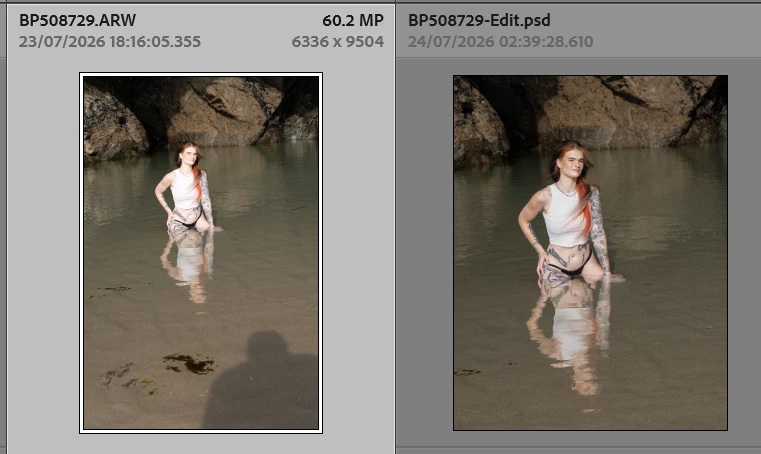
The image below shows what I mean - the image shot on 24/07/2026 - the psd fille has a creation date of 25/07/2026 - which is when the image was edited, not when it was created.
 

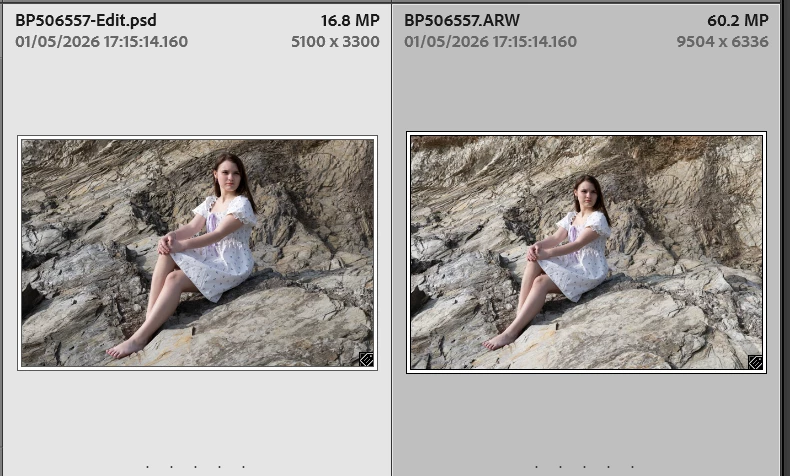
If I look a at some images from just a month or so ago this did not happen the image below shows an image taken on 01/05/2026 and edited a few days later - the original image creation date and time have been preserved in the PSD file
I’m now wasting a lot of time having to manually correct the capture date/times this is a real PITA. 
 

    5 replies

    Inspiring
    August 1, 2026

    This now seems to have resolved itself - it did seem to be linked to the fact that Lightroom was being painfully slow in updating metadata 

    Inspiring
    July 25, 2026

    I can confirm that the problem occurs when lightroom is writing the metadata to the xmp files. I no saving activity is underway then everything behaves normally and the PSD file is stamped with the creation date from the RAW file.

    johnrellis
    Legend
    July 25, 2026

    [View this post in your web browser. It contains formatting and images that don't appear in email.]


    This problem doesn’t occur on my LR 15.4.1 / PS 27.8.0 / Mac OS 26.4.1 either:


    So there’s likely something specific to your installation or the particular files you’re editing.


    BTW checked all the preferences in LR and PS and can’t see anything there that could be affecting this.  


    The problem may be caused by corrupted preference files, not necessarily a setting you’ve made. LR and PS unfortunately soil their preference files occasionally. So try resetting the preference files as suggested by Johan.


    it seems to happen when lightroom is saving metadata


    Do you mean that the problem occurs when you have enabled Catalog Settings > Metadata > Automatically Write Changes Into Sidecars?  Or do you mean something else?


    If resetting preferences doesn’t help, share one of the problem raw photos along with its catalog metadata:


    1. In Library, select the photo.


    2. Do File > Export As Catalog, selecting the options Export Select Photos Only and Export Negative Files.


    3. Zip up the exported catalog folder and attach it here. If it’s larger than 47 MB, then upload it to Wetransfer, Dropbox, Google Drive or similar free service and post the sharing link here.

    JohanElzenga
    Community Expert
    Community Expert
    July 24, 2026

    I can’t check it right now, but if it just started happening, then most likely this is caused by some corruption. Likely candidates are the Lightroom Classic preferences and the Photoshop preferences. Try resetting them one by one, starting with the Photoshop preferences (because Photoshop writes the file with the wrong date). 
    https://helpx.adobe.com/photoshop/desktop/get-started/settings-and-preferences/reset-preferences.html If that doesn’t work, then try Lightroom https://helpx.adobe.com/lightroom-classic/desktop/introduction-to-lightroom-classic/reset-preferences.html


    Update: I just did a quick test with Lightroom Classic 15.4.1 and Photoshop 27.8 and I cannot reproduce what you see. When I send a raw file (also Sony) to Photoshop, the resulting TIFF has the correct date.

    -- Johan W. Elzenga
    Inspiring
    July 25, 2026

    Nevertheless it happens - The creation date on the PSD image is taking its value from the date that the PSD file is made, not the creation date of the RAW image file.

    It may be related to metadata being saved - as I've just noticed that it seems to happen when lightroom is saving metadata - I’m sure this did not happen previously, something has changed. I will confirm the relationship with saving metadata shortly.

    BTW checked all the preferences in LR and PS and can’t see anything there that could be affecting this.