Participant
October 20, 2017
Answered

Creative Cloud Files on External drive

  • October 20, 2017
  • 2 replies
  • 2719 views

Hi,

I store my photos on an external Thunderbolt drive.

I would like to make my photos available to all my devices by using the Creative Cloud. My question is simple:

1. can I point Creative Cloud Files to an external drive, or alternatively,

2. can the Creative Cloud Files folder reside on the external drive with my photos as a sub-folder within the CC Files folder.

Obviously, I want to avoid storing my photos on my Mac SSD .

Any pointers would be greatly appreciated.

Many thanks
    This topic has been closed for replies.
    Correct answer Ian Lyons

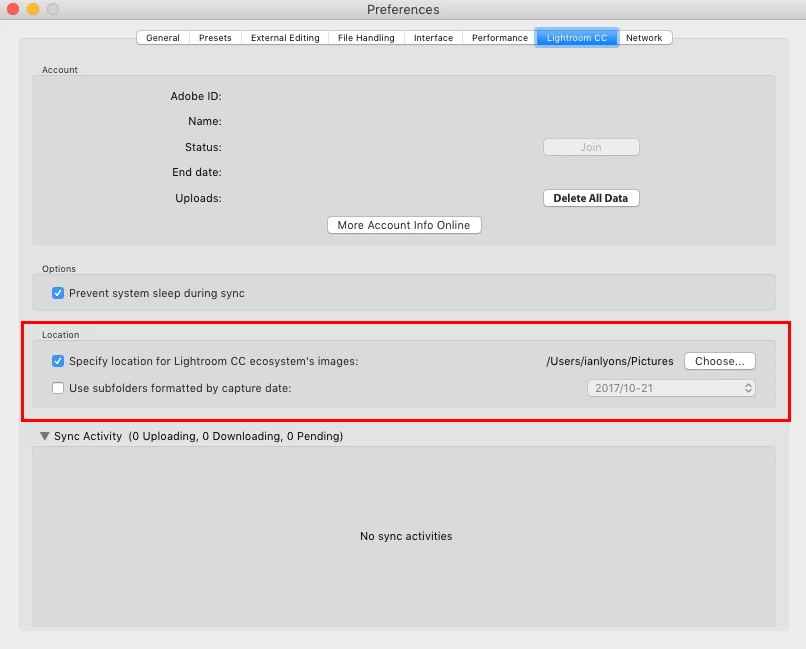
    Below screenshot might make it clearer as to where you'll need to configure how direct your Creative Cloud photos to an external drive.

    2 replies

    Ian Lyons
    Community Expert
    Ian LyonsCommunity ExpertCorrect answer
    Community Expert
    October 21, 2017

    Below screenshot might make it clearer as to where you'll need to configure how direct your Creative Cloud photos to an external drive.

    SgtDaveAuthor
    Participant
    October 21, 2017

    Thanks !!

    KR Seals
    Community Expert
    Community Expert
    October 20, 2017

    Dave, this is the LR Classic (photos are on your local drives) forum. You may want to ask this question in the LR CC (new web-based app) forum.

    Ken Seals - Nikon Z 9, Z 8, 14mm-800mm. Computer Win 11 Pro, I7-14700K, 64GB, RTX3070TI. Travel machine: 2021 MacBook Pro M1 MAX 64GB. All Adobe apps.
    SgtDaveAuthor
    Participant
    October 21, 2017

    Thanks KR however I believe this IS the correct forum. I have used Lightroom since it's inception and now I want to upload my photos to the Creative Cloud. The question remains:

    1. can I point Creative Cloud Files to an external drive, or alternatively,

    2. can the Creative Cloud Files folder reside on the external drive with my photos as a sub-folder within the CC Files folder

    Thanks again

    F. McLion
    Community Expert
    Community Expert
    October 21, 2017

    Yes, in the CC desktop app you can set the local path to the CC folder.

    Open presets in the CC app and look for the second tab Files.

    --- Got your issue resolved? Please label the response as 'Correct Answer' to help your fellow community members find a solution to similar problems. ---