So when editing photos and trying to save edits to several photos at once, the crop sign is blanked out...like it is dimmed and cannot be turned on or off so it is cropping all my photos! Also when editing, these stars are showing up and it is taking so much longer to edit. What is going on?? Biggest issue is the crop.
Correct answer johnrellis
[View this post in your web browser. It contains formatting and images that don't appear in email.]
when editing photos and trying to save edits to several photos at once, the crop sign is blanked out
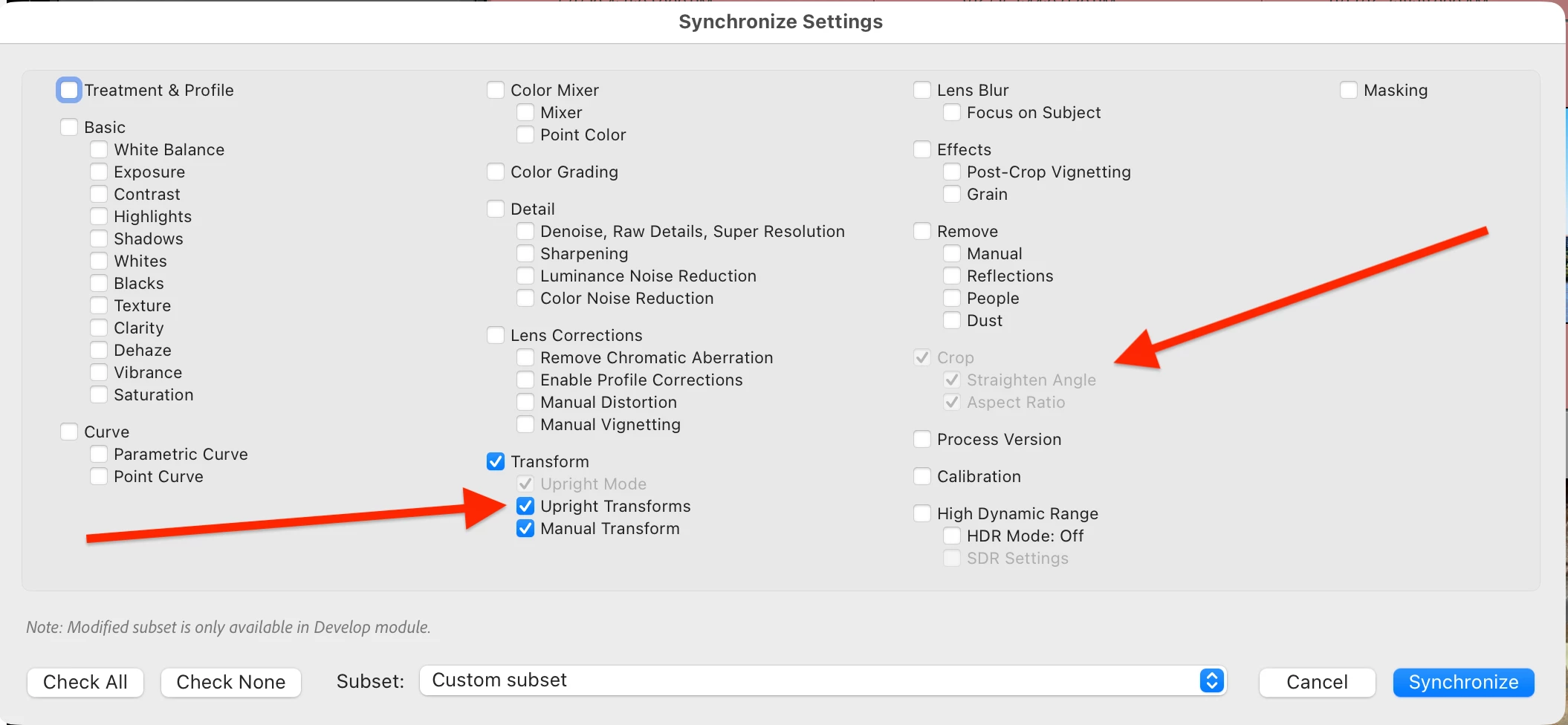
I’m assuming that you’re using the Copy Settings or the Synchronize Settings commands. When you’ve selected Upright Transforms or Manual Transform, the Crop option is always checked and greyed out:
This change in behavior was introduced in LR 15, and Adobe has pronounced it “as designed” without any justification for why the design was changed in 15.0.
If you don’t need to copy Transform, then uncheck it, and you’ll also be able to uncheck Crop. If you need to copy Transform without copying Crop, see these workarounds:
[View this post in your web browser. It contains formatting and images that don't appear in email.]
when editing photos and trying to save edits to several photos at once, the crop sign is blanked out
I’m assuming that you’re using the Copy Settings or the Synchronize Settings commands. When you’ve selected Upright Transforms or Manual Transform, the Crop option is always checked and greyed out:
This change in behavior was introduced in LR 15, and Adobe has pronounced it “as designed” without any justification for why the design was changed in 15.0.
If you don’t need to copy Transform, then uncheck it, and you’ll also be able to uncheck Crop. If you need to copy Transform without copying Crop, see these workarounds:
Wow thanks I will give that a try. When copying and pasting edits, are you seeing gold stars on your bottom list of photos??? It is weird and it seems to be taking longer than ever to copy and paste!!
You probably have two independent things happening.
The gold stars indicate some AI operation is happening, this is new in Lightroom Classic (I think starting with version 15.0, but I am not 100% sure about the version number when it changed) and expected. This is how the new LrC is designed.
The other issue, that it is taking a long time, is a separate issue, and there are some users reporting similar slowness in LrC 15.3 or 15.3.1 and I am not aware of a solution. Certainly not all users are having this slowness. So it might help if you made sure all of your drivers are up to date (actually check, don’t just say they are up to date) and if you have an NVidia GPU, make sure you have the Studio driver and not the Game Ready driver.



 AdChoices