



Ian Hylands DEITY
Participant
April 28, 2026
Answered

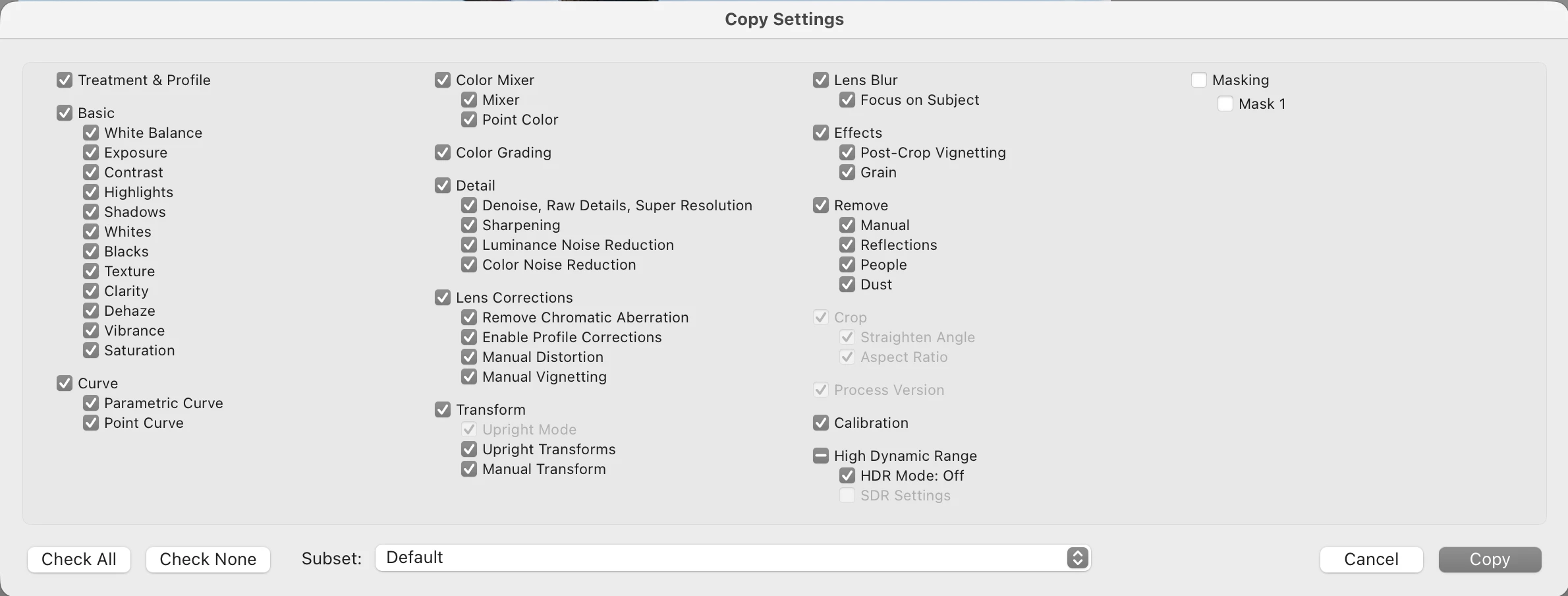
"Crop" Setting grayed out in copy/paste settings in LR 15.3 How do I fix this?

  • April 28, 2026
  • 2 replies
  • 543 views

Today when I went to copy and paste settings between images it automatically pasted the previous crop. I never have the  “crop” settings checkbox selected, and when I went to deselect it it was checked on and grayed out so I couldn‘t change it. I deselected all and the selected everything except crop and masking (my default settings) and it worked for one image. However as soon as I went to the next image it was back on and grayed out again. Is this a new feature with a hidden way to disable it, or is this a current bug? Any advice would be appreciated as I’m having to completely change my editing process because of this.

LR 15.3 Macbook Pro M1 Max running MacOS 26.3.1 (a) (25D771280a)
 

    Correct answer Ian Hylands DEITY

    After more messing around with it I have discovered that “Crop” is now tied to “Transform” If you check the Transform checkbox it automatically selects Crop including Straighten Angle and Aspect Ratio and prohibits you from changing them.

    2 replies

    johnrellis
    Legend
    May 1, 2026

    Adobe says this behavior (introduce in LR 15) is “as designed”:

    They’ve declined to provide a design rationale  -- it seems pretty strange to me.


    See here for workarounds:


    Ian Hylands DEITY
    Ian Hylands DEITYAuthorCorrect answer
    Participant
    April 28, 2026

    After more messing around with it I have discovered that “Crop” is now tied to “Transform” If you check the Transform checkbox it automatically selects Crop including Straighten Angle and Aspect Ratio and prohibits you from changing them.

    Inspiring
    April 28, 2026

    Thanks for this explanation...saved hours of searching and guessing...any tip why process version is greyed out?

    @ADOBE, is there any official place where I could have found such information on my own and in an coordinated way?

    pb9019
    Participant
    May 6, 2026

    If there is no transform applied, it should not gray out the crop.  Seems weird to me. Now I have to uncheck two things