
dc:subject, lr:hierarchicalSubject + Adobe Bridge
Hello
I have recently switched from Photoshop CS6 to the Adobe Photo Plan an I am now using Photoshop CC 2018. As I have now also Adobe Lightroom I like to drop my previous Photo Catalog Software. I will still stay with Bridge/Camera Raw/Photoshop for my workflow, because I have a bunch of Bridge Scripts especially to handle XMP-Metadata. I want to use Lightroom in the way I have used the previous software - mainly for searching and selecting pictures - because it's not really feasible to use Bridge for filtering on 50000+ files in a directory an subdirectories.
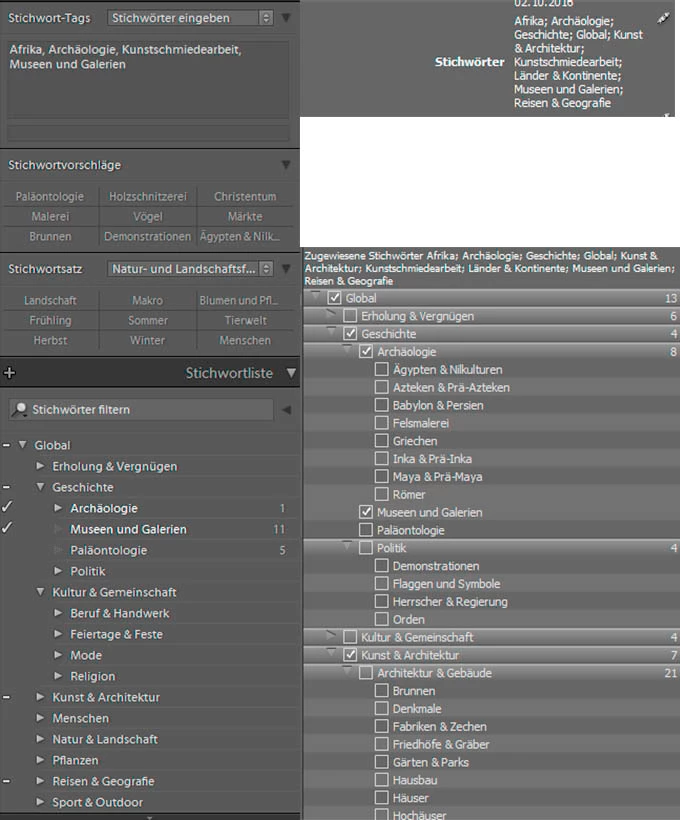
What I have found is that the default handling of hierarchical Keywords in Lightroom is a problem for me. I jave imported the same Keyword Catalog as I have in Bridge to Lightroom. When I import photos to Lightroom CC 2018 the keyword from metadata dc:subject are matched with the keyword catalog and probably the hierarchical structure is saved in the database for the every picture. On the UI in the field for the keyword tags there are still only the original keywords from dc:subject and in the keyword list only these keywords are checked (+ dashes on the higher level). If I ever write back XMP data to the original file Lightroom will write the hierarical structure for the picture to lr:hierarchicalSubject and will change the content of dc:subject. From this point on the visible information for keyword data differs for the same picture in Lightroom and Bridge. In Lightroom it will stay as above mentioned, while Bridge is also showing the keywords from higher levels and also has this keywords checked in the keyword tree (picture with Lightroom and Bridge information side by side is below).
I have seen that for exporting pictures there ist a option "exporting Keywords as Lightroom hierarchy" which can be unchecked. I have not found a setting for the XMP writeback to prevent the modification of dc:subject.
 AdChoices