Participant
September 10, 2022
Answered

Dehaze missing in Develop Effects in Classic 11.5

  • September 10, 2022
  • 3 replies
  • 294 views

There is no DeHaze option under the Develop - Effects panel. Where did it go and how do I get it back?


I am running a licensed version of 11.5 Lightroom Classic with Camera Raw 14.5 on Mac OS Monterey 12.5.1 on an M1 Mac Mini.


I've already restarted LR, rebooted etc.


thanks
This topic has been closed for replies.
Correct answer Per Berntsen

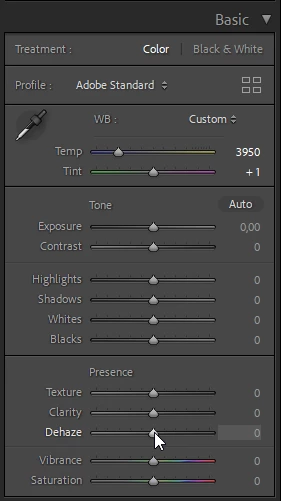
Dehaze has moved to the Presence section of the Basic panel.


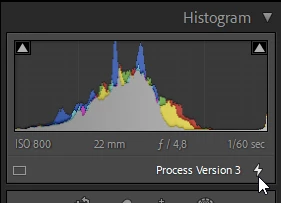
If it's not there, the image is using an old process version version, and you'll need to update it by clicking the lightning icon below the histogram.


3 replies

DdeGannes
Community Expert
Community Expert
September 10, 2022

Yes Per, the process version could also be an issue.

Regards, Denis: iMac 27” mid-2015, macOS 11.7.10 Big Sur; 2TB SSD, 24 GB Ram, GPU 2 GB; LrC 12.5,; Lr 6.5, PS 24.7,; ACR 15.5,; (also Laptop Win 11, ver 24H2, LrC 15.0.1, PS 27.0; ) Camera Oly OM-D E-M1.
Per Berntsen
Community Expert
Per BerntsenCommunity ExpertCorrect answer
Community Expert
September 10, 2022

Dehaze has moved to the Presence section of the Basic panel.


If it's not there, the image is using an old process version version, and you'll need to update it by clicking the lightning icon below the histogram.


Participant
September 18, 2022

Thanks, yes it is there. I appreciate your response.

DdeGannes
Community Expert
Community Expert
September 10, 2022

You should find DeHase in the basic panel. See the screen capture under Presence.


Regards, Denis: iMac 27” mid-2015, macOS 11.7.10 Big Sur; 2TB SSD, 24 GB Ram, GPU 2 GB; LrC 12.5,; Lr 6.5, PS 24.7,; ACR 15.5,; (also Laptop Win 11, ver 24H2, LrC 15.0.1, PS 27.0; ) Camera Oly OM-D E-M1.
Participant
September 18, 2022

thanks, I found it!