Participant
January 27, 2019
Answered

Dehaze Slider Lightroom Classic CC

  • January 27, 2019
  • 3 replies
  • 356 views

Why do I not have the Dehaze option in Lightroom Classic CC?
A friend of mine using a macbook has the dehaze slider...

Im using windows and Lightroom Classic CC latest update.

Thanks for your help!

This topic has been closed for replies.
Correct answer TheDigitalDog

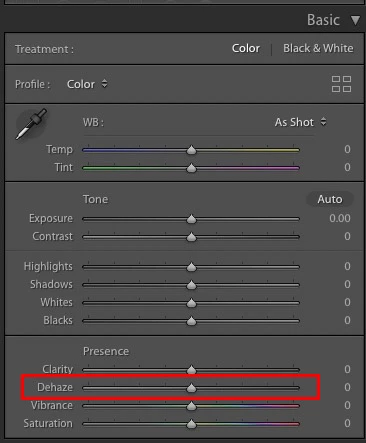
And to add to the above, a screen capture:
3 replies

Community Expert
January 27, 2019

If your Classic is at the latest version (8.1) you probably need to make sure that the image you are trying to edit is at the current process version. Whenever Lightroom adds significant new features, images edited in the older versions typically stay in the older versions of the develop process in order to not have any shifts in the look of the image. However, you can manually shift over the image to the newer development process. Look if there is a tiny lightning bolt on the right bottom side of the histogram in Develop. If so, click it and make it update the current image to the current process version. That should enable the dehaze slider.

TheDigitalDog
TheDigitalDogCorrect answer
Inspiring
January 27, 2019

And to add to the above, a screen capture:

Author “Color Management for Photographers" & "Photoshop CC Color Management/pluralsight"
dj_paige
Legend
January 27, 2019

thilol26416871  wrote

Why do I not have the Dehaze option in Lightroom Classic CC?
A friend of mine using a macbook has the dehaze slider...

Either you don't really have Lightroom Classic CC (what is the EXACT version number of your Lightroom?) — or — you are looking in the wrong place. Depending on what version number you have, the dehaze slider is either in the Basic Panel or the Effects panel (or it's not there at all if you don't really have Lightroom Classic CC).