
Michel Bérubé
Inspiring
August 15, 2018
Question

Deleted Plugin Appear in Right-click Menu

  • August 15, 2018
  • 1 reply
  • 537 views

Deleted and disabled my old ON1 Perfect 9 suite plugins. While they no longer appear anywhere else, they still show up in the drop down menu when I right-click an image. How to I get rid of them? Thanks.
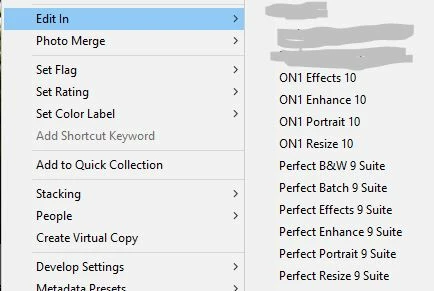
    This topic has been closed for replies.

    1 reply

    JohanElzenga
    Community Expert
    Community Expert
    August 15, 2018

    In Lightroom preferences - External editor, select the preset first. Then you can delete it via the same menu.

    -- Johan W. Elzenga
    Michel Bérubé
    Inspiring
    August 15, 2018

    Hi,

    Thank you for your reply. I can confirm that the preset(s) are deleted from my system (Windows 10). However, the dropdown menu entries linger. Also, the presets from the version 9 suite are selectable in the ADDITIONAL EXTERNAL EDITOR dropdown. On Windows, the option to delete the preset is not down in the same manner.

    JohanElzenga
    Community Expert
    Community Expert
    August 15, 2018

    No, you should not use the 'Clear' button. That only clears the application choice, but not the preset itself.

    Follow my instructions. Select the preset after the word 'Preset:', then select the same menu and at the bottom you get the option to delete it. Just like I showed in the screenshot.

    -- Johan W. Elzenga