Known Participant
August 23, 2022
Answered

Deleting LR catalogs to free up space

  • August 23, 2022
  • 2 replies
  • 1637 views

I need to free up space on Mac HD and largest files are LR catalogs. My current catalog is on ext HD.
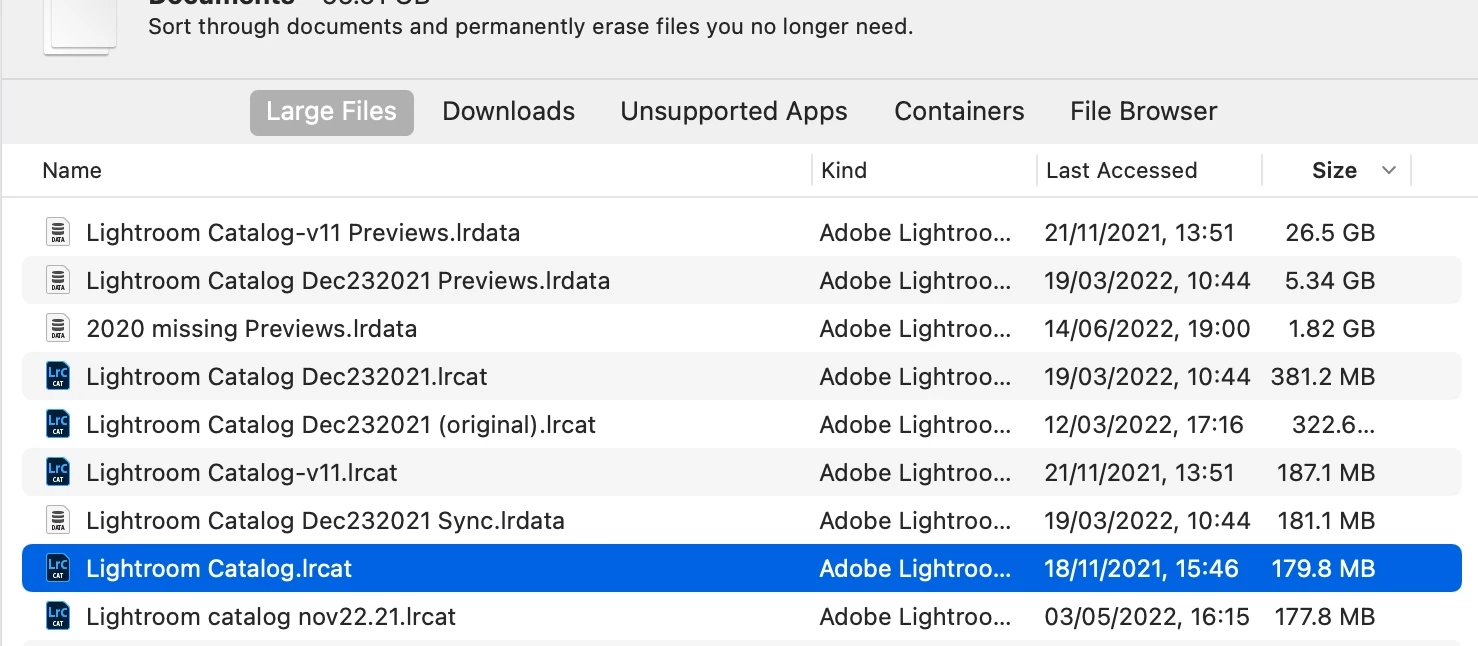
I'm unsure which ones I can safely delete

Can anyone advise?

This topic has been closed for replies.
Correct answer dj_paige

The catalogs are the .LRCAT files. You can open each catalog file and SEE with your own eyes what is in it, and then determine if you want to delete it or not.


If you decide to delete a catalog, you can also delete the associated (having the same name before the word Previews) .LRDATA folders.


Better yet, move the ones you don't want to a different drive, just to be sure, just in case you do need them.


I also suggest that moving forward, you use ONE catalog only (if necessary, combine multiple catalogs into one). Not only is that the simplest way to go, but it also eliminates the confusion about which catalog is which.

2 replies

JohanElzenga
Community Expert
Community Expert
August 23, 2022

The largest file by far is the first one: 'Lightroom Catalog-v11 Previews.lrdata' of 26.5 GB. That is not a catalog file, it's a previews file. You can always delete a previews file, because Lightroom will simply rebuild the previews if and when necessary. These previews and the catalog file they belong to have not been used since 21 November last year, so this catalog does not seem to be your latest catalog. 


I agree with @dj_paige that you should reconsider your catalogs. It looks like you create new catalogs all over the place, sometimes for one single day. That is confusing and inefficient. Use one single catalog.


-- Johan W. Elzenga
Jan0846Author
Known Participant
August 24, 2022

Thank you See reply above. I certainly didnt purposefully start new catalogs. LR did it, like it will copy to mac HD, if I don't check every time that it should be copying to Ext HD. I am learning all the the time - but getting there

JohanElzenga
Community Expert
Community Expert
August 24, 2022

Lightroom does not create catalogs named 'Lightroom Catalog Dec232021' all by itself. Only a Lightroom user can have done that.


-- Johan W. Elzenga
dj_paige
dj_paigeCorrect answer
Legend
August 23, 2022

The catalogs are the .LRCAT files. You can open each catalog file and SEE with your own eyes what is in it, and then determine if you want to delete it or not.


If you decide to delete a catalog, you can also delete the associated (having the same name before the word Previews) .LRDATA folders.


Better yet, move the ones you don't want to a different drive, just to be sure, just in case you do need them.


I also suggest that moving forward, you use ONE catalog only (if necessary, combine multiple catalogs into one). Not only is that the simplest way to go, but it also eliminates the confusion about which catalog is which.

Jan0846Author
Known Participant
August 24, 2022

Thank you. I opened them in original location and they are not linked to current catalog. I have moved them to Ext HD and deleted from Mac HD. LR for some reason made a lot of new files and I didn't notice - at the time being fairly new. I only use one file now and dsid merge them. Just wary about deleting anything.