Participant
September 28, 2023
Question

Deleting Old Lightroom Catalogs

  • September 28, 2023
  • 2 replies
  • 632 views

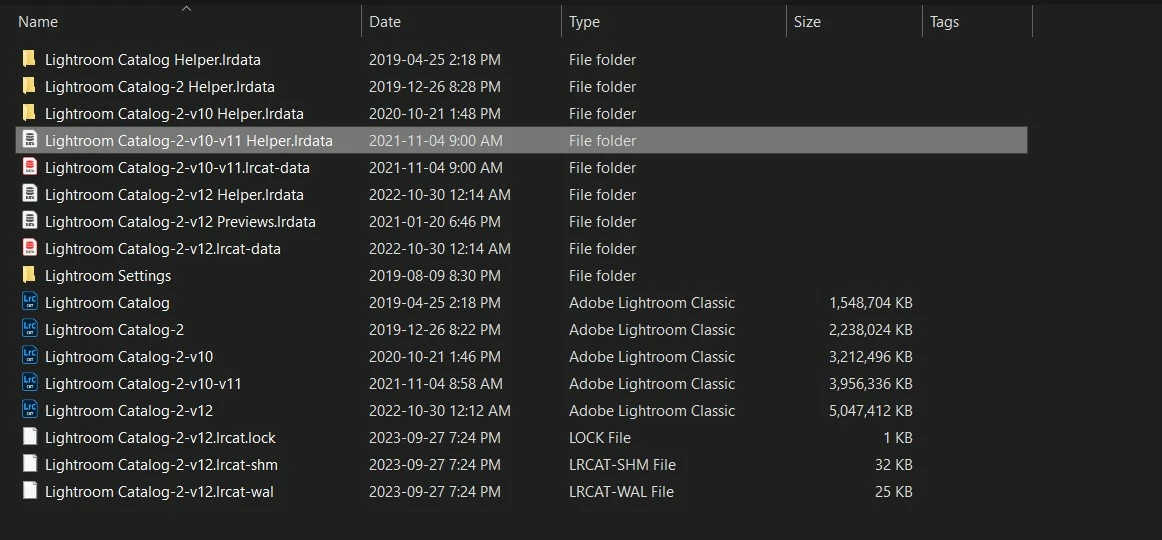
Can someone please tell me which of these files I can safely delete?
This topic has been closed for replies.

2 replies

Rob_Cullen
Community Expert
Community Expert
September 28, 2023

The files that I referred to as " -v12 support files" are not absolutely essential.

The Catalog file (.LRCAT) alone is sufficient if you ever had to restore from a backup Catalog,


In v12 when you do a backup- the ZIP file contains two files- the ,LRCAT catalog, and the .LRCAT-DATA file that contains masking information.


Keeping your existing '-v12' support files ( including the Previews file) would just keep the catalog running as normal. If you were to Delete the Previews file  {....previews.LRDATA} it would require a re-build of the Previews  with resulting slowness of operation.


The Backup folders that contain the ZIP backup must be on a separate physical disk to the working catalog- as you are doing correctly. But you do not need to keep them all forever.  There are differing views on ' what to keep?'- eg. Several of recent weeks, one or two from past months, etc. You have to decide how many backups to keep, considering if you ever had to restore a lot of data, like a mistaken deletion of many keywords (and you might need to pull this data from 6-months ago!).


Regards. My System: Windows-11, Lightroom-Classic 15.1.1, Photoshop 27.3.1, ACR 18.1.1, Lightroom 9.0, Lr-iOS 10.4.0, Bridge 16.0.2 .
Participant
September 29, 2023

Thanks Rob, super helpful! Mary

Rob_Cullen
Community Expert
Community Expert
September 28, 2023

Looking at the CATALOGS only-

1) {Lightroom Catalog}  would be your First catalog

2) {Lightroom Catalog-2}  would be an upgrade from 1)

3) {Lightroom Catalog-2-v10}  would be an upgrade from 2)

4) {Lightroom Catalog-2-v10-v11}  would be an upgrade from 3)

5) {Lightroom Catalog-2-v12} is an upgrade- and looks like your most recent for LrC v12 (and largest) of the Catalogs.

*IF you renamed {Lightroom Catalog-2-v10-v11} to be {Lightroom Catalog-2-v12} then {Lightroom Catalog-2-v12} is the one to keep.

(It is remotely possible, but unlikely, you upgraded the 2) {Lightroom Catalog-2}catalog to v12 which would have been the wrong thing to do)


Archive the rest (Don't delete yet) until you are sure that {Lightroom Catalog-2-v12} has all your images. 

Any file that has "-v12' in the name would be a current support file for the -v12 catalog and should NOT be deleted or moved.


Regards. My System: Windows-11, Lightroom-Classic 15.1.1, Photoshop 27.3.1, ACR 18.1.1, Lightroom 9.0, Lr-iOS 10.4.0, Bridge 16.0.2 .
Participant
September 28, 2023

Thanks for your detailed response Bob. In November of 2022 when I realized how much room these files were taking on my hard drive, I moved the backup folder to an external hard drive. I also have all these. The latest catalog is 2.84 Gb. However, the support files did not follow and are still on my C Drive. I am assuming I should keep the supporting files on C... and continue to backup the catalog to my external hard drive?
