
Participating Frequently
September 6, 2024
Answered

Denoise AI increases chromatic aberrations

  • September 6, 2024
  • 3 replies
  • 591 views

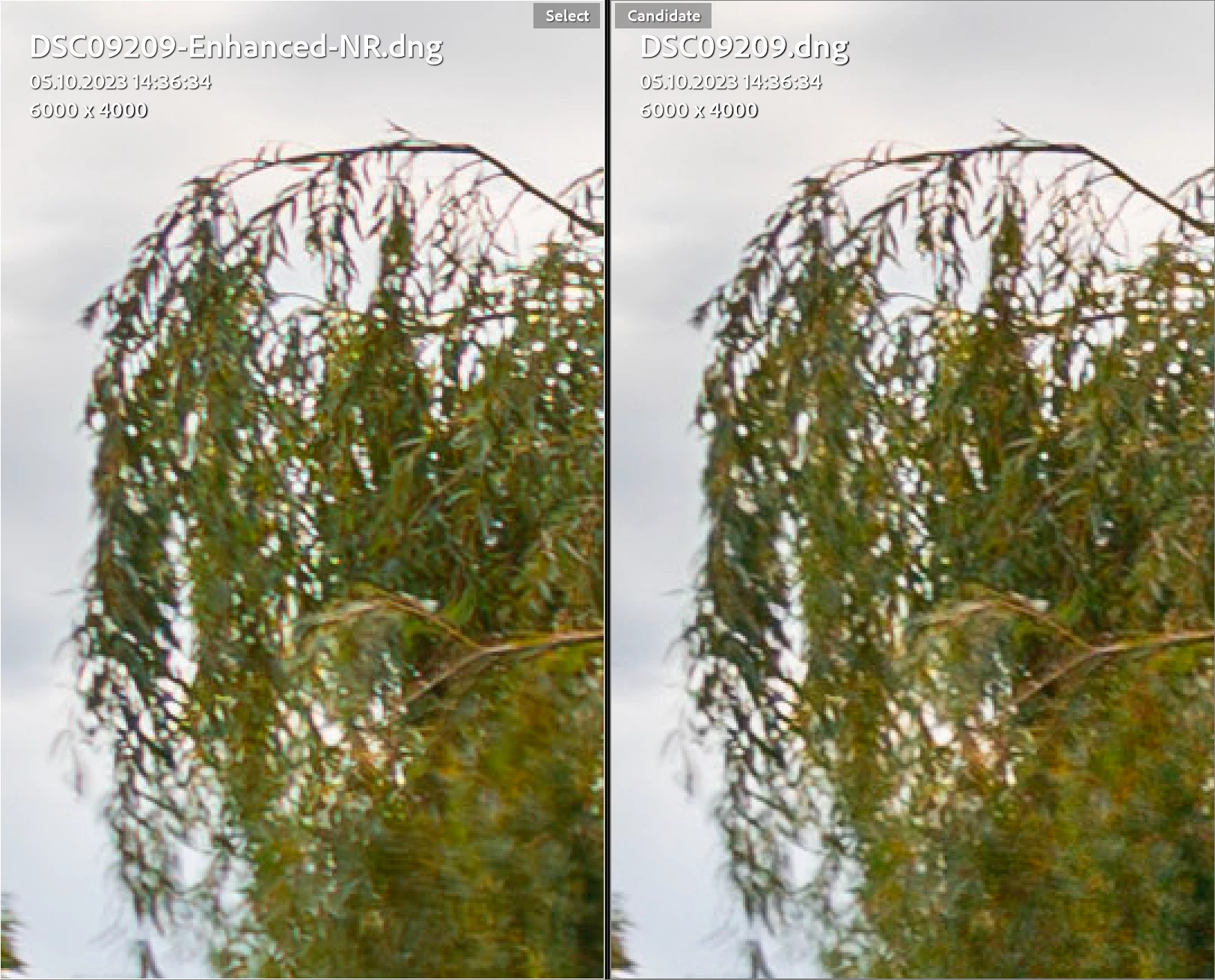
Denoise AI increases chromatic aberrations. "Remove chromatic aberrations" is enabled and "built-in lens profile" is used on both photos. The amplification of aberrations by denoise varies from lens to lens. In the case of Tamron 17-28 F2.8 Di III, they are very visible. For the Tamron 28-75 F2.8 A063 and 70-180 2.8 A056 they are less visible or not visible at all.
Lightroom version 13.5.1

This topic has been closed for replies.
Correct answer Rikk Flohr_Photography

What is likely happening is that, by running Denoise, you lose the default value of 25 for Color NR.  It tends to hide minor CA by blurring them slightly.  The workaround is, after Denoise), to add a value >0 to the Color NR. 

While Denoise is great at reducing color noise in an image, I am afraid it doesn't affect CA which is an artifact of the lens. 

3 replies

JohanElzenga
Community Expert
Community Expert
September 6, 2024

Out of curiosity: why did you denoise in the first place? I do not see any noise in the original DNG in your screenshot.


-- Johan W. Elzenga
Participating Frequently
September 6, 2024

Darker parts of the photo have more noise due to strong shadow recovery.

Rikk Flohr_Photography
Community Manager
September 6, 2024

What is likely happening is that, by running Denoise, you lose the default value of 25 for Color NR.  It tends to hide minor CA by blurring them slightly.  The workaround is, after Denoise), to add a value >0 to the Color NR. 

While Denoise is great at reducing color noise in an image, I am afraid it doesn't affect CA which is an artifact of the lens. 

Rikk Flohr: Adobe Photography Org
johnrellis
Legend
September 6, 2024

Upload the original photo to Dropbox, Google Drive, or similar and post the sharing link here, so Adobe can reproduce the issue.