


Known Participant
July 8, 2025
Answered

Denoise is not working

  • July 8, 2025
  • 2 replies
  • 465 views

Until now I have used denoise function to enhance photos. Now it´s suddenly not working. When I click on denoise it looks like it´s enhancing the photo but afte a few seconds it stops and nothing happen. What happened? Photos are in RAW format. I use Windows. Maybe I have clicked on something and changed settings.

Correct answer dj_paige
quote

My GPU driver is OK.


By @Rastis77


I would say, no it is not okay. Its two years old.


quote

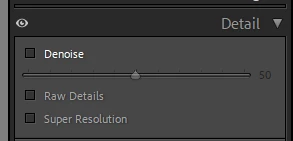
What about that eye icon. I think it was no there before. How can I change it to the previous icon. I don´t know how it is called, bu it wasn´t the eye icon before. I know how to change it temporarily (Alt + clicking on the icon), but I want to change it permanently. 


All of the panels in develop module have the eye icon. If you click on it and hold the mouse button down, you can temporarily see the photo with that panel's changes turned off. This has been present for several releases of LrC. If you want the previous icon, hold down the Alt key on Windows (I don't know what that is on Macs).

2 replies

GoldingD
Legend
July 8, 2025

I think that your GPU driver is old.

Rastis77Author
Known Participant
July 8, 2025

My GPU driver is OK. What about that eye icon. I think it was no there before. How can I change it to the previous icon. I don´t know how it is called, bu it wasn´t the eye icon before. I know how to change it temporarily (Alt + clicking on the icon), but I want to change it permanently. 


dj_paige
dj_paigeCorrect answer
Legend
July 8, 2025
quote

My GPU driver is OK.


By @Rastis77


I would say, no it is not okay. Its two years old.


quote

What about that eye icon. I think it was no there before. How can I change it to the previous icon. I don´t know how it is called, bu it wasn´t the eye icon before. I know how to change it temporarily (Alt + clicking on the icon), but I want to change it permanently. 


All of the panels in develop module have the eye icon. If you click on it and hold the mouse button down, you can temporarily see the photo with that panel's changes turned off. This has been present for several releases of LrC. If you want the previous icon, hold down the Alt key on Windows (I don't know what that is on Macs).

dj_paige
Legend
July 8, 2025

Please tell us the text under Help->System Info in LrC. We need to see down to (and including) the plug-in information. Anything after that is not needed and a waste of space.

Rastis77Author
Known Participant
July 8, 2025