
Participant
May 15, 2023
Question

Denoise problem producing weird artifacts in final result

  • May 15, 2023
  • 4 replies
  • 2792 views

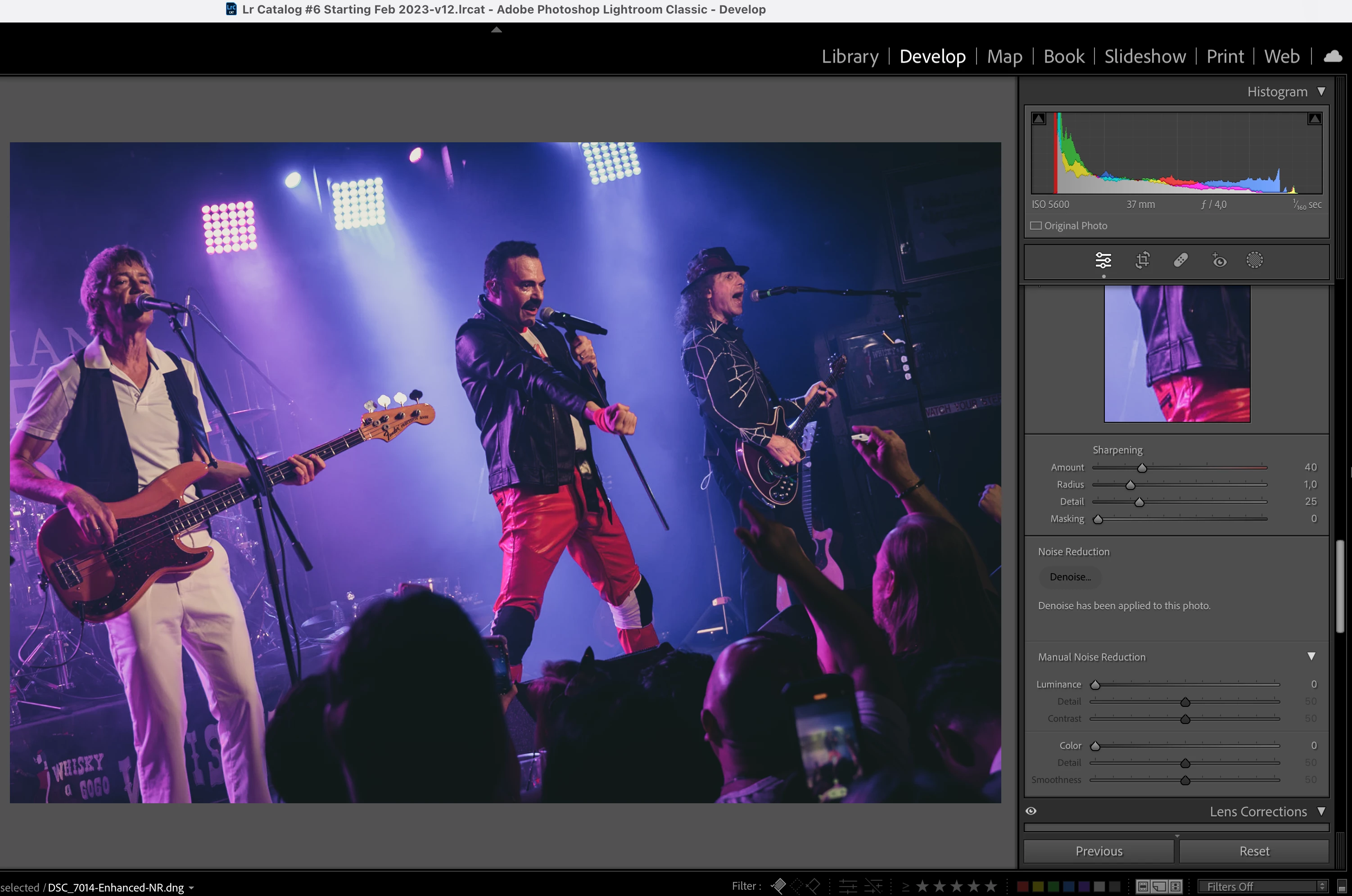
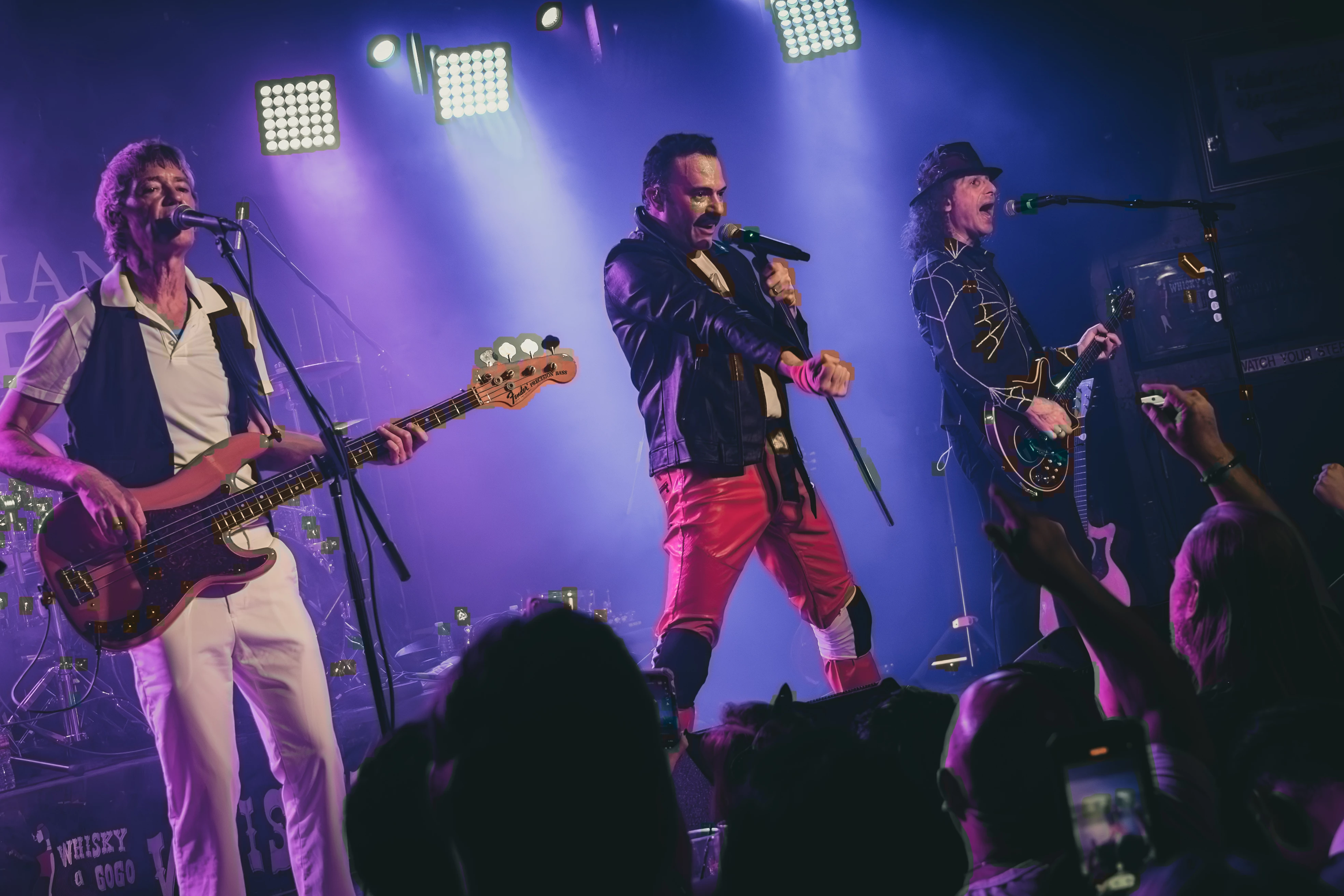
Anybody else having problems using Denoise AI on lightroom? Seems like a great tool for concert photorgraphy where you usually have low light conditions most of the time, the problem is that for some reason once you export the photo the final result is not the same as you see in lightroom. It has some weird artifacts and color spots that were not there in first place.

Also, once you apply denoise to a photo seems like you can't go back to the original photo without denoise, even if you reset all the settings, still shows like denoise is apply to the raw image. 

Here are the photo i see in Lightroom after applying denoise and the final result:
This topic has been closed for replies.

4 replies

Participant
January 2, 2024

Good evening,


I am having a slight issue with Denoise in Lightroom. The before picture was at 320 ISO. The after picture cleared up the pre-existing noise, but seems to have added more noise at certain points. Especially near the nose of the aircraft. It gets even worse when you turn up the detail of the imagine. Anyone know how to fix this?


[Mod: Moved because of double posting]


D Fosse
Community Expert
Community Expert
January 2, 2024

The obvious thing to note here is that using Denoise on an ISO 320 shot has no real purpose. Denoise is for the extreme cases, say, ISO 5000 and up. Denoise was never intended to be used on every image.


That said, if you're getting artifacts, the first thing to look at is your GPU driver. Denoise runs entirely in the GPU; it doesn't even touch the CPU. What GPU do you have?

Participant
January 2, 2024

I am having a simalar issue. The before picture shows my picture taken with 320 ISO. The after picture cleared up the noise, but created noise in certain areas, especially the nose of the airplane. 

KR Seals
Community Expert
Community Expert
January 2, 2024

I'm not seeing any noticible noise at the nose of the plane in either version of the image. Can you describe what you are seeing?

I would normally not even consider NR for images taken at ISO 500 and below from my cameras, Nikon Z 9, Z 8 and in the past D500 and D850.


Ken Seals - Nikon Z 9, Z 8, 14mm-800mm. Computer Win 11 Pro, I7-14700K, 64GB, RTX3070TI. Travel machine: 2021 MacBook Pro M1 MAX 64GB. All Adobe apps.
DdeGannes
Community Expert
Community Expert
May 16, 2023

@Ricardo29900108rpo0 , the Mac operating system is now at macOS 13.3.1, any specific reason you have not updated your computer? There may be updates to your GPU drivers.

See the article below for some info and tips for the new Denoise AI.

https://www.lightroomqueen.com/denoise-work/


Regards, Denis: iMac 27” mid-2015, macOS 11.7.10 Big Sur; 2TB SSD, 24 GB Ram, GPU 2 GB; LrC 12.5,; Lr 6.5, PS 24.7,; ACR 15.5,; (also Laptop Win 11, ver 24H2, LrC 15.0.1, PS 27.0; ) Camera Oly OM-D E-M1.
johnrellis
Legend
May 15, 2023

Most problems with LR's AI commands are caused by older, buggy graphics drivers. As a first step, please copy/paste here the entire contents of the LR menu command Help > System Info -- that will let us see exactly which versions of hardware and software LR thinks you're running.

Participant
May 16, 2023

Thanks for the reply, here's my System Info contents:


Lightroom Classic version: 12.3 [ 202304101834-a085245c ]
License: Creative Cloud
Language setting: en-US
Operating system: Mac OS 12
Version: 12.1.0 [21C52]
Application architecture: arm64
Logical processor count: 8
Processor speed: NA
SqLite Version: 3.36.0
Built-in memory: 16.384,0 MB
Real memory available to Lightroom: 16.384,0 MB
Real memory used by Lightroom: 769,0 MB (4,6%)
Virtual memory used by Lightroom: 422.735,2 MB
Memory cache size: 573,8MB
Internal Camera Raw version: 15.3 [ 1451 ]
Maximum thread count used by Camera Raw: 5
Camera Raw SIMD optimization: SSE2
Camera Raw virtual memory: 2555MB / 8191MB (31%)
Camera Raw real memory: 2975MB / 16384MB (18%)
Standard Preview Size: 1440 pixels
Displays: 1) 3840x2160, 2) 3840x2160

Graphics Processor Info:
Metal: Apple M1
Init State: GPU for Export supported by default
User Preference: Auto

Application folder: /Applications/Adobe Lightroom Classic
Library Path: /Volumes/Crucial X8 SSD/Lr Catalog #6 Starting Feb 2023/Lr Catalog #6 Starting Feb 2023-v12.lrcat
Settings Folder: /Users/RicardoImac/Library/Application Support/Adobe/Lightroom

Installed Plugins:
1) AdobeStock
2) Aperture/iPhoto Importer Plug-in
3) Flickr
4) Luminar AI
5) Luminar Neo
6) Nikon Tether Plugin
7) ON1 NoNoise AI 2022
😎 ON1 Photo RAW 2021
9) ON1 Resize 2021

Config.lua flags: None