
avatararies
Participant
May 21, 2021
Question

Desaturated Photos from Lightroom

  • May 21, 2021
  • 2 replies
  • 701 views

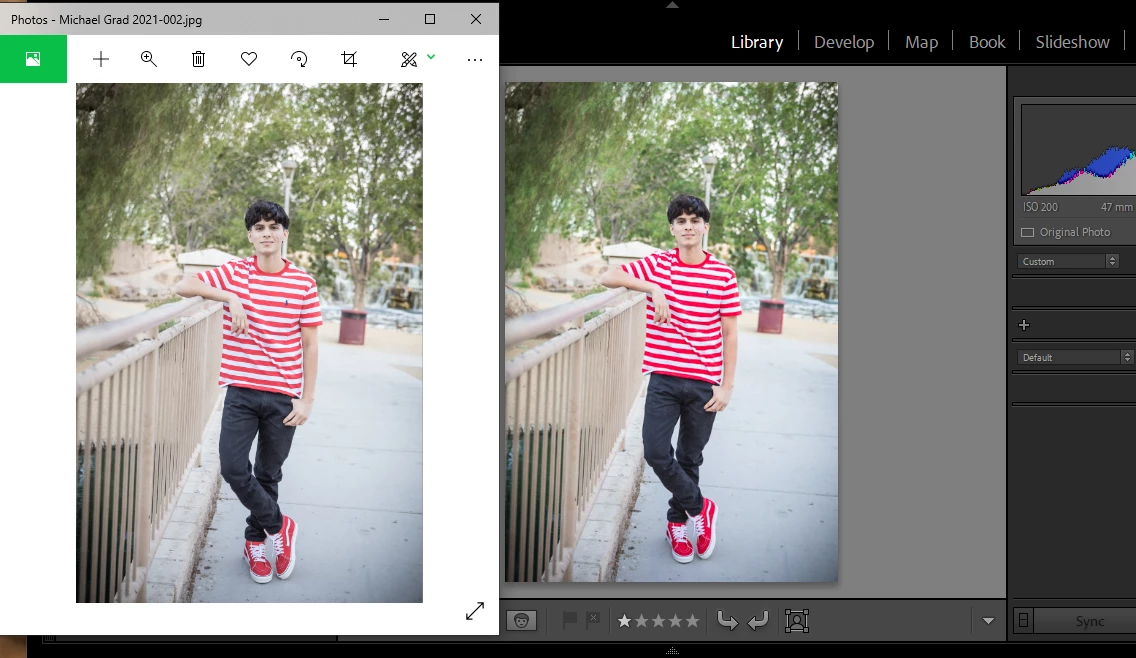
Ok, looked through other topics and nothing has worked. I have calibrated my screens with a spyder (yes, 2 computers, same issue) and my images look great in Lightroom, been using lightroom and the same preset for over 4 years. but come out terrible once I export them the last few months and I'm going insane trying to edit and make up for the desaturation I keep running in to. Any help would be greatly appreciated.  
This topic has been closed for replies.

2 replies

josephlavine
Community Expert
Community Expert
May 21, 2021

What application are you using to view your images outside of Lightroom? As Per Bernsten discussed, some applications are not color managed and unable to display colors accurately.

warmly/j

avatararies
Participant
May 22, 2021

I use windows explorer to view the images outside of adobe products, which they look fine in the like bridge, photo shop and lightroom, but not windows explorer, and that is how they would upload as well, what I see in windows explorer.

Todd Shaner
Legend
May 22, 2021

Windows File Explorer also is NOT color managed as explained concerning Windows Photo app as well. Why would you even use Explorer for judging image quality? LrC and Bridge have far more capability for that purpose.


Concering uploading images to the Web make sure you are exporting them with the LrC Export module File Settings> Color Space is set to sRGB. Then you need to use a fully color mangaged Web Browser that has been properly setup to use the display profile.


https://cameratico.com/guides/web-browser-color-management-guide/


Per Berntsen
Community Expert
Community Expert
May 21, 2021

Lightroom is color managed, and uses the monitor profile to display correct colors. The colors are converted from the document profile (for instance sRGB) to the monitor profile.

When you calibrate your monitor, a custom monitor profile is created and installed, and this profile contains an accurate description of the color response of your monitor. This ensures that color managed software will display correct colors.


The Photos app is not color managed, does not use the monitor profile, and will display uncorrected, wrong colors.

Windows does not come with any color managed software, except the Edge browser.

You can use Adobe Bridge (included in your subscription) to view exported images, or use a third party, color managed image viewer, like


  1. FastStone image viewer. Free for personal use. Color management must be enabled under Settings > CMS, and both boxes must be checked,
  2. ACDSee. Not free. Color managed out of the box.
  3. Irfanview. Free for none commercial use. Color management must be enabled under Options > Properties/Settings.
avatararies
Participant
May 22, 2021

Thank you. The problem is, the photos after being exported look fine in the adobe products, like bridge and what not, but I use windows explorer to look at the photos and that is also how they look when I upload them to pixieset. They didn't used to look completely different from lightroom to windows, but now they do. 

Per Berntsen
Community Expert
Community Expert
May 22, 2021

Your screenshot shows that you are viewing the image in Photos, I guess you mean that you double-click the file in the File Explorer.

quote

that is also how they look when I upload them to pixieset. They didn't used to look completely different from lightroom to windows, but now they do. 


By @avatararies


Are you viewing the uploaded images in a web browser? Which one?

Did you calibrate your monitor recently, or a long time ago?