

Participating Frequently
April 26, 2026
Question

Different export filesizes for simulary raw files

  • April 26, 2026
  • 4 replies
  • 61 views

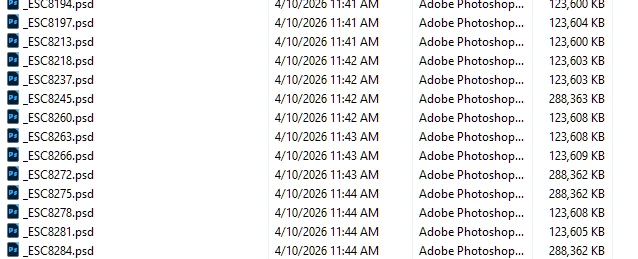
sony raw files produce normaly a export file size of about 123 MB occationally 288 MB..why?

the develop settings are the same also noise reduction and resolution are the sane ???
 

    4 replies

    Community Expert
    April 29, 2026

    Just wondering: had Noise Reduction maybe been applied to some of these photos? (I don’t mean using the sliders in Detail panel, I mean the generation of a noise-reduced version of the whole photo)

    Per Berntsen
    Community Expert
    Community Expert
    April 29, 2026

    If you don’t mind sharing a couple of PSDs (one large and one small), I can take look at them.
    You’ll have to use Dropbox or some other file sharing service, and post a link here.
    Or, if you don’t want the files to be available for everyone, send me the link in a private message.
    Hover your mouse cursor over my avatar, and click the message icon in the top right corner.

    Participating Frequently
    April 29, 2026

    Hi,

    Thanks for your idea, but no ...all files are treated in the same way ..exported as 8bit


    that was the first thing what I checked ..because the size was suspicius 

    and I also checked in PS if they really open as 8bit


    so I think its a bug because I didnt find any diff when I compare these pics in PS

    Per Berntsen
    Community Expert
    Community Expert
    April 26, 2026

    The large files are probably 16-bit files, which are twice the size of 8-bit files.
    In the Export dialog there’s an option for Bit depth – 8-bit or 16-bit.
    If you’re going to edit these files in Photoshop, 16-bit is strongly recommended.
    It will give you plenty of editing headroom with little risk of image degradation.


    If you’re using Edit in Photoshop, you’ll find the same option in Preferences > External editing.
