stefanh45494374
Participant
October 27, 2019
Question

Different saturation between the development modul and fullscreen preview in Lightroom CC

  • October 27, 2019
  • 2 replies
  • 373 views

Hi there

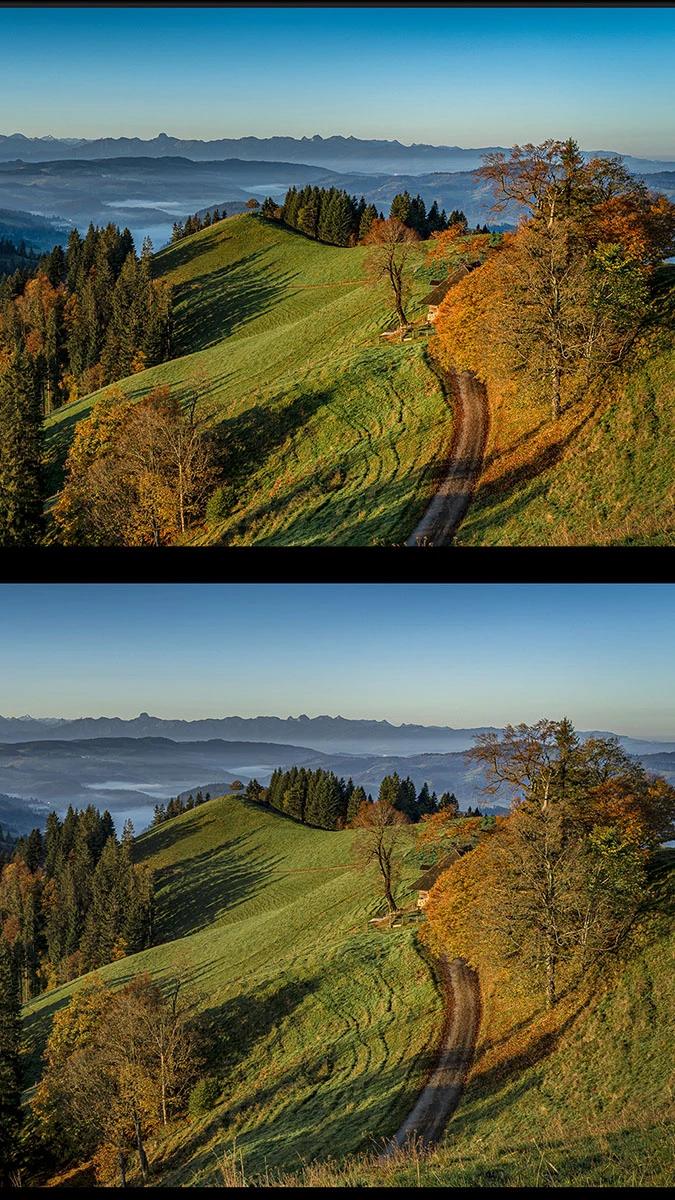
Since I'm using my new BenQ SW 271 monitor the saturation in the development modul (1st image) is higher than it is in the fullscreen preview (shortcut f - 2nd image). The saturation in the fullscreen preview is more or less equal with those in Photoshop and Windows Explorer.

Following my research in other forums the development modul works with ProPhotoRGB. Is this true and can this issue be fixed in the settings of  Lightroom?

thx Stefan
 

    This topic has been closed for replies.

    2 replies

    Per Berntsen
    Community Expert
    Community Expert
    October 27, 2019

    First of all, try to disable the GPU. Go to Edit > Preferences > Performance, uncheck Use graphics processor.

    If  this fixes the issue, update your graphics driver, then try turning the GPU back on. You probably need it with a 4k monitor.


    If that doesn't help, you most likely have a defective or incompatible monitor profile.

    If you have used the Palette Master calibration software, that may be the cause of the problem.  There have been numerous reports about it creating buggy profiles. Because of this new forum's useless search function, I'm unable to find any of these threads.


    To troubleshoot the monitor profile, try setting it to Adobe RGB. 

    Press the Windows key + R, type colorcpl in the box and press Enter, which will open the Color management dialog.

    Add Adobe RGB, then set it as default. (the screenshot below uses sRGB, you should use Adobe RGB since you have a wide gamut monitor). Lightroom needs to be restarted to become aware of the new profile.

    If this fixes the issue, try recalibrating with Palette Master (make sure it's up to date), making a version 2 (not version 4), matrix based (not table based) profile.  Alternatively, use the software that came with your calibrator.


    F. McLion
    Community Expert
    Community Expert
    October 27, 2019

    Hi Stefan

    Did you calibrate your monitor? Since this is a wide-gamut monitor, applications need to be able to call a matching profile.

    Franz

    --- Got your issue resolved? Please label the response as 'Correct Answer' to help your fellow community members find a solution to similar problems. ---